Feature Description / 功能描述
免费的 qwen3.5-plus 效果也还不错:


接入过程发现并解决了一些问题:
1.浏览器 alert 弹窗导致 page-agent 卡住
已解决:替换成自定义弹窗 TommyLemon/APIAuto@9e452d2
2.page-agent 自带的 X 关闭按钮点击后不能自动恢复显示
已解决:替换成 new PageAgent,设置项加上 显示/隐藏 AI Agent,分别调用 pageAgent?.panel?.show() 和 pageAgent?.panel?.hide()
3.pageAgent.config 改模型配置无效
原来这样没生效:
              pageAgent = pageAgent || new PageAgent()
              const config = pageAgent?.config || new PageAgentCoreConfig()
              config.model = this.aiModel || config?.model
              config.baseURL = this.aiBaseUrl || config?.baseURL
              config.apiKey = this.aiApiKey || config?.apiKey
              config.language = this.aiLanguage || config?.language
              pageAgent?.panel?.show()
后面干脆直接 new PageAgent({model,baseURL,apiKey,language}) 在构造函数传入配置解决了:
TommyLemon/APIAuto@30dbc9e
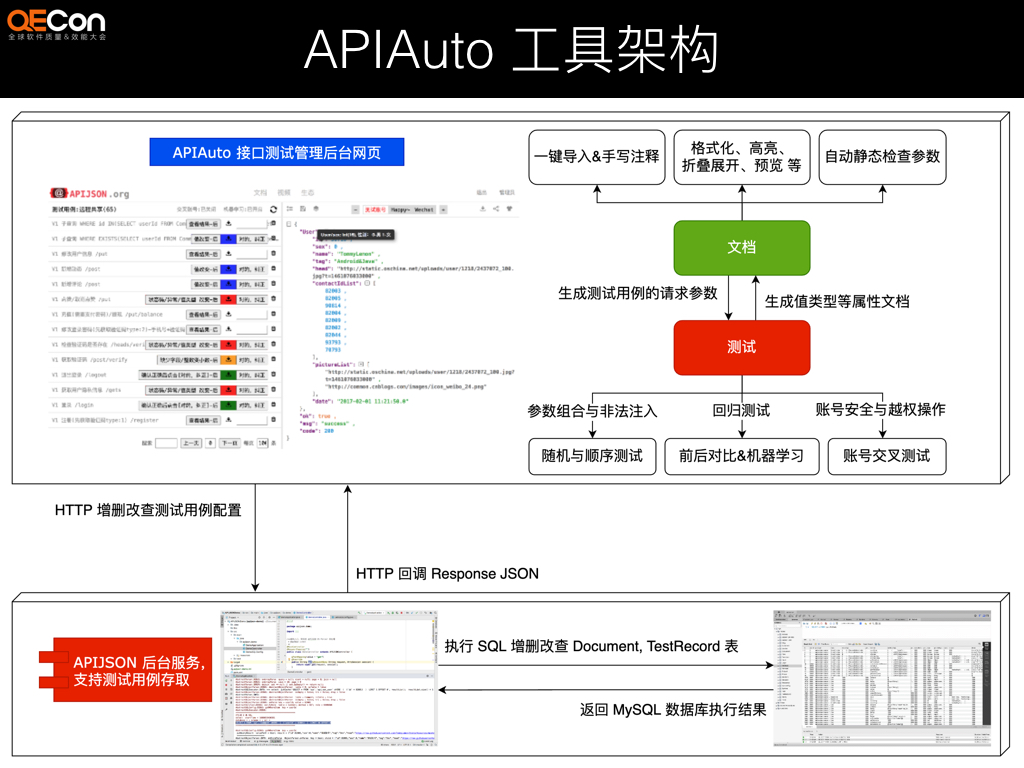
APIAuto:☔ 敏捷开发最强大易用的接口工具,机器学习零代码测试与 AI 问答、生成代码与静态检查、生成文档与光标悬浮注释,腾讯、华为、SHEIN、传音、工行等使用。具体见
https://github.com/TommyLemon/APIAuto


Before submitting
Feature Description / 功能描述
免费的 qwen3.5-plus 效果也还不错:


接入过程发现并解决了一些问题:
1.浏览器 alert 弹窗导致 page-agent 卡住
已解决:替换成自定义弹窗 TommyLemon/APIAuto@9e452d2
2.page-agent 自带的 X 关闭按钮点击后不能自动恢复显示
已解决:替换成 new PageAgent,设置项加上 显示/隐藏 AI Agent,分别调用 pageAgent?.panel?.show() 和 pageAgent?.panel?.hide()
3.pageAgent.config 改模型配置无效
原来这样没生效:
后面干脆直接 new PageAgent({model,baseURL,apiKey,language}) 在构造函数传入配置解决了:
TommyLemon/APIAuto@30dbc9e
APIAuto:☔ 敏捷开发最强大易用的接口工具,机器学习零代码测试与 AI 问答、生成代码与静态检查、生成文档与光标悬浮注释,腾讯、华为、SHEIN、传音、工行等使用。具体见
https://github.com/TommyLemon/APIAuto
Before submitting