SendWyre integration #201


Description

Motivation
SendWyre is like changelly, which allows user to buy crypto via ACH or credit card. Send wyre has lower fees, so we should offer this as an alternative choice.
Let's replace changelly with Sendwyre for simplicity.
Implementation
Step 1 - choose currency
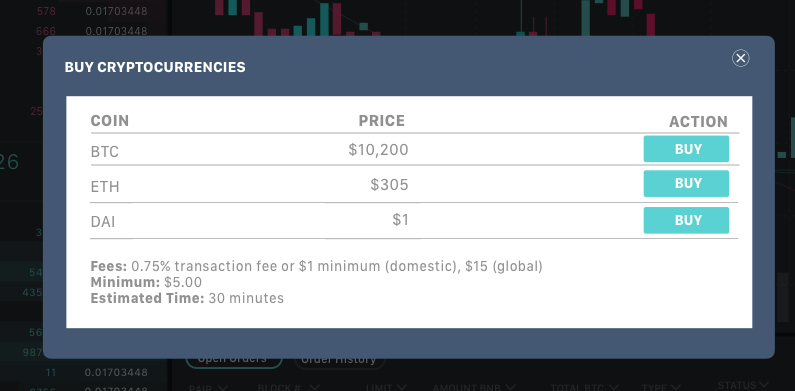
Get Price from https://docs.sendwyre.com/docs/live-exchange-rates . If it doesn't have CORS, i will add it into our python api
Step 2 - Verify & Buy
Input:
-
DEVICE_TOKEN - this is the token we keep secret as a way to retrieve the information we filled out with sendwyre previously. It should be secure. Let's encrypt, "SENDWYRETOKEN" with the userprivate key to generate this.
-
YOUR_WYRE_ACCOUNT_ID - This is a parent account we want to associate the user to. I will provide this information for testnet and mainnet
-
dest: Prefilled address to send the purchased tokens to.
Coins supported: ETH, BTC, DAI
<html>
  <body>
    <button id="verifyButton">Verify with Wyre!</button>

    <!-- Install the Wyre Loader -->
    <script src="https://verify.sendwyre.com/js/widget-loader.js"></script>
    <script>
      // generate a device token if it hasn't been already
      var deviceToken = localStorage.getItem("DEVICE_TOKEN");
      if(!deviceToken) {
        var array = new Uint8Array(25);
        window.crypto.getRandomValues(array);
        deviceToken = Array.prototype.map.call(array, x => ("00" + x.toString(16)).slice(-2)).join('');
        localStorage.setItem("DEVICE_TOKEN", deviceToken);
      }

      // configure the widget to authenticate using the generated key
      var widget = new Wyre.Widget({
        env: "test",
        accountId: "YOUR_WYRE_ACCOUNT_ID",
        auth: {
          type: "secretKey",
          secretKey: deviceToken
        },
        operation: {
          type: "onramp",
          destCurrency: "ETH",
          dest: "ethereum:0xBB9bc244D798123fDe783fCc1C72d3Bb8C189413",
          sourceAmount: 10.0
        }
      });

      // open the widget when the user presses the button
      document
        .getElementById("verifyButton")
        .addEventListener('click', function(e) { widget.open(); });

      //add events here
      widget.on("complete", function(event) {
        console.log("Completed", event);
      });
    </script>
  </body>
</html>