


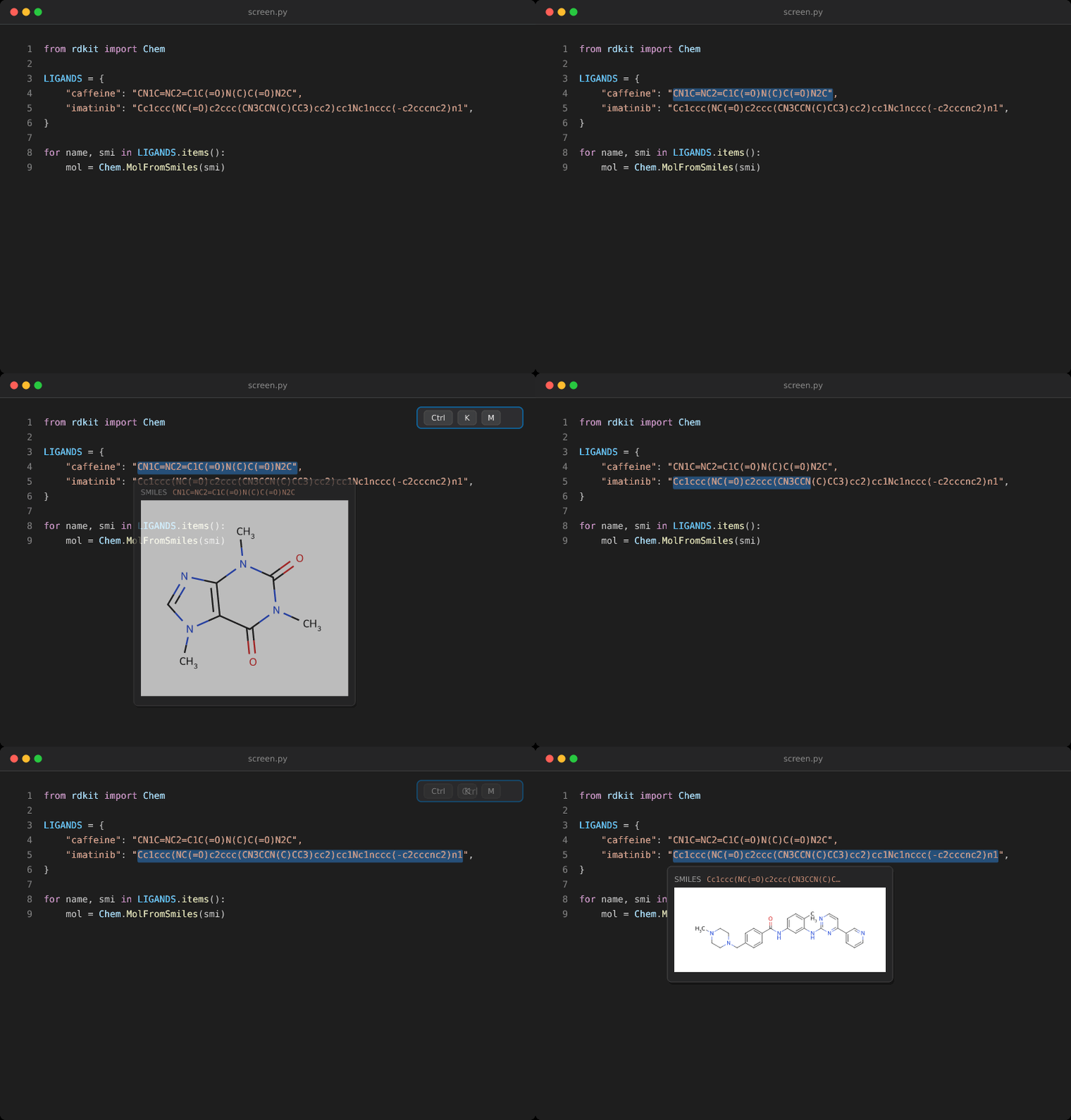
Hover a SMILES string and see its 2D structure, rendered with RDKit in ChemDraw style. Works in any editor tab — code, CSV, Markdown, notebooks down to their cell output, read-only output tabs — and reaction SMILES are drawn whole, arrow and all. Molecules on screen are drawn before you reach for them; anything that isn't chemistry is ignored.
No Python, no pip install, no configuration. RDKit ships inside the extension
as WebAssembly.
VS Code — Extensions view (Ctrl+Shift+X) → search SMILES Hover →
Install. Or:
code --install-extension adrianm0.smiles-hoverCursor, VSCodium, Windsurf can't reach the Microsoft Marketplace: download
the .vsix from the
latest release and
run cursor --install-extension smiles-hover-<version>.vsix (or Command
Palette → Extensions: Install from VSIX…). Only stable VS Code API is used,
so any current fork should work.
Remote SSH, WSL, containers — install it on the remote side, where your files are.
Just hover. Everything on screen is scanned as you scroll and type, so the structure is already waiting.
What counts as a molecule. Only what RDKit parses, so prose and identifiers
never hover. Short uppercase tokens are the ambiguous ones — CNN, ISC,
CSS are all valid molecules and none are meant as one — so how short a token
may be depends on where it sits:
- Declared — after a
smiles:key, alone on its line, or under a header naming a SMILES column. Any length. - A field — a quoted string or a CSV cell. Needs structure (ring, branch,
bracket atom, bond) or 4+ characters (
smilesHover.autoDetectMinLength). - Prose — running text. Needs both, or 8+ characters of pure chain.
So Chem.MolFromSmiles("CCO") and smiles = ["CCO", "CCN"] are drawn despite
CCO being short. Lower autoDetectMinLength to 3 if you write bare CCO
in prose.
Reactions. CCO.CC(=O)O>[H+]>CCOC(C)=O.O draws as one picture: components
joined by +, agents above the arrow, arrow between the sides. Two >
separators are required, as RXNSMILES says, which keeps cin>>x out.
Rendering by hand. For a SMILES buried in a longer string, select it and
press Ctrl+K M (Cmd+K M), or right-click → SMILES Hover: Show Molecule
for Selection. Quotes, trailing commas and escapes are stripped first. It
stays hoverable at every occurrence of that string for 15 minutes
(smilesHover.retentionMinutes).
Command Palette also has Toggle Automatic Detection and Clear Cache. The first render loads the WASM module (~200 ms); the rest are milliseconds and cached.
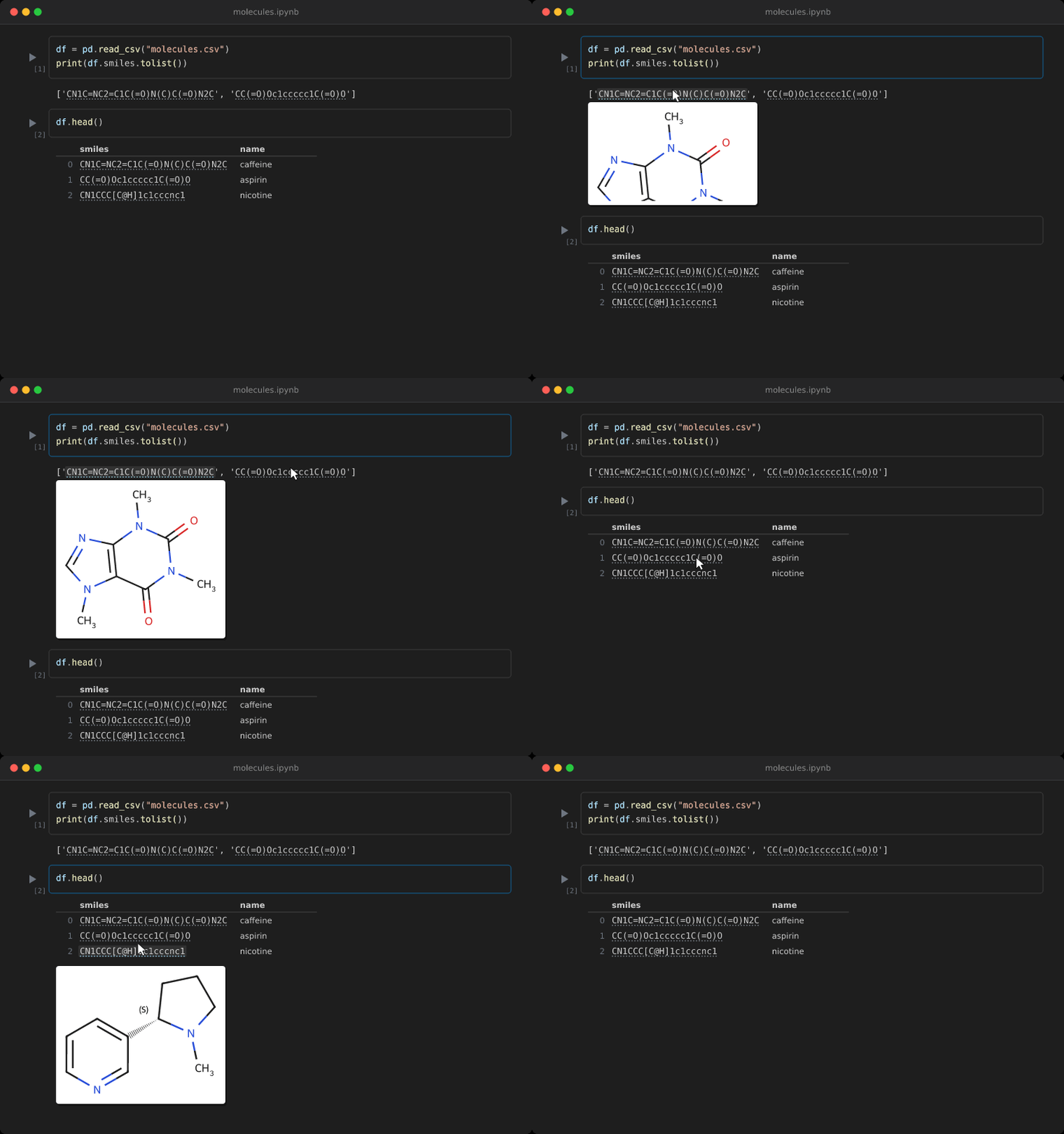
Cell sources behave exactly like a file. Cell output is covered too —
print(), a list or dict repr, a df.head() table, the cell's result —
whatever the built-in renderer drew. Molecules there get a dotted underline;
hovering one shows the structure right beneath it, and the output grows to make
room (cells are painted over the output area, so a floating picture would be
hidden by the next cell). A smiles column header vouches for every cell under
it, and each printed line is read on its own, so a printed column of short
SMILES comes alive whole.
RDKit stays in the extension host, so its 7 MB is never loaded into the notebook. Output drawn by a third-party renderer — plotly, ipywidgets — lives in its own frame and isn't reached. The Interactive Window works like a notebook.
| Setting | Default | Description |
|---|---|---|
smilesHover.autoDetect |
true |
Find and draw molecules on screen automatically. |
smilesHover.autoDetectMinLength |
4 |
Shortest bare token considered a molecule. |
smilesHover.maxPrerender |
40 |
Molecules drawn ahead per screenful. |
smilesHover.autoSize |
true |
Size the canvas to the molecule. |
smilesHover.maxHoverWidth |
460 |
Max displayed width inside the hover, px. |
smilesHover.maxHoverHeight |
240 |
Max displayed height inside the hover, px. |
smilesHover.imageWidth |
500 |
Base render width in px. |
smilesHover.imageHeight |
350 |
Base render height in px. |
smilesHover.colorPreset |
chemdraw |
chemdraw, bright, or mono atom palette. |
smilesHover.retentionMinutes |
15 |
How long a hand-render stays hoverable, minutes. |
autoSize draws every structure at one scale and line weight, sized from its
own 2D layout — ethanol small, imatinib wide, both legible;
imageWidth/imageHeight scale that up or down. The picture is then scaled
down on display to fit maxHoverWidth × maxHoverHeight, since VS Code clips
oversized hovers rather than shrinking them. It's vector, so nothing blurs.
Raise maxHoverHeight in a tall editor for bigger structures. The background is
always white, so molecules read the same in light and dark themes.
- No InChI, and no reaction SMARTS: query atoms like
[#6]aren't molecules. - The integrated terminal isn't a document, so nothing hovers there. Editor tabs holding command output do.
- Notebook output from a third-party renderer isn't reached.
- Detection is conservative with short featureless tokens. Put them under a
smilesheader, on a line of their own, after asmiles:key, or lowerautoDetectMinLength. - The
.vsixis ~7 MB, nearly all of it the RDKit WASM binary.
npm install
npm run compile   # vendors RDKit's WASM into vendor/, then runs tsc
npm test
npm run package   # build a .vsix
Press F5 for an Extension Development Host. The demo GIFs are generated from
real renderer output rather than recorded (npm run demo). Pushing a v* tag
releases to the Marketplace.
Detection lives in src/scan.ts and src/detect.ts,
drawing in src/renderer.ts — including reaction layout, which
is composed from per-component drawings because MinimalLib's own get_rxn
output is grey and its arrow has nan coordinates. Cell output is handled in
the webview by src/output-renderer.ts, which asks the
host for verdicts and pictures (src/output-messaging.ts).
MIT — see LICENSE. Bundles RDKit (BSD-3-Clause) via @rdkit/rdkit; notice in THIRD-PARTY-NOTICES.md.