

The harness for your agent harness.
LocalSetup (LS) adds shared project context, reusable workflows, visible operations, and explicit control boundaries around the AI tools you already use. It helps you carry your standards between supported clients and inspect managed work outside the conversation.
Visibility. Security. Privacy. See live commands in an owned terminal companion. Define authority before sensitive operations. Use shared OpenPGP capabilities for supported signed and encrypted workflows. Keep private operational evidence separate from material intended for publication.
AI is a tool. Expertise determines what it multiplies. LocalSetup brings engineering discipline to AI-assisted work: clear scope, observable execution, tested procedures, and evidence you can review.
Read the complete story · Explore the capabilities · Understand the security boundaries
Watch a Codex session work through a simulated coding task while LocalSetup's terminal companion shows commands, results, and layout controls. The full demo is silent and runs for about six minutes.
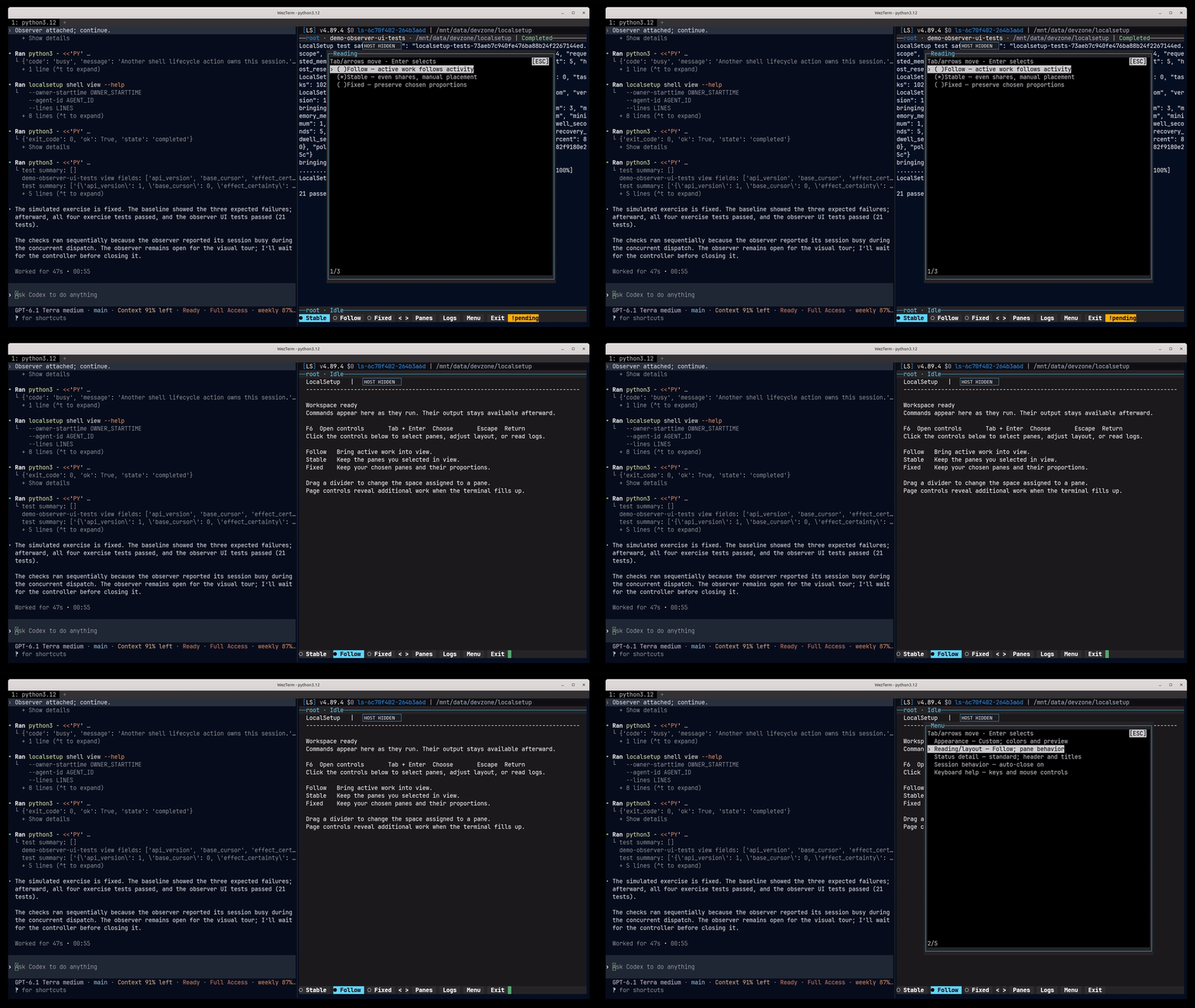
Carry your context forward. Keep project instructions, architectural decisions, and engineering standards in reviewable files. Reuse them across projects and supported clients instead of reconstructing them for each conversation.
Reuse proven actions. Selected skills and workflows give agents a practical reference for implementation, tests, documentation, infrastructure, and maintenance. Client loading rules and native permissions remain in force.
See work as it happens. LocalSetup's managed tmux workflow exposes live operations in persistent native panes, with protected observation and explicit input handoffs. It provides an operator view of work dispatched through that workflow—not surveillance of every client action. Terminal capabilities and prerequisites.
Control sensitive workflows. Shared OpenPGP tools support explicit trust, signatures, encrypted envelopes, and protected artifacts. Installation does not enroll trust or encrypt every file. The optional integrated LSCli runtime provides its own qualified grants and access controls; external clients retain their security models.
Keep improving between sessions. Opt-in heartbeat automation can collect evidence and perform a configured review in a separate run. Scheduling and agent execution require explicit setup. Reusable context, maintenance records, and handoffs make ongoing work easier to resume.
Library size and supported clients
| Fact | Value |
|---|---|
| Current version | 4.89.10 |
| Supported platforms | codex, claude-code, cursor, kilo, opencode, openclaw, github-copilot-cli, github-copilot-vscode, cline-cli, cline-vscode, amp-cli, goose-cli, pi-cli, hermes-agent, qwen-code-cli, kimi-cli, factory-droid, antigravity-app, gemini-cli, omp-cli |
| Shipped skills | 115 |
| Workflow packages | 21 |
| Source | ls/docs/_generated/facts.json |
LocalSetup is developed by Crux Experts LLC, grounded in its founder's 35 years of hands-on engineering—from Netscape-era websites in 1995 through networks, protocol stacks, servers, data centers, and software. That includes more than nine years owning a web hosting company, growing it from a bootstrapped bedroom operation into an office with employees before selling it.
AI is a force multiplier for that experience. Continued research, maintenance, and custom integration keep the system useful as tools and requirements change. The value is a maintained operating foundation backed by practical engineering judgment.
Start with the business, identify work worth improving, and measure the result. A focused integration should demonstrate time saved, fewer errors, or lower operating cost against a real baseline. LocalSetup supports that work; the service is the expertise to choose the right opportunity and deliver it responsibly.
For commercial inquiries and integration services, visit Crux Experts. Read the engineering and service philosophy.
LocalSetup is part of the CruxExperts ecosystem, a collection of independently useful development and operations tools. Each project has its own licensing and operational scope.
Envman manages environment variables and sensitive configuration. LocalSetup supports optional installation and update checks while leaving Envman's private configuration under its own control.
bbackup (BestBackup) provides encrypted Linux file backups, verified file restores, and a structured command interface for automation. It is a complementary, separately managed tool.
Use an interactive Bash terminal on Linux or macOS, or Windows through WSL2. You'll need Git, Python 3.12 or later, uv, and internet access to GitHub. See the requirements for details.
curl -sSL https://raw.githubusercontent.com/CruxExperts/localsetup/main/install | bash -s --The guided installer explains the options, lets you select packages and supported AI clients, and previews changes before applying them.
- Getting started
- Features and capabilities
- Skills catalog
- Supported AI platforms
- Workflow packages
- All documentation
Release included in this checkout
Version: 4.89.10
LocalSetup 4.89.10 updates the pinned CI actions and Python dependencies, keeps packaged dependency exports aligned, and makes existing boundary and allocation checks more reliable.
- CI uses reviewed immutable pins for setup-python 7.1.0 and setup-uv 10.3.2. Regression checks enforce immutable, consistent pins without copying changing release hashes into tests; successful exact-commit validation remains reusable during main integration and publication.
- Python updates include OpenAI 3.37.0, setuptools 84.2.1, and Boto3/botocore 1.43.118, with regenerated SDK locks, integrity receipt and hashed storage requirements.
- More reliable checks: filesystem-boundary tests bind their simulated Git responses, and concurrent allocation tests separate readiness from a bounded completion watchdog. Production behavior, real locking, durable-artifact assertions and cleanup remain unchanged.
See the 4.89.10 release guide for compatibility, updating, and verification.
LocalSetup is developed by Crux Experts LLC. Current first-party source is free for noncommercial use under PolyForm Noncommercial 1.0.0; commercial use requires a separate license. See licensing scope for earlier MIT grants and separately licensed components. Commercial inquiries are welcome through the company website.
Establish standards, preserve useful knowledge, and build a more consistent development environment around the AI tools you already use.
Own your stack. Standardize your agents. Automate the work.
For questions, start a GitHub Discussion. For bugs and feature requests, see Support. Report security issues using SECURITY.md.
Copyright © 2026 Crux Experts LLC. See contribution and attribution notes.