
RpiDNS is a comprehensive DNS-based ad-blocking and security monitoring application powered by ioc2rpz.net. It provides a central management interface for monitoring and controlling DNS traffic across your entire network using Response Policy Zones (RPZ) to block malicious domains, advertisements, trackers, and other unwanted content at the DNS level.
The system integrates with ISC BIND DNS server and provides real-time visibility into all DNS queries originating from devices on your network.
Key capabilities include:
- DNS Query Monitoring - Comprehensive tracking of all DNS queries from every device on your network
- Ad & Malware Blocking - Automatic blocking using RPZ feeds from ioc2rpz.net
- Custom Block/Allow Lists - Full control over domain blocking with your own custom rules
- Network Asset Tracking - Automatic discovery and tracking of devices by MAC or IP address
- Security Analytics - Detailed statistics and visualizations for threat analysis
RpiDNS supports two deployment models:
- On-Premises Installation - Direct installation on Raspberry Pi or Linux server
- Container Deployment - Docker-based deployment (recommended for portability)
The container deployment provides a lightweight, portable way to run RpiDNS using Docker.
┌─────────────────────────────────────────────────────────────────┐
│                        Host System                               │
│  ┌─────────────────────────────────────────────────────────┐    │
│  │              Docker Network: rpidns-net                  │    │
│  │  ┌─────────────────────┐  ┌─────────────────────────┐   │    │
│  │  │   Bind Container    │  │     Web Container       │   │    │
│  │  │   ───────────────   │  │   ─────────────────     │   │    │
│  │  │   ISC Bind9 + RPZ   │  │   OpenResty + PHP-FPM   │   │    │
│  │  │   Port 53 TCP/UDP   │  │   + RSyslog             │   │    │
│  │  │                     │  │   Ports 80, 443, 10514  │   │    │
│  │  └─────────────────────┘  └─────────────────────────┘   │    │
│  └─────────────────────────────────────────────────────────┘    │
│                                                                  │
│  ┌─────────────────────────────────────────────────────────┐    │
│  │                  Persistent Volumes                      │    │
│  │  ./config/bind  ./config/nginx  ./www  ./logs  ./scripts│    │
│  └─────────────────────────────────────────────────────────┘    │
└─────────────────────────────────────────────────────────────────┘
| Container | Base Image | Purpose | Key Packages |
|---|---|---|---|
| Bind | Alpine 3.21 | DNS resolution with RPZ blocking | bind, bind-tools, rsyslog |
| Web | Alpine 3.21 | Web UI, log collection | openresty, php83-fpm, php83-sqlite3, rsyslog, dcron |
https://ioc2rpz.net community generate install scripts for container and non-container based deployments. For manual deployment follow the instruction below.
# 1. Create directory structure
mkdir -p rpidns && cd rpidns
mkdir -p config/bind config/nginx www www/db logs scripts bind-cache

# 2. Copy docker-compose.yml from rpidns-docker directory

# 3. Create .env file
cat > .env << EOF
RPIDNS_HOSTNAME=rpidns.local
RPIDNS_DNS_TYPE=primary
RPIDNS_DNS_IPNET=192.168.0.0/16
RPIDNS_LOGGING=local
RPIDNS_LOGGING_HOST=
EOF

# 4. Start containers
docker-compose up -d

# 5. Verify deployment
docker-compose ps
dig @localhost example.com| Variable | Default | Description |
|---|---|---|
RPIDNS_HOSTNAME |
rpidns.local |
Hostname for the RpiDNS instance |
RPIDNS_DNS_TYPE |
primary |
DNS server type: primary or secondary |
RPIDNS_DNS_IPNET |
192.168.0.0/16 |
IP network for DNS ACL |
RPIDNS_LOGGING |
local |
Logging mode: local or forward |
RPIDNS_LOGGING_HOST |
(empty) | Remote syslog host (when forward mode) |
RPIDNS_ADMIN_PASSWORD |
(auto-generated) | Admin password for web UI |
| Port | Protocol | Container | Description |
|---|---|---|---|
| 53 | TCP/UDP | Bind | DNS queries |
| 80 | TCP | Web | HTTP web interface |
| 443 | TCP | Web | HTTPS web interface |
| 10514 | TCP | Web | Syslog receiver |
For detailed container deployment documentation, see rpidns-docker/README.md.
To access RpiDNS, navigate to the URL where RpiDNS is hosted on your network. Enter your credentials:
- Username - Your assigned username (case-sensitive)
- Password - Your account password (case-sensitive)
Your session remains active until you explicitly log out or close your browser.
RpiDNS features a tab-based navigation system with a vertical sidebar on desktop and horizontal layout on mobile:
| Tab | Description |
|---|---|
| Dashboard | Real-time overview of DNS activity with statistical widgets and traffic charts |
| Query Log | Searchable log of all DNS queries with filtering and aggregation |
| RPZ Hits | Dedicated view of blocked DNS queries by RPZ rules |
| Admin | Configuration and management tools (Assets, Feeds, Block/Allow Lists, Settings, Tools, Users) |
| Help | Comprehensive documentation and guidance |
The navigation menu can be collapsed to show only icons for more screen space.
Located in the top-right corner, the user menu provides:
- Change Password - Update your account password
- Logout - Securely sign out and terminate your session
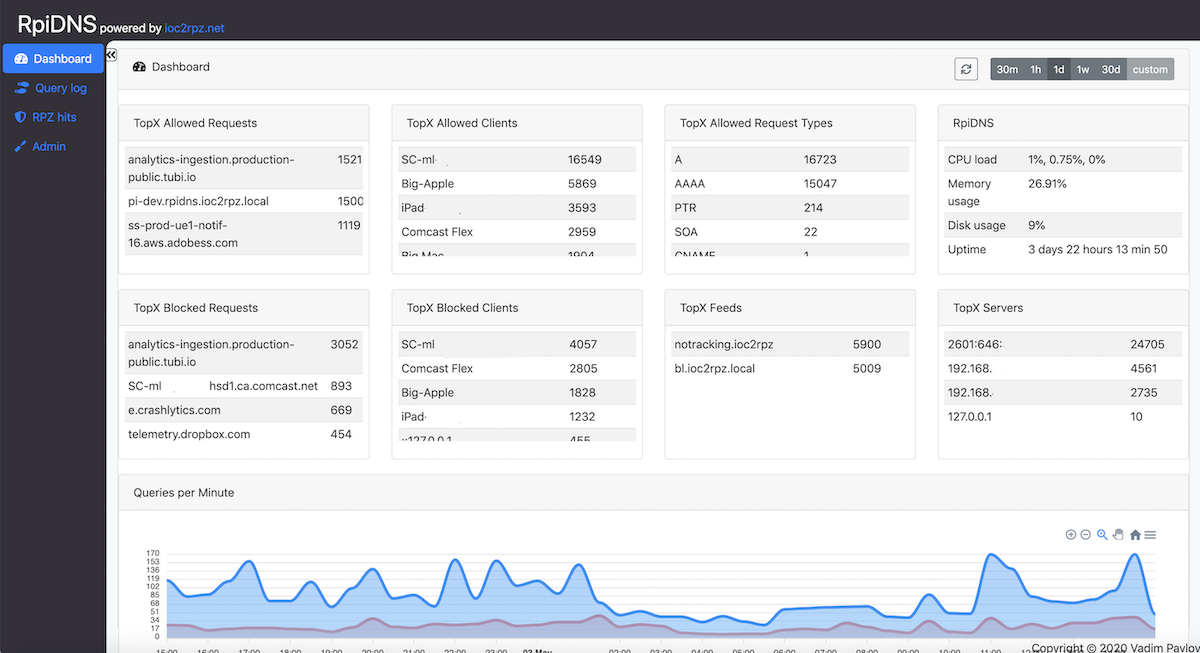
The Dashboard is your central command center for monitoring DNS activity. It displays statistical widget cards and a queries-per-minute chart.
| Period | Description |
|---|---|
| 30m | Last 30 minutes - ideal for real-time monitoring |
| 1h | Last hour |
| 1d | Last 24 hours - understand daily patterns |
| 1w | Last 7 days - analyze weekly trends |
| 30d | Last 30 days - long-term trend analysis |
| custom | Select specific start and end date/time |
Auto-Refresh: Toggle the "Auto" switch to enable automatic refresh every 60 seconds.
Allowed Traffic (Top Row):
| Widget | Description |
|---|---|
| TopX Allowed Requests | Most frequently requested domains that were allowed. Helps understand commonly accessed services. |
| TopX Allowed Clients | Devices generating the most allowed queries. Identifies most active devices. |
| TopX Allowed Request Types | DNS record types (A, AAAA, CNAME, MX, TXT, etc.). Unusual distribution might indicate DNS tunneling. |
| RpiDNS Stats | Server metrics: CPU load, memory usage, system uptime. |
Blocked Traffic (Bottom Row):
| Widget | Description |
|---|---|
| TopX Blocked Requests | Domains most frequently blocked by RPZ. High-frequency blocks often include ads and malware. |
| TopX Blocked Clients | Devices triggering the most blocks. High counts may indicate malware or aggressive advertising. |
| TopX Feeds | RPZ feeds responsible for most blocks. Understand which threat categories affect your network. |
| TopX Servers | DNS servers handling the most queries. Useful for load distribution analysis. |
Hover over items in widgets to reveal action buttons:
- Show queries - Navigate to Query Log filtered by the selected item
- Show hits - Navigate to RPZ Hits filtered by the selected item
- Block - Add domain to your custom Block List
- Allow - Add domain to Allow List (overrides RPZ blocks)
- Research - Open external security research tools
Visual representation of DNS query volume over time:
- Blue area - Allowed (successful) DNS queries per minute
- Red area - Blocked queries (RPZ hits) per minute
Hover over any point to see exact timestamp and query counts.
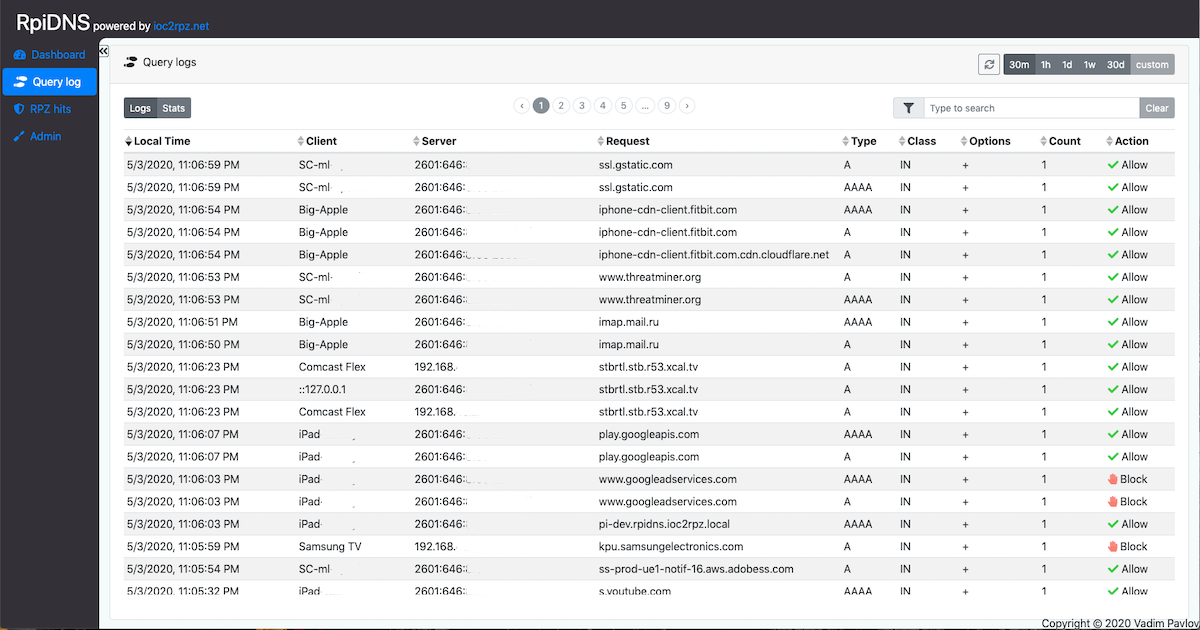
The Query Log provides a comprehensive, searchable record of all DNS queries processed by your DNS server.
| Mode | Description |
|---|---|
| Logs | Individual query records with timestamps. Ideal for investigating specific incidents. |
| Stats | Aggregated statistics grouped by selected fields. Use checkboxes to configure grouping. |
Tip: Start with Stats view to identify patterns, then switch to Logs view to investigate specific items.
| Column | Description |
|---|---|
| Local Time | Timestamp when query was received (Logs view only) |
| Client | Device that made the query (friendly name or IP/MAC) |
| Server | DNS server that processed the query |
| Request | Fully qualified domain name (FQDN) queried |
| Type | DNS record type (A, AAAA, CNAME, MX, TXT, PTR, SRV, NS) |
| Class | DNS query class (typically "IN" for Internet) |
| Options | Additional DNS query options and flags |
| Count | Number of queries (Stats view) or 1 (Logs view) |
| Action | Allow or Block status |
Simple Text Search: Type any text to search across all columns (case-insensitive).
Field-Specific Filters:
fqdn=example.com- Filter by domain nameclient_ip=192.168.1.100- Filter by client IP addressmac=AA:BB:CC:DD:EE:FF- Filter by MAC addresstype=A- Filter by DNS record typeserver=dns1- Filter by DNS server
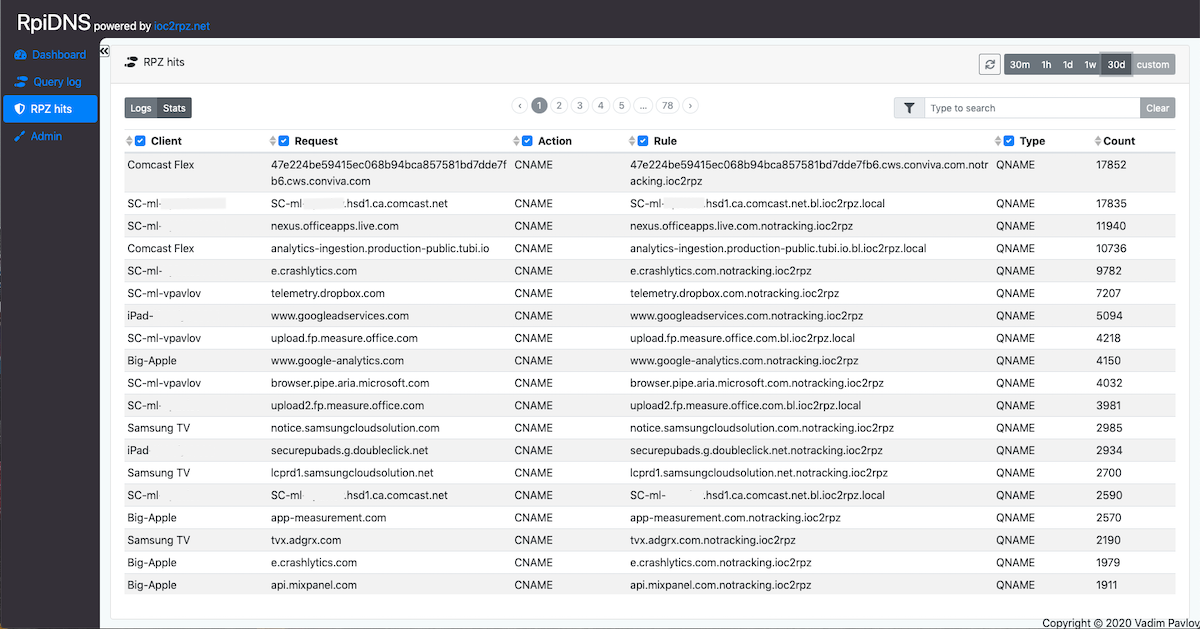
The RPZ Hits section shows all DNS queries blocked by Response Policy Zone rules. Blocks originate from RPZ feeds (curated threat lists) and your custom Block List.
| Column | Description |
|---|---|
| Local Time | Timestamp when blocked query occurred (Logs view only) |
| Client | Device that attempted to access the blocked domain |
| Request | Domain name that was blocked |
| Action | RPZ action applied (NXDOMAIN, NODATA, etc.) |
| Rule | Specific RPZ rule that triggered the block (includes feed name) |
| Type | Rule type (QNAME, RPZ-IP, RPZ-NSDNAME, RPZ-NSIP, RPZ-CLIENT-IP) |
| Count | Number of times this block occurred (Stats view) |
Investigation Workflow: Check RPZ Hits for suspected devices. Multiple blocks to similar domains might indicate malware trying to contact command and control servers.
False Positives: If a legitimate domain is blocked, add it to your Allow List. Allow List entries take precedence over all RPZ feed rules.
Manage network devices tracked by RpiDNS. Assets can be automatically discovered or manually added.
| Column | Description |
|---|---|
| Address | MAC or IP address (depending on tracking mode) |
| Name | Friendly name for easy identification |
| Vendor | Hardware manufacturer (auto-detected from MAC) |
| Added | Date/time when asset was first seen |
| Comment | Optional notes about the device |
Actions: Add, Edit, Delete, Refresh
Tracking Mode: MAC address tracking is recommended (consistent even when IPs change). Configure in Settings.
Manage RPZ feeds that control DNS-level blocking. Feed order is critical - BIND evaluates feeds top to bottom, first match wins.
Feed Source Types:
| Type | Description |
|---|---|
| ioc2rpz.net | Open source threat intelligence feeds, auto-updated via zone transfers |
| Local | Custom feeds you create and manage directly |
| Third-Party | External RPZ feeds from other providers |
Policy Actions:
| Action | Description |
|---|---|
| NXDOMAIN | Returns "domain does not exist" - most common blocking action |
| NODATA | Domain exists but has no records of requested type |
| PASSTHRU | Allow query to proceed (for whitelist feeds) |
| DROP | Silently drop query without response |
| CNAME | Redirect to different domain (e.g., block page) |
| GIVEN | Use action defined within feed rules |
Custom collection of domains/IPs to block on your network.
| Column | Description |
|---|---|
| Domain/IP | Domain name or IP address to block |
| Added | Date/time when entry was created |
| Active | Toggle to enable/disable the rule |
| *. (Subdomains) | Toggle to also block all subdomains |
| Comment | Optional notes about why domain was blocked |
Domains that should never be blocked, regardless of RPZ feed rules. Allow List entries take precedence over all blocking rules.
Same interface as Block List. Use for handling false positives where legitimate domains are incorrectly blocked.
Security Warning: Verify domains are safe before adding to Allow List. Use Research links to investigate.
| Setting | Description |
|---|---|
| Data Retention | Days to keep data before automatic deletion (per table) |
| Automatically create assets | Auto-add new devices when they make DNS queries |
| Track assets by | MAC Address (recommended) or IP Address |
| Dashboard show Top | Number of items in Dashboard widgets |
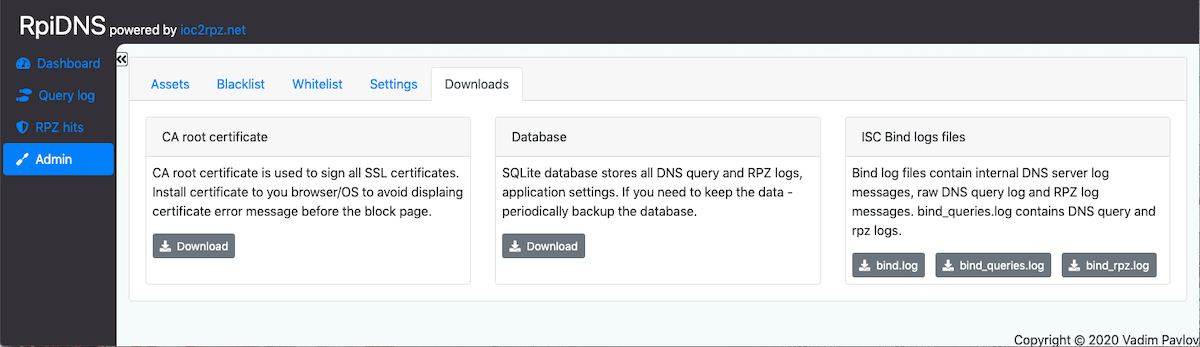
| Tool | Description |
|---|---|
| CA Root Certificate | Download root CA for SSL certificates (eliminates browser warnings on block pages) |
| Database Download | Backup SQLite database with all RpiDNS data |
| Database Import | Restore from backup (overwrites current data) |
| bind.log | General DNS server operational logs |
| bind_queries.log | Raw DNS query logs in BIND format |
| bind_rpz.log | RPZ-specific logs for troubleshooting |
| Column | Description |
|---|---|
| Username | Login name (case-sensitive, unique) |
| Admin | Administrator privileges status |
| Created | Account creation date |
Actions: Add User, Reset Password, Delete
Note: Cannot delete the last administrator account to prevent lockout.
For threat hunting and false positive investigation, RpiDNS integrates with external research tools:
| Tool | Description |
|---|---|
| DuckDuckGo | Privacy-focused search engine |
| General search engine | |
| VirusTotal | Domain/IP/URL malware validation with multi-engine scanning |
| RiskIQ Community | Passive DNS and digital footprint data |
| DomainTools Whois | Domain and IP registration information |
| Robtex | IP, domain, AS, routes information |
| Apility.io | Threat intelligence SaaS for abuse detection |
| ThreatMiner | IOC threat intelligence portal |
Access Research tools by hovering over domains in Dashboard widgets or reports.
| Script | Description |
|---|---|
rpidns_install.sh |
Installation script for Raspbian |
init_db.php |
Database initialization |
clean_db.php |
Crontab script for DB cleanup |
parse_bind_logs.php |
Parse bind logs, save to DB, aggregate data |
RpiDNS requires ISC Bind configured with:
- DNS query and RPZ hit logging enabled
- Local RPZs:
allow.ioc2rpz.local,allow-ip.ioc2rpz.local,block.ioc2rpz.local,block-ip.ioc2rpz.local
- GitHub Sponsors (one-time, recurring)
- PayPal (one-time)
- Email: feedback(at)ioc2rpz[.]net
- Telegram
Copyright 2020-2026 Vadim Pavlov ioc2rpz[at]gmail[.]com
Licensed under the Apache License, Version 2.0 (the "License"); you may not use this file except in compliance with the License.
You may obtain a copy of the License at
http://www.apache.org/licenses/LICENSE-2.0
Unless required by applicable law or agreed to in writing, software distributed under the License is distributed on an "AS IS" BASIS, WITHOUT WARRANTIES OR CONDITIONS OF ANY KIND, either express or implied. See the License for the specific language governing permissions and limitations under the License.