

C# bindings for Scikit-Learn, focused on bringing Machine Learning into the C# environment. This library provides easy access to machine learning models, results, parameters, and datasets.
Built on top of Numpy.Bare and made from Scikit-Learn’s documentation, supporting most classes and methods.



Set the path to your python311.dll file as follows:
Runtime.PythonDLL = "your_path_to_python311.dll";Replace "your_path_to_python311.dll" with the actual path to python311.dll on your system. This allows Sklearn.NET to use your existing Python installation.
If you prefer a local Python installation, install Python.Included NuGet package (version 3.11.6) and then add the following code to initialize the environment:
using Python.Included;
using Python.Runtime;
using Numpy;
using ScikitLearn;
internal class Program
{
// 🚨 WARNING: This method REQUIRES an internet connection and may take several minutes
// on the first attempt. It can also FAIL on the first tries.
// ✅ RECOMMENDATION: Once the Python folder is created, reuse it across multiple projects
// to avoid this delay in the future.
// This asynchronous method installs NumPy and Scikit-learn.
private static async Task InitializeInstallerAsync()
{
// Set the desired installation path
Installer.InstallPath = Environment.GetFolderPath(Environment.SpecialFolder.MyDocuments);
await Installer.SetupPython();
await Installer.TryInstallPip();
await Installer.PipInstallModule("numpy");
await Installer.PipInstallModule("scikit-learn");
}
public static void Main(string[] args)
{
Task.Run(InitializeInstallerAsync).Wait();
// Your code here
}
}✅ Recommendation: Once the Python folder is created, reuse it across multiple projects to avoid this delay.
Example replicating DBSCAN:
var X = np.array(new int[,] {
    { 1, 2 }, { 2, 2 }, { 2, 3 },
    { 8, 7 }, { 8, 8 }, { 25, 25 } });

var clustering = new sklearn.cluster.DBSCAN(eps: 3, min_samples: 2).fit(X);
Console.WriteLine(clustering.labels_);
Output:
[ 0 0 0 1 1 -1]
Scikit-Learn typically uses ndarray(int64), which corresponds to long[] in C#. Use the following to extract data:
long[] labels = my_model.labels_.GetData<long>();⚠ If you need to convert floating-point arrays to a C# format, be extremely careful with type conversion!
var x = sklearn.datasets.make_circles(n_samples: 1).X;
Console.WriteLine(x.GetData<float>()[0]);
Console.WriteLine(x.GetData<double>()[0]);
-1.5881868E-23 // using float [ERROR]
0.8 // using double [OK]
In the future, expressions of the form NDarray<double> are planned to be returned where appropriate instead of NDarray.
In the meantime, make sure to unit test and verify that the results match expectations.
For desktop apps, always call PythonEngine.Shutdown() when the app closes to avoid Python processes running in the background.
Each static class contains a self field of type PyObject, which you can use to create instances or call missing methods.
If you create an object and are confident of its type, use the static Wrap(PyObject pyObject) method to convert it into a typed wrapper:
PyObject obj = sklearn.cluster.self.InvokeMethod("DBSCAN", your_custom_args);

var model = sklearn.cluster.DBSCAN.Wrap(obj);
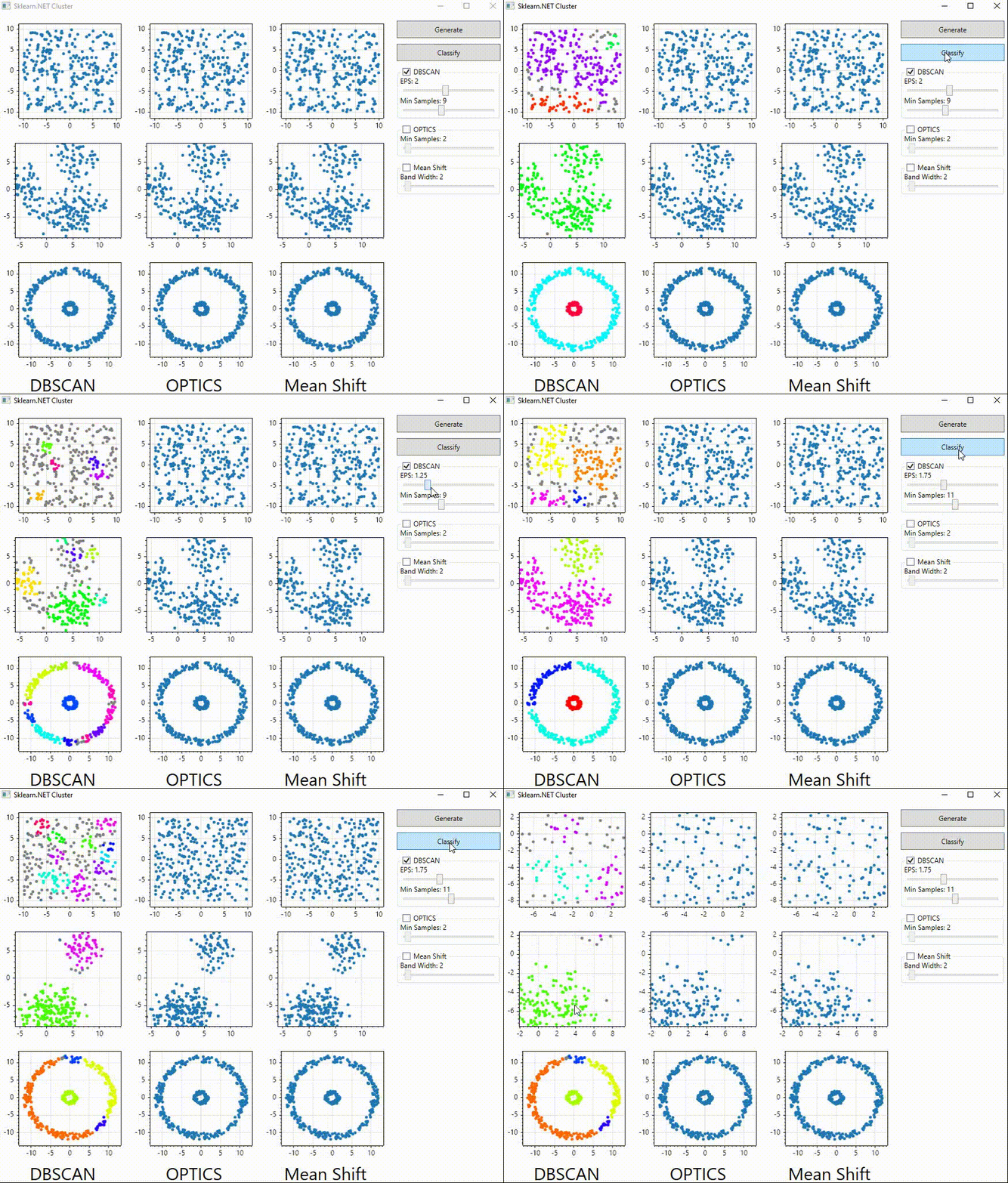
model.fit(...);This project was born from the need to use classification algorithms within the rich UI features of C#, such as WinForms and WPF, for building complex applications. Here’s a simple app that interactively compares clustering methods like DBSCAN, OPTICS, and Mean Shift using the ScottPlot graphing library:
To make the project easier to maintain, all class and method declarations are located in the ScikitLearn.Signatures project.
If a method, constructor, or class has incorrect parameters, correct or implement it there. Then run the CodeGenerator to apply changes.
This project is still in early development, so some parts may be incomplete or lack error handling. Work is ongoing to add tests that verify return types and improve type safety.
This project is licensed under the MIT License.
It wraps and makes use of the Scikit-Learn project, which is licensed under the BSD 3-Clause License.
See LICENSE.scikit-learn for details.