
eepp is an open source, cross-platform C++ GUI framework for building desktop applications, tools, and rich graphical interfaces.
It provides a hardware-accelerated retained-mode UI toolkit with CSS styling, XML layouts, a comprehensive widget set, DPI-aware interfaces, data binding, rich text and HTML/Markdown rendering, animations, internationalization, and application infrastructure.






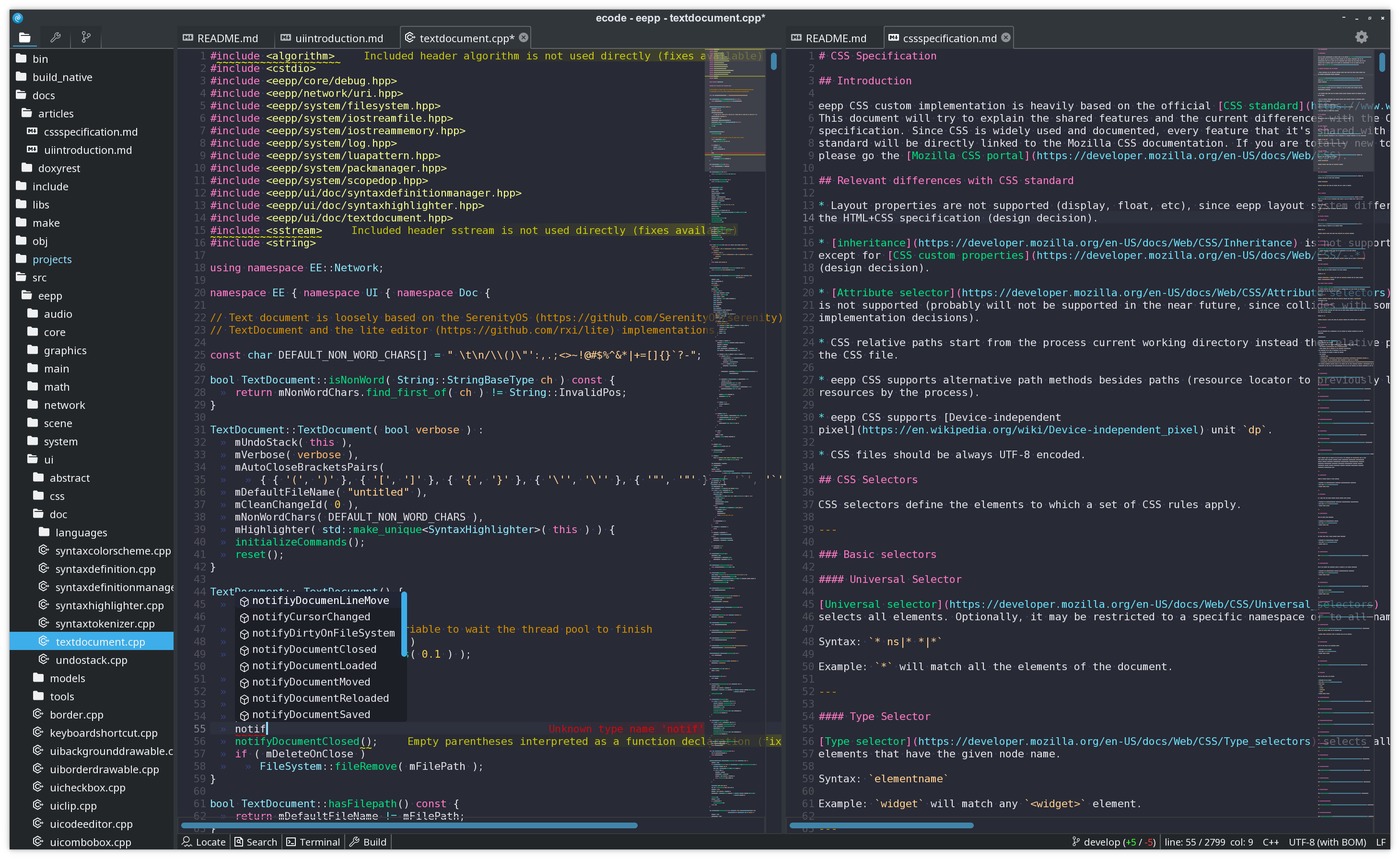
The ecode code editor is built on the eepp GUI.
- A complete C++ GUI toolkit. Build real desktop applications with windows, menus, tabs, splitters, lists, tables, trees, text inputs, dialogs, scrolling containers, and many other reusable widgets.
- Hardware accelerated and retained-mode. eepp owns its rendering stack and uses draw invalidation, so unchanged interfaces do not need to be continuously redrawn.
- CSS styling and theming. Style widget trees with selectors, pseudo-classes, custom
properties, transitions, animations, media queries,
@font-face, and reusable themes. - Declarative or programmatic UI. Compose interfaces from XML layouts, C++, or a mix of both, with reusable layout primitives and DPI-aware sizing.
- Rich text and document surfaces. Text selection, clipboard integration, Unicode, the
UICodeEditor, Markdown rendering throughUIMarkdownView, and native HTML/CSS rendering throughUIWebView. - Model/view data controls. Data-oriented widgets such as lists, tables, trees, and model-backed selectors can use reusable data models, keeping application data separate from its presentation.
- Application infrastructure included. Commands and key bindings, data binding, internationalization, resource management, virtual filesystems, threading, networking, filesystem APIs, and runtime UI inspection are part of the same framework.
- Cross-platform from one codebase. Linux, Windows, macOS, FreeBSD, Haiku, Android, iOS, and the web through Emscripten/WebAssembly.
- MIT licensed.
The UI system is a retained-mode widget hierarchy with event handling, focus management, clipping, animations, transforms, messages, commands, key bindings, text selection, clipboard support, themes, and reusable application-level controls.
Interfaces can be built directly in C++ or loaded from XML. The layout system includes
LinearLayout, RelativeLayout, GridLayout, size policies, margins, padding, alignment,
and pixel-density-aware units.
Several data-oriented components follow a model/view architecture, allowing the same application data to be presented and manipulated independently from the widgets displaying it.
Widgets can be styled using eepp's CSS implementation. It supports the familiar model of
selectors and pseudo-classes together with features such as custom properties, transitions,
animations, media queries, @font-face, backgrounds, borders, box-model properties, text
styling, and theme-specific extensions.
The default Breeze-based theme is implemented in CSS and can be used as a reference for building complete application themes.
UIWebView renders HTML documents natively on the eepp UI stack, and UIMarkdownView uses the
same infrastructure for Markdown content. The HTML/CSS compatibility layer includes block and
inline layout, Flexbox, Grid, tables, lists, absolute/fixed/relative/sticky positioning, floats,
rich inline text, document-scoped stylesheets, viewport/media queries, and scoped font resources.
Where implemented, the HTML/CSS layer follows the CSS and HTML Living Standard specifications rather than defining custom layout behavior.
The GUI is backed by eepp's graphics and windowing layers rather than platform-native widgets. Rendering is hardware accelerated, automatically batched, and supports draw invalidation to keep idle application resource usage low. The renderer supports OpenGL 2, OpenGL 3, OpenGL ES and OpenGL Core Profile backends, while SDL2 currently provides the main window/input backend.
eepp also provides a terminal runtime that can render GUI applications inside compatible terminals using the Kitty graphics protocol. Applications can opt into it with EEPP_RUNTIME=terminal, using the same eepp UI rather than a separate terminal-specific interface.
The runtime UI inspector can query and interact with live widget trees, which is useful for application debugging, automated validation, and development tooling.
Officially supported platforms include Linux, Windows, macOS, FreeBSD, Haiku, Android and iOS. Applications can also be exported to the web with Emscripten/WebAssembly, with some platform-specific limitations.
The GUI framework is built on a set of lower-level eepp modules. They are usable independently, but today they primarily provide the portable foundation for eepp applications.
| Module | Provides |
|---|---|
| Graphics | GPU rendering, fonts, shaders, framebuffers, textures, image loading, clipping, drawables, texture atlases and batching. |
| Window | SDL2-based windows and input, clipboard, cursors, display management and joystick support. |
| System / Core | Threads, clocks, resources, localization, virtual filesystems, Unicode strings and core utilities. |
| Network | HTTP/HTTPS, asynchronous requests, TCP/UDP, FTP/FTPS, proxies, redirects, compression and resume support. |
| Audio | OpenAL/mojoAL-based audio with OGG, WAV, MP3 and FLAC support. |
| Terminal / eterm | Reusable terminal emulator module and GUI terminal widget, used by applications such as ecode and the eterm terminal application. |
| Scene | Node hierarchy, events, messages and programmable actions. |
| Physics / Maps | Optional Chipmunk2D wrapper and tiled-map support inherited from eepp's game-framework origins. |
ecode is a full-featured code editor and the largest real-world application built with eepp. Its interface, editor widgets, themes, terminals, settings UI, dialogs and application chrome are all built on the eepp GUI.
- eproc - system monitor built with the eepp application and UI stack.
- eterm - terminal emulator demonstrating tabs, splits, settings UI and
the reusable
etermterminal module. - eeiv - image viewer implemented on the current eepp GUI stack.
These applications are developed alongside the framework and serve as practical test beds for its desktop application APIs.
The UI Editor loads layouts and CSS and displays changes in real time, making it useful for iterating on eepp interfaces and themes.
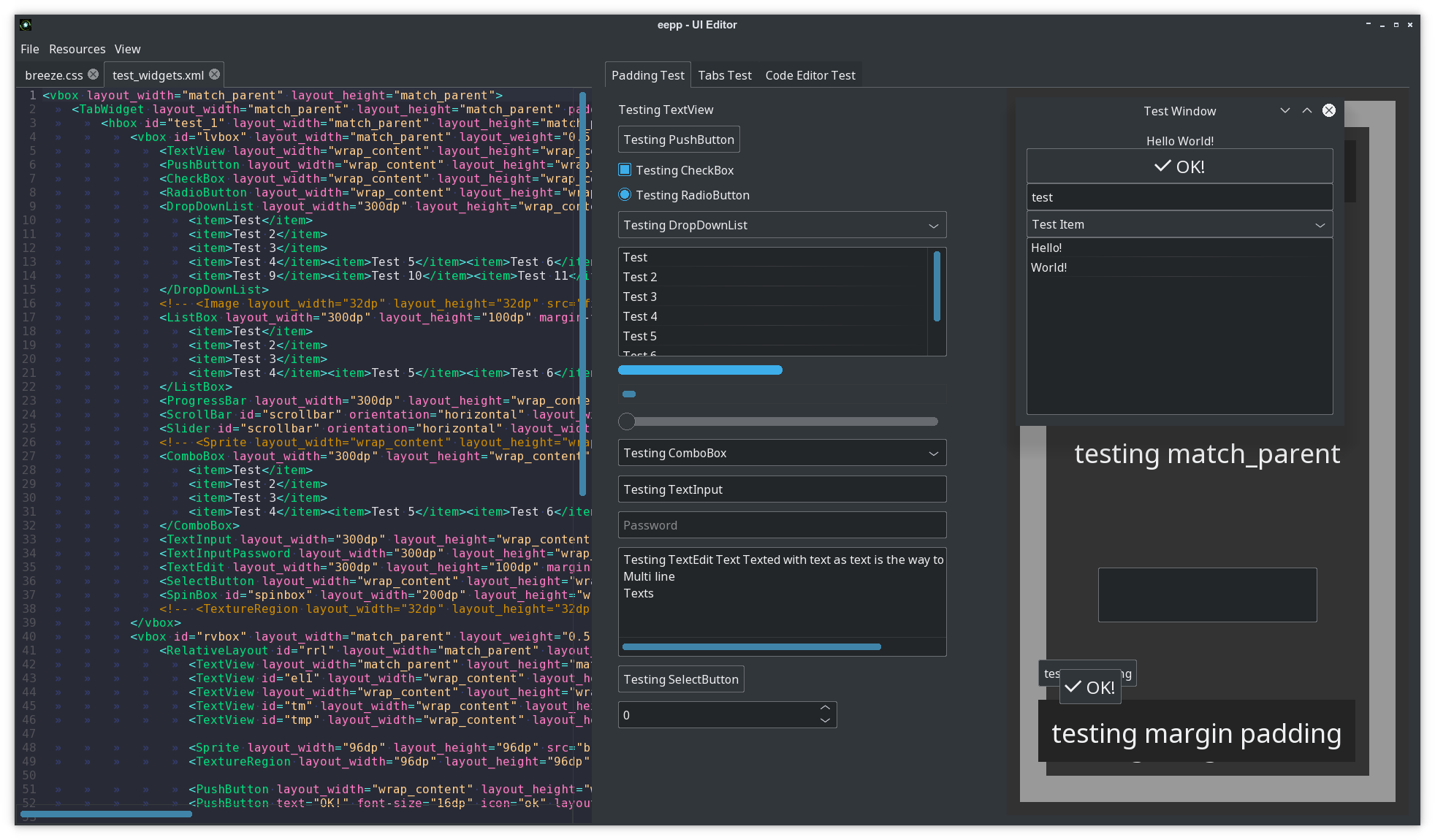
The project also includes graphics-oriented tools such as the Texture Atlas Editor and Map Editor, reflecting eepp's origins as a broader multimedia/game-development framework.
API documentation is available at cdn.ensoft.dev/eepp-docs.
The repository also contains examples in src/examples, tests in src/test, tools in src/tools,
and focused guides for the GUI framework:
Contributions and pull requests are welcome. Before participating, please read the contribution and community support guidelines and the Code of Conduct.
Prebuilt eepp SDKs are automatically produced from the latest develop branch and are
available from the nightly release.
Nightly SDK packages are provided for several desktop platforms and toolchains, making it possible to start developing with eepp without building the framework and its dependencies from source.
The repository uses git submodules. Clone it together with its submodules with:
git clone --recurse-submodules https://github.com/SpartanJ/eepp.git
It should look really familiar to any Android developer. This is a window with the most basic widgets in a vertical linear layout display.
<window layout_width="300dp" layout_height="300dp" window-flags="default|maximize|shadow">
  <LinearLayout id="testlayout" orientation="vertical" layout_width="match_parent" layout_height="match_parent" layout_margin="8dp">
	<TextView text="Hello World!" gravity="center" layout_gravity="center_horizontal" layout_width="match_parent" layout_height="wrap_content" backgroundColor="black" />
	<PushButton text="OK!" textSize="16dp" icon="ok" gravity="center" layout_gravity="center_horizontal" layout_width="match_parent" layout_height="wrap_content" />
	<Image src="thecircle" layout_width="match_parent" layout_height="32dp" flags="clip" />
	<Sprite src="gn" />
	<TextInput text="test" layout_width="match_parent" layout_height="wrap_content" />
	<DropDownList layout_width="match_parent" layout_height="wrap_content" selectedIndex="0">
	  <item>Test Item</item>
	  <item>@string/test_item</item>
	</DropDownList>
	<ListBox layout_width="match_parent" layout_height="match_parent" layout_weight="1">
	  <item>Hello!</item>
	  <item>World!</item>
	</ListBox>
  </LinearLayout>
</window>
UI introduction can be found here.
The UI data-binding guide can be found here.
The runtime UI inspector guide can be found here.
How does it look with real code?
UITextView::New()->setText( "Text  on  test  1" )
		 ->setCharacterSize( 12 )
		 ->setLayoutMargin( Rect( 10, 10, 10, 10 ) )
		 ->setLayoutSizePolicy( SizePolicy::MatchParent, SizePolicy::WrapContent )
->setParent( layout );Element styling can be done with a custom implementation of Cascading Style Sheets, most common CSS2 rules are available, plus several CSS3 rules (some examples: animations, transitions, custom properties, media queries, @font-face at rule, :root element). Here is a small example on how the CSS looks like:
@font-face {
  font-family: "OpenSans Regular";
  src: url("https://raw.githubusercontent.com/SpartanJ/eepp/develop/bin/assets/fonts/OpenSans-Regular.ttf");
}

@import url("assets/layouts/imported.css") screen and (min-width: 800px);

:root {
  --font-color: black;
  --background-input-color: rgba(255, 255, 255, 0.7);
  --border-color: black;
  --border-width: 1dp;
}

.screen TextView {
  color: var(--font-color);
}

.form {
  background-image: @drawable/back;
  background-repeat: no-repeat;
  background-size: cover;
}

.form .form_inputs {
  background-color: var(--non-existent, var(--background-input-color));
  margin-left: 100dp;
  margin-right: 100dp;
  padding-top: 72dp;
  padding-left: 57dp;
  padding-right: 57dp;
  padding-bottom: 115dp;
}

.screen TextView.input,
.screen TextInput.input {
  font-family: AkzidenzGroteskBQ-Cnd;
  layout-width: match_parent;
  layout-height: 80dp;
  border-color: var(--border-color);
  border-width: var(--border-width);
  color: var(--font-color);
  padding-left: 40dp;
  padding-right: 40dp;
  margin-bottom: 32dp;
  skin: none;
  hint-font-family: AkzidenzGroteskBQ-Cnd;
  hint-font-size: 46dp;
  hint-color: #818285;
  background-color: #FFFFFF00;
  transition: all 0.125s;
}

.screen TextInput.input:focus {
  background-color: #FFFFFF66;
  border-color: #796500;
}

.screen TextInput.input:hover {
  background-color: #FFFFFF66;
}

@media screen and (max-width: 1024px) {

.form .form_inputs {
  background-color: red;
}

}
The complete CSS specification can be found in the docs: here.
You can also check how a pure CSS theme looks like in eepp: here.
Since eepp supports emscripten you can take a quick look on some of the examples, demos and tools that the library currently provides. Please be aware that you'll find some differences based on the limitations that emscripten have at the moment (no access to the file system, no custom cursors, etc) and also demos are not optimized for size and they're bigger than they should be. Note: Please use a modern browser with good WebGL and WASM support (Chrome/ium 70+ or Firefox 80+).
7GUIs is known as a "GUI Programming Benchmark" that it's used to compare different GUI libraries and explore each library approach to GUI programming. All the 7 tasks proposed in 7GUIs has been implemented for eepp. The tasks are very good representative of what can be achieved with eepp GUI and also are very useful to demonstrate how to implement different tasks with the library.
The 7GUIs are composed by the following tasks:
-
Counter: Demo and code implementation.
-
Timer: Demo and code implementation.
-
CRUD: Demo and code implementation.
-
Cells: Demo and code implementation.
The library has only one external dependency. You will only need SDL2 library with the headers installed. Also premake5 or premake4 is needed to generate the Makefiles or project files to build the library. I will assume that you know what you are doing and skip the basics.
Notice: eepp uses mojoAL by default as an OpenAL drop-in replacement.
OpenAL is optionally available as an audio backend. If you want to use it, you
have the alternative to enable it. To enable it and disable the mojoAL drop-in replacemente, you
need to add the parameter --without-mojoal to any premake call
( ex: premake5 --without-mojoal gmake ).
In a Ubuntu system it would be something like ( also you will need gcc but it will be installed anyways ):
sudo apt-get install premake5 libsdl2-2.0-0 libsdl2-dev
Clone the repository and run on the repository root directory:
premake5 gmake
or if you have premake4 installed you can run:
premake4 gmake
Then just build the library:
if premake4 was used:
make -C make/linux config=release (config=debug for debug build)
if premake5 was used:
make -C make/linux config=release_x86_64 (debug_x86_64 for debug build, or release_arm64/debug_arm64 if building from arm64)
That's it. That will build the whole project.
You have two options: build with Visual Studio
or with MinGW.
To be able to build the project with any of these options first you will need to
generate the project files with premake4 or premake5.
Then you will need to add the binary file to any of the executable paths defined
in PATH ( or add one, or use it from a local path ).
Download Visual Studio or MinGW files depending on your needs.
You will need to use premake5 and run:
premake5.exe --windows-vc-build vs2022
Then the project files should be found in make/windows/. A complete solution
and all the project will be available. Having installed everything, you'll be
able to build the Visual Studio solution as any other project.
Using the command line argument --windows-vc-build will download the SDL2 dependency automatically
and add the paths to the build process to link against it without the need to download manually any
external dependency.
Then just build the solution in Visual Studio or run MSBuild manually in a
console:
"%MSBUILD_PATH%\MSBuild.exe" .\make\windows\eepp.sln -m
Where %MSBUILD_PATH% is the MSBuild.exe Visual Studio path, for example for
VS2022 Community Edition the path usually is:
C:\Program Files\Microsoft Visual Studio\2022\Community\MSBuild\Current\Bin\
Windows MinGW builds are being produced and tested with w64devkit distribution. MSYS is currently not officially supported given some issues found on the build process (but it's possible to build with some extra steps).
If you're using w64devkit you'll have to download it and extract it, we will assume that it's extracted at C:\w64devkit.
Execute C:\w64devkit\w64devkit.exe as an administrator (right click -> Run as administrator ).
Then go to the eepp cloned repository directory and run:
premake5.exe --windows-mingw-build gmake
--windows-mingw-build will automatically download and link external dependencies (SDL2).
Then just build the project located in make/windows/ with mingw32-make.exe or any equivalent:
mingw32-make.exe -C make\\windows config=release_x86_64
To build a debug build run:
mingw32-make.exe -C make\\windows config=debug_x86_64
And then make sure to copy the SDL2.dll file located at src/thirdparty/SDL2-2.XX.X/x86_64-w64-mingw32/bin/SDL2.dll to bin.
If for some reason eepp.dll (or eepp-debug.dll) hasn't being copied automatically you can copy them from libs/windows/x86_64/ to bin.
You will need the prebuild binaries and development libraries of SDL2, OpenAL is included with the OS. Install the SDL2 framework and you should be able to build the project.
You have two options to build the project: with XCode or with Makefiles. To build with any of both options first you will also need to build the project files with premake4 or premake5.
Generate the project:
premake5 --use-frameworks gmake
And build it:
make -C make/macosx config=release_x86_64 (or config=debug_x86_64 for a debug build, or release_arm64/debug_arm64 if building from arm64)
You can use the projects/osx/make.sh script, that generates the Makefiles
and builds the project.
Run:
premake5 --use-frameworks xcode4
And open the XCode project generated at make/macosx/ or simply build from the
command line with:
xcodebuild -project make/macosx/project-name.xcodeproj
There's a gradle project in projects/android-project/. It will build the
library with all the dependencies included. Use the example project as a base
for your project. Notice that there's a eepp.mk project file that builds the
library. That file can be used in you projects.
The project provides two files to build the library and the demos. You can use
any of them depending on your needs.
The files are located in projects/ios:
This script can be used to generate the xcode projects and solution of all the
included projects in eepp (demos, tools, shared lib, static lib, etc). It will
also download and build the SDL2 fat static library in order to be able to
reference the library to the project. After building the projects sadly you'll
need to make some minor changes to any/all of the projects you wan't to build
or test, since the project generated lacks some minor configurations. After
you run this script you'll need to open the solution located in
make/ios/eepp.xcworkspace. To build the static libraries you'll not find any
problem (that will work out of the box). But to test some of the examples it's
required to:
Select (click on the project name) the project you want to test, for example
eepp-empty-window. You will se several tabs/options, go to Build Settings,
and locate the option Info.plist file, double click to edit and write:
Info.plist. This will indicate to read that file that is located in the same
directory than the project. The go to the tab General and complete the
Bundle Identifier with an identifier name of the app bundle that will be
generated, for this example you can use something like: eepp-empty-window.
That will allow you to build and run the project.
This eepp-empty-window demo does not use any assets/resources, but other demos
will need to load assets, and this assets need to be added to the project in order
to be available to the app bundle. For example, the project eepp-ui-hello-world,
will require you to add the assets folder into the project. What you need to do
is: select the project and go to the Build Phases tab, in Copy Bundles Resources
click in the plus icon (+), then go to Add Other... and locate and select the
bin/assets/ folder and Finish. That should be enough.
This script can be used to build the SDL2 and eepp as two fat static libraries
with arm64 and x86_64 architectures in it (arm64 for iPhone/iPad and x86_64 for
the simulators). To generate a release build pass config=release_arm64 as a parameter
for the script (sh compile-all.sh config=release_arm64). The built files will be
located in libs/ios/, as libSDL2.a and libeepp.a (or libeepp-debug.a for
debug build). This two files can be integrated in your project.
You will first need to download and install emscripten.
Then there's a script for building the emscripten project in
projects/emscripten/make.sh. Before running this script remember to set the
emsdk environment, it should be something like: source /path/to/emsdk/emsdk_env.sh.
That should be enough in GNU/Linux or macOS ( only tested this on GNU/Linux ).
All the binaries are located at the bin directory after built. The binaries require two files:
the eepp library and the SDL2 library. The eepp library will be located in libs/{OS}/. The build
script will try to symlink the eepp library into bin, if that fails it should be copied or
symlinked manually. Regarding the SDL2 library is not provided in the repository, so in order to run
the demos you'll need to download the correct SDL2 library OS version and architecture.
eepp began as Entropia Engine++, a general-purpose multimedia and game-development framework. Over time the project evolved around its strongest and most actively developed area: the GUI and application toolkit. Today eepp is developed primarily as a cross-platform C++ GUI framework, while the graphics, windowing, system, networking, audio, scene, physics and map modules remain available as the lower-level foundation inherited from that history.
The framework is used by real applications including ecode and the first-party tools developed in this repository. Those applications are also important test beds: new widgets, application APIs, styling features and runtime tooling are exercised in production-sized interfaces instead of only in isolated examples.
The API is mature but not completely frozen. eepp has been developed for many years, so some older areas of the codebase still use legacy C++ patterns. Modernization is done incrementally where it provides a clear benefit, while new code generally follows newer C++ practices.
Ideas and experience have come from many projects and ecosystems over the years, including the Android UI toolkit, SFML, cocos2d-x, raylib, libGDX, Godot, XNA, LÖVE and others. eepp keeps its own implementation where doing so provides useful control over portability, rendering, UI behavior and application integration.
- Keep expanding and refining the GUI widget set, layouts, CSS support and theming system.
- Improve the HTML/CSS compatibility layer and rich-document components.
- Improve GUI documentation, examples and developer tooling.
- Continue using ecode, eproc, eterm, eeiv and other first-party applications to drive and validate framework development.
- Continue modernizing the codebase where it improves maintainability without unnecessary churn.
- Evaluate scripting support after the core APIs are sufficiently stable.
- Keep legacy game-oriented modules available where useful, while focusing new development effort on the GUI and application framework.
Contributors are welcome, especially around the GUI framework, documentation, examples, platform support and developer tooling.
-
Sean Barrett for stb_image and all the stb libraries.
-
Sam Latinga for Simple DirectMedia Layer.
-
Jonathan Dummer for the Simple OpenGL Image Library.
-
Laurent Gomila for SFML
-
Yuri Kobets for litehtml
-
Michael R. P. Ragazzon for RmlUI
-
rxi for lite
-
Andreas Kling for SerenityOS
-
Ryan C. Gordon for mojoAL
-
David Reid for dr_libs
-
Lion (Lieff) for minimp3 and more
-
Lewis Van Winkle for PlusCallback
-
Dieter Baron and Thomas Klausner for libzip
-
Jean-loup Gailly and Mark Adler for zlib
-
Milan Ikits and Marcelo Magallon for GLEW
-
Mikko Mononen for nanosvg
-
Scott Lembcke for Chipmunk2D
-
Christophe Riccio for glm
-
Rich Geldreich for imageresampler and jpeg-compressor
-
Arseny Kapoulkine for pugixml
-
Jason Perkins for premake
-
Martín Lucas Golini ( me ) and all the several contributors for SOIL2 and efsw
-
kcat for openal-soft
-
The FreeType Project
-
And a lot more people!