Blog
The Blog is a space where developers can record their development journey or information that does not strictly fit into the existing documentation spaces including the Trello board or the specification document on Google Doc. You can write your development journey that can be useful to be shared across the contributors. Such blog articles can discuss new findings, proposals and etc.
Graph Theory is the basis of core logic in WhiskGraph project, which will determine the connections between each task aka vertices through edges. This section of the blog will explain the essential concepts behind the theory itself and my initial opinion on how implementing it to the system.
In mathematics, a graph is used to model relationships between objects, and it is commonly referred to as a mathematical structure. It consists of vertices or nodes to represents objects, and they are connected using edges that are drawn as line or arc.
The term "Vertices" is a plural for vertex, which represents objects in a graph. It is depicted as a point or a dot in most graphs.

A connection between vertices. There are different types of edges including:
- Multiple Edges: Many edges connecting same vertices
- Directed Edges: Edges with direction, indicating a path between node A and B
- Number of edges to a vertex
- Possible to have 0 degree
- Do not use "number of degree" since a degree is already a number
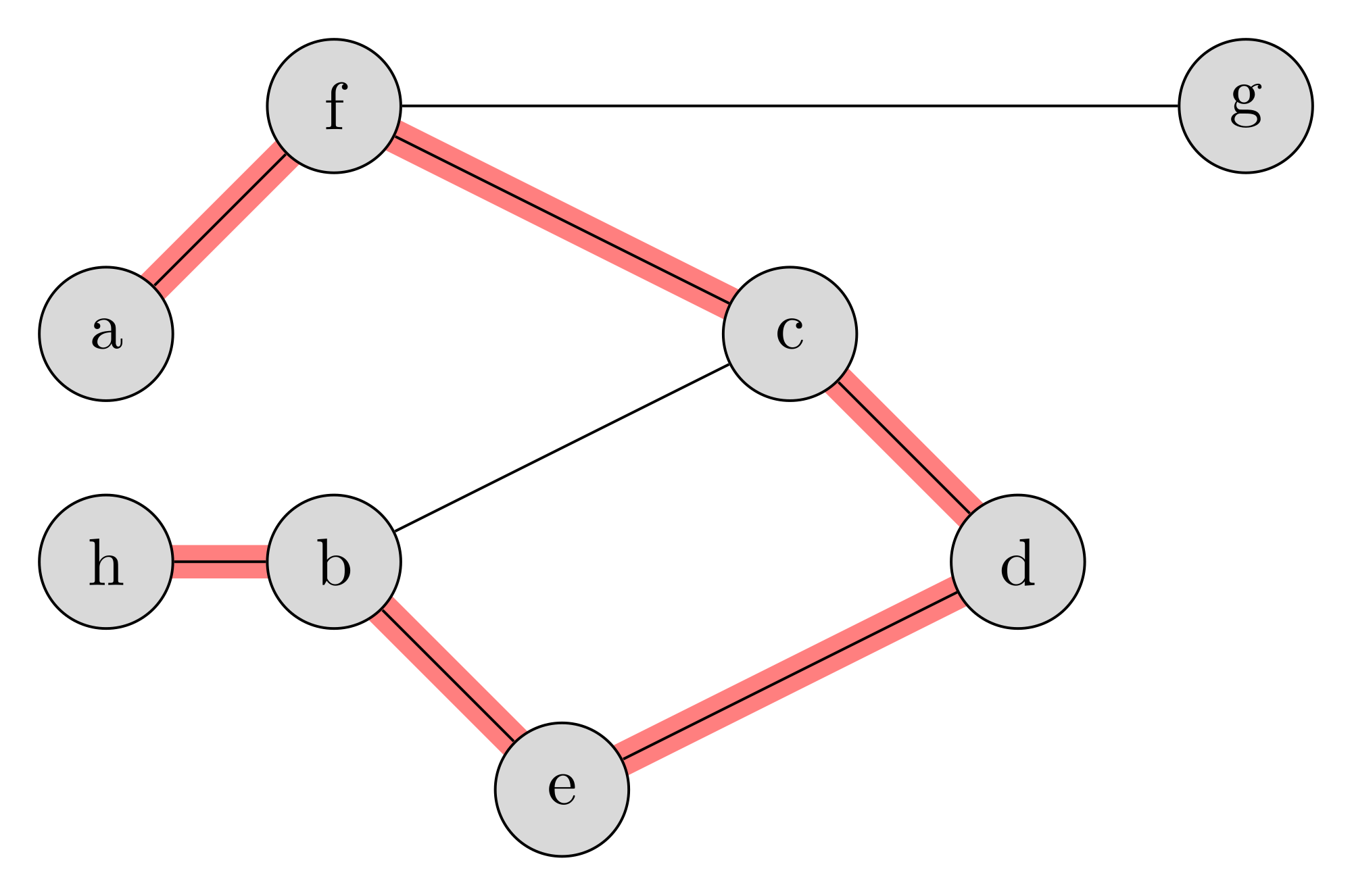
Example of graph path with length of 6
A sequence of distinct edges

- A loop adds +2 to the total degrees
Date: 30 / 10 / 2018
Author: Jason Shin
The philosophy behind Unit Testing n Scala and Play Framework is different than the traditional OOP based web frameworks. In the traditional testing routine, we would hijack creation of an object or invocation of a module's function and mock the behaviour. In Scala, it seems like they prefer to keep everything higher-order function oriented. For example to in Scala and Play, it is more natural to do:
@Singleton
class FileEncoder {

  def readFileAsString(path: String): String = {
    val fileInputStream = new FileInputStream(new File(path))
    val str = CharStreams.toString(new InputStreamReader(fileInputStream, Charsets.UTF_8))
    return str
  }
  def getActionAsBase64(
    appName: String,
    taskType: String,
    taskName: String,
    readFileAsString: (String) => String = this.readFileAsString
  ): String = {
    val pwd = System.getProperty("user.dir")
    val filePath = Paths.get(pwd, "..", "tasks", appName, taskType, taskName, taskName + ".zip").toString
    val simplified = Files.simplifyPath(filePath)
    val content: String = readFileAsString(simplified)
    val encoded = new BASE64Encoder()
    val fileInputStream = new FileInputStream(new File(path))
    val str = CharStreams.toString(new InputStreamReader(fileInputStream, Charsets.UTF_8))
    return str.encode(content.getBytes(Charsets.UTF_8))
    return encoded.toString
  }
}
than
@Singleton
class FileEncoder {

  def getActionAsBase64(
    appName: String,
    taskType: String,
    taskName: String,
  ): String = {
    val pwd = System.getProperty("user.dir")
    val filePath = Paths.get(pwd, "..", "tasks", appName, taskType, taskName, taskName + ".zip").toString
    val simplified = Files.simplifyPath(filePath)
    val fileInputStream = new FileInputStream(new File(path))
    val contnet = CharStreams.toString(new InputStreamReader(fileInputStream, Charsets.UTF_8))

    // Encoding the file using Base64encoder
    val encoded = new BASE64Encoder()// Reading the file as a FileInputStream
    val fileInputStream = new FileInputStream(new File(path))
    val str = CharStreams.toString(new InputStreamReader(fileInputStream, Charsets.UTF_8))
    return str.encode(content.getBytes(Charsets.UTF_8))
  }
}
Date: 26 / 10 / 2018
Author: Jason Shin
Aim to implement below user stories for the MVP release
- [Github/Trigger] on Wiki update -> [Github/Action] create new issue
- [Github/Trigger] on Wiki update -> [Discord/Action] send a new message
- [Trello/Trigger] on Trello update -> [Discord/Action] direct message to @me
Require App implementations
- Discord
- Github
Date: 25 / September / 2018
Author: Jason Shin
As part of the initial MVP goal, I've successfully deployed an OpenWhisk action that is triggered via Github webhook. New achievements as a result of this experiment include
- Ability to deploy a Node.js action as a package, which deals with NPM dependencies
- Using
--paramto inject dependent values such as Github access token - Deploying a minimalistic sequence of action according to the use-case of "When a user creates an issue, create another issue"; nothing surprising, this is just for a demo
- Using the existing Ngrok architecture to test the webhook triggered action on my local environment. No hosted server or DNS was required.
Result:

Instruction:
In this experiment, we will be creating a sequence against a use case
When a Github wiki article is updated on a repo, create a new Github issue
- Packaging the "create a new Github issue" action as a zip file
$ cd tasks/github/actions/create_issue
$ zip -r create_issue.zip *- Starting the OpenWhisk stack
$ pwd # make sure you are in the root directory of the project
$ make compose-run- Creating the create_issue action
$ ./compose/openwhisk-master/bin/wsk -i action create github_create_issue ./tasks/github/actions/create_issue/create_issue.zip --param REPO <REPO NAME> --param USER <USER NAME> --param ACCESS_TOKEN <ACCESS TOKEN> --kind nodejs:6 --web trueREPO: Name of the Github repository, for example "Stormwind" USER: Name of the user, for example "JasonShin" ACCESS_TOKEN: Github personal access token: https://help.github.com/articles/creating-a-personal-access-token-for-the-command-line/
4.Creating a Github webhook using a node script
$ env $(cat tasks/github/triggers/on_wiki_update/.env | xargs) node tasks/github/actions/on_wiki_update/on_wiki_update.js.env example
REPO=ensemble-io-backend
USER=JasonShin
ACCESS_TOKEN=<ACCESS TOKEN>
WEBHOOK_URL=<NGROK URL>
You can retrieve the NGROK url by running
$ curl "$(docker port ngrok 4040)/api/tunnels"- testing
try updating the Github wiki pages and see it creating new Github issues everytime you do it!