A lightweight browser extension that adds bookmark export and import to Chromium-based browsers that support extensions but lack a native bookmark management UI.




Built for Chromium-based browsers for Android that support extensions but have no built-in bookmark import/export.
Browsers like Ultimatum and other chromium forks for Android allow you to install extensions — but offer no way to export or import bookmarks through the UI. This extension fills that gap.
- 📤 Export your bookmarks as JSON or HTML at any time
- 📥 Import bookmarks from a file into the browser
- 🔄 Sync your bookmarks across browsers using a local file as the bridge — no account, no server
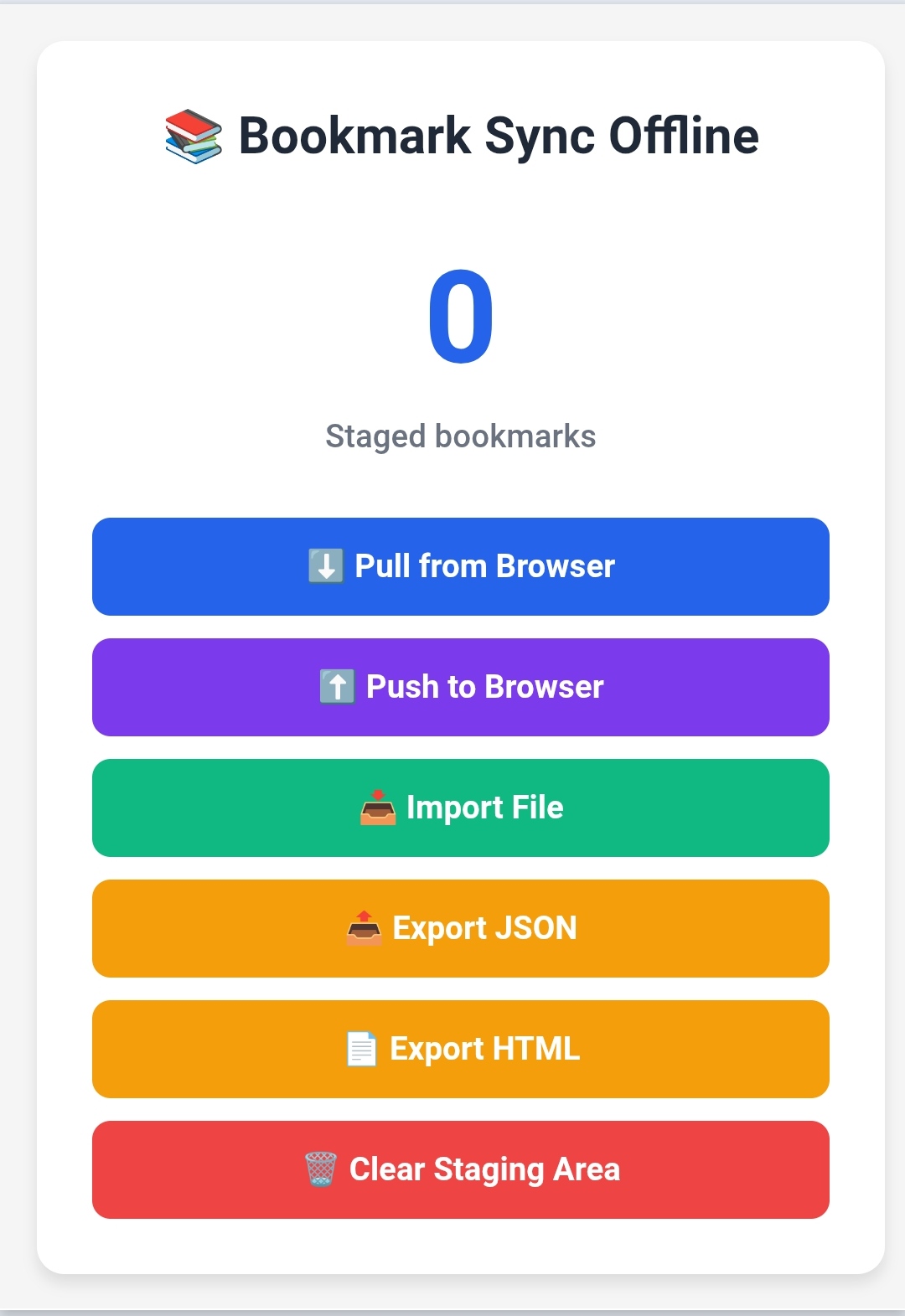
- 📤 Export Bookmarks - Save all your bookmarks as a JSON or HTML file at any time
- 📥 Import Bookmarks - Load bookmarks from a JSON or HTML file into the browser
- 📡 Change Detection - Background listener detects bookmark changes and notifies the popup in real time
- 📊 Staging Area - Review and manage bookmarks before pushing them to the browser
- 🎯 Lightweight - Minimal resource usage with fast performance
- 🔒 Privacy Focused - All data stored locally, no server or account required
- 🎨 Modern UI - Clean and user-friendly interface
-
Clone the repository
git clone https://github.com/Sumon-Kayal/Bookmark-Sync-Offline.git cd Bookmark-Sync-Offline -
Load in your Chromium-based browser
- Open
chrome://extensions/(or the equivalent in your browser) - Enable "Developer mode" (toggle in top-right corner)
- Click "Load unpacked"
- Select the
Bookmark-Sync-Offlinefolder
- Open
-
Export your bookmarks
- Click the extension icon in your browser toolbar
- Click "Pull from Browser" to stage all your bookmarks
- Click "Export JSON" or "Export HTML" to save the file
-
Import bookmarks
- Click "Import File" to open the import page
- Use the file picker to load a JSON or HTML bookmark file
- Click "Push to Browser" to add them to your browser
-
Automatic change tracking
- The extension automatically detects when you:
- Add new bookmarks
- Delete bookmarks
- Move bookmarks between folders
- Rename bookmarks or folders
- The extension automatically detects when you:
- Popup Interface: Quick access to pull, push, export, and import bookmarks
- Import File Page: Full-page interface for importing bookmarks from JSON or HTML files
- Change Detection: Background listener that detects bookmark changes and notifies the popup
- Storage Statistics: View how many bookmarks are staged
- A Chromium-based browser with extension support (see compatibility table below)
- Basic knowledge of JavaScript and browser extensions
- Text editor or IDE (VS Code recommended)
Bookmark-Sync-Offline/
├── manifest.json          # Extension manifest (MV3)
├── background.js          # Background service worker
├── popup.html            # Extension popup interface
├── popup.js              # Popup functionality
├── manager.html          # Bookmark import page
├── styles.css            # Shared styles
├── README.md             # This file
├── CHANGELOG.md          # Version history
├── SETUP.md              # Setup and icon documentation
├── LICENSE               # GPL-3.0 License
└── .gitignore           # Git ignore rules
- manifest.json - Defines extension properties, permissions, and scripts
- background.js - Handles bookmark events and synchronization logic
- popup.js - Controls the popup interface and user interactions
- manager.html - Full-page bookmark import interface (file picker and drag-and-drop)
-
Make Changes
# Edit files in your preferred editor
code .
-
Reload Extension
- Go to
chrome://extensions/and click the reload icon
- Go to
-
Test Features
- Test bookmark creation, deletion, and modification
- Verify sync functionality
- Check manager interface
- Test error handling
-
Debug
- Right-click extension icon → "Inspect popup" (for popup debugging)
- Go to
chrome://extensions/→ "Inspect views: service worker" (for background script) - Check browser console for errors
- Extension installs without errors
- Popup opens and displays correctly
- Initial sync saves all bookmarks
- New bookmarks are automatically detected
- Bookmark manager opens correctly via Import File button
- JSON and HTML import works correctly
- Export JSON and Export HTML produce valid files
- Push to Browser adds bookmarks without duplicates
- Clear Staging Area wipes only extension storage
- Extension icon displays properly
| Browser | Version | Status |
|---|---|---|
| Cromite (Android) | 140+ | ✅ Supported |
| Ultimatum | 140+ | |
| Other Chromium-based browsers with extension support | 140+ | ✅ Supported |
| Opera Android | - | ❌ No extension support |
| Safari | - | ❌ Not supported |
Note: This extension targets Chromium-based Android browsers that support extensions but lack a native bookmark import/export feature.
// Bookmarks are stored in chrome.storage.local
{
  "bookmarks_data": {
    "data": [
      {
        "title": "Example Site",
        "url": "https://example.com",
        "dateAdded": 1234567890000
      }
    ],
    "savedAt": 1234567890000,
    "count": 1
  }
}background.js
initializeExtension()— Sets default metadata on first installsetupAlarms()— Creates the 24h maintenance alarm (clears first to avoid duplicates)performMaintenance()— Runs periodic storage housekeepingdebounceNotifyPopup(message)— Alarm-based debounce for bookmark change notifications
popup.js
handlePull()— Reads the full bookmark tree and saves to local storagehandlePush()— Pushes staged bookmarks into the browser's bookmark barhandleExportJson()/handleExportHtml()— Exports stored bookmarks to filehandleImportFileData(file)— Imports bookmarks from a JSON or HTML filefindOrCreateFolder(title)— Finds or creates a folder on the bookmarks bar
Contributions are welcome! Here's how you can help:
- Fork the repository
- Create a feature branch
git checkout -b feature/amazing-feature
- Commit your changes
git commit -m 'Add some amazing feature' - Push to the branch
git push origin feature/amazing-feature
- Open a Pull Request
- Follow existing code style
- Add comments for complex logic
- Test thoroughly before submitting
- Update documentation as needed
- Keep commits focused and descriptive
- None currently reported
- Search functionality in manager
- Tag system for bookmarks
- Keyboard shortcuts
- Dark mode support
- Bookmark statistics and analytics
- Duplicate detection
- Backup scheduling
This project is licensed under the GNU General Public License v3.0 - see the LICENSE file for details.
Sumon Kayal
- GitHub: @Sumon-Kayal
- Thanks to all contributors
- Inspired by the need for better bookmark management on Android browsers
- Built with modern web extension APIs
If you encounter any issues or have questions:
- Open an Issue
- Check existing issues for solutions
- Star the repository if you find it useful!
- Documentation (Coming soon)
Made with ❤️ by Sumon Kayal