
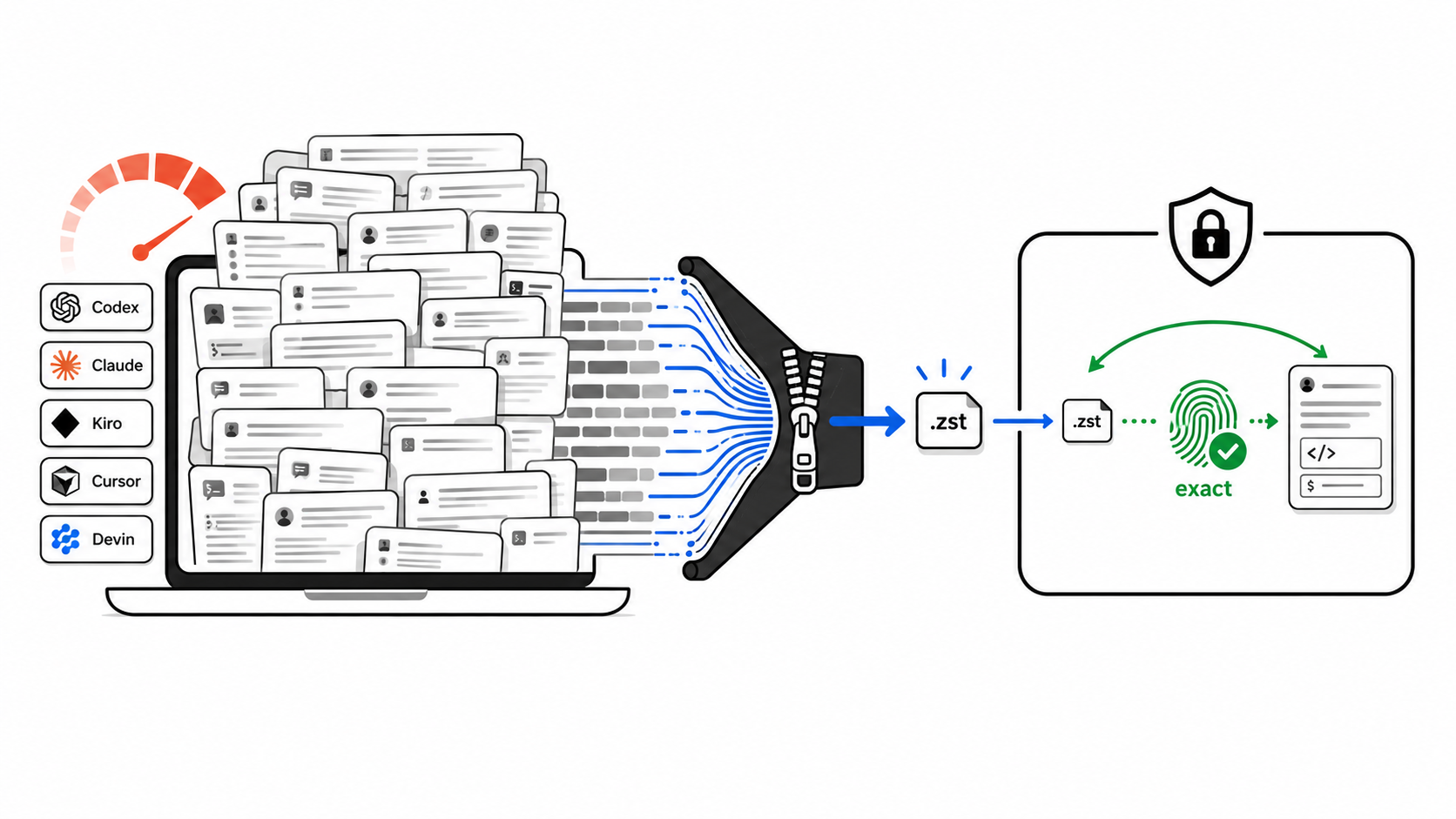
Cold storage for local AI coding-agent sessions. Shrink Codex, Claude Code, Kiro, Grok, Kimi, OpenCode, and Gemini CLI history on disk, and get every byte back on restore.



English · 日本語 · עברית · Español · 简体中文
Agent Session Pack is a Node.js CLI for developers and coding agents whose local session history has grown large. It finds the session stores of OpenAI Codex CLI, Claude Code, Kiro CLI, Grok, Kimi Code, OpenCode, Gemini CLI, Cursor, and Devin CLI, proves lossless Zstandard compression on copies, and packs cold sessions into a local vault only when you ask. Every pack restores the archive and compares SHA-256 hashes before an original file is removed.
No daemon, no cloud sync, no summarizing. Your sessions never leave your machine.
- Features
- Supported agents
- Benchmarks
- Agent Session Pack vs. deleting or zipping
- One-click AI setup
- Quick start
- Commands
- Lifecycle: auto-restore on launch
- Safety model
- Hello world
- Alternatives
- FAQ
- Contributing
- Resources
- License
- Contributors
- 9 coding agents - Codex, Claude Code, Kiro, Grok, Kimi Code, OpenCode, and Gemini CLI are packed and restored; Cursor and Devin are backup-only.
- Proof before change -
checkcopies one session per agent, compresses it, restores it, and compares hashes. Real files stay untouched. - Byte-exact restore - every archive is restored and verified with SHA-256 before the original is removed.
- Dry-run by default - nothing is removed without
--apply, and--applyasks first unless you pass--yes. - Cold-session filter -
--older-than 7d(or12h,1d,2w,30d) keeps your active work untouched. - Built for agents -
guide --jsonprints the safe command map, and the scan, check, pack, unpack, restore, and lifecycle commands have stable--jsonoutput with no prompts. - Opt-in lifecycle - provider wrappers restore a packed session when you open it, and
maintainre-packs cold ones. - Local-first - no daemon, no network, no credentials read.
| Agent | Mode | Session store |
|---|---|---|
| Codex | Archive | ~/.codex/sessions |
| Claude Code | Archive | ~/.claude/projects |
| Kiro | Archive | ~/.kiro/sessions |
| Grok | Archive | ~/.grok/sessions (whole session folders) |
| Kimi Code | Archive | ~/.kimi-code/sessions (whole session folders) |
| OpenCode | Archive | ~/.local/share/opencode, ~/.opencode |
| Gemini CLI | Archive | ~/.gemini, ~/.gemini/tmp |
| Cursor | Backup-only | ~/Library/Application Support/Cursor |
| Devin | Backup-only | ~/.local/share/devin/cli (reads sessions.db metadata only) |
Archive means sessions can be packed into the vault and restored. Backup-only means the agent is listed as supported, but its native store is never changed. Cursor discovery currently returns no sessions.
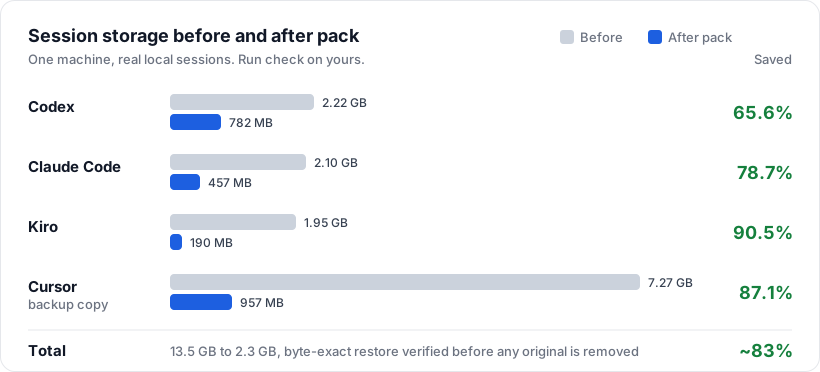
| Agent | Before | After | Saved |
|---|---|---|---|
| Codex | 2.22 GB | 782 MB | 65.6% |
| Claude Code | 2.10 GB | 457 MB | 78.7% |
| Kiro | 1.95 GB | 190 MB | 90.5% |
| Cursor (backup copy) | 7.27 GB | 957 MB | 87.1% |
| Total | 13.5 GB | 2.3 GB | ~83% |
This is one machine's real session history, not a universal benchmark. Run npx --yes agent-session-pack check to measure yours; it only works on copies.
| Agent Session Pack | Deleting old files | zstd or tar by hand | |
|---|---|---|---|
| Get the session back | Byte-exact, verified before removal | Gone for good | Only if you check it yourself |
| Finds every agent's store | Built in for 9 agents | You hunt for paths | You hunt for paths |
| Puts files back where the agent expects | Restore manifest per session | Not applicable | You track paths yourself |
| Changed files on restore | Skipped, never overwritten | Not applicable | Overwritten silently |
| Multi-file sessions (Grok, Kimi) | Packed as whole folders | Easy to half-delete | Easy to miss files |
| Preview first | Dry-run is the default | No | No |
Let your coding agent run it for you. Copy the prompt below into Claude Code, Codex, or any agent with a shell.
Click to copy the AI setup prompt
I want to free disk space used by my local AI coding-agent sessions with
Agent Session Pack (https://github.com/YosefHayim/agent-session-pack).

Please:
1. Check that Node.js 20+ and zstd are installed. If zstd is missing, tell me how to install it on my OS.
2. Run: npx --yes agent-session-pack guide --json
   and follow its safe command map.
3. Run: npx --yes agent-session-pack check --json
   and show me the before/after savings per agent. This only touches copies.
4. Run: npx --yes agent-session-pack pack --all-providers --older-than 7d --dry-run --json
   and show me which sessions would be packed.
5. Stop and ask me before running anything with --apply.
- Node.js 20 or newer.
zstdon yourPATHfor proof, pack, and restore.sqlite3only if you use Devin.HOMEset in your shell (normal on macOS and Linux; see.env.example).
Run npx --yes agent-session-pack doctor to check them.
npx --yes agent-session-pack checkcheck copies one session per agent into a temp workspace, compresses it, restores it, compares hashes, and prints a before/after table. Real session files stay untouched.
npx --yes agent-session-pack pack --all-providers --older-than 7d --dry-runnpx --yes agent-session-pack pack --all-providers --older-than 7d --applyEach session is archived into ~/.agent-session-pack, restored and hash-checked, recorded in a manifest, and only then removed from the agent's store.
npx --yes agent-session-pack unpack --all-providers --apply   # everything
npx --yes agent-session-pack restore SESSION_ID_OR_NAME       # one session
restore and open take a session id or its first characters, the name, the slug, or a few words from the name. Add a prefix such as codex: to search one agent. If more than one session matches, nothing is restored and the matches are listed.
Prefer a guided menu? Run npx --yes agent-session-pack with no arguments in a terminal. To keep the command on your path, install it globally with npm install -g agent-session-pack.
| Command | What it does | Changes files |
|---|---|---|
guide [--json] |
Safe command map for agents and automation | No |
check [--json] |
No-install savings proof on copies | No |
savings [--json] |
Same copy-only before/after proof | No |
scan [--json] |
Lists session stores, sizes, and cold candidates | No |
doctor [--json] |
Checks that zstd and sqlite3 are installed |
No |
init |
Shows the vault policy; in a terminal, opens guided setup that writes the config | Config only |
pack --dry-run |
Previews cold sessions to pack | No |
pack --apply [--yes] |
Archives, verifies, then removes originals | Yes |
unpack --apply [--yes] |
Restores archived sessions to their original paths | Yes |
restore <selector> |
Restores one session by id, id prefix, name, slug, or words from its name | Yes |
open <session> |
Finds a session the same way and restores it if packed | Yes |
lifecycle enable|disable|status |
Installs or removes the auto-restore wrappers | Wrappers and config |
maintain --apply [--yes] |
Re-packs sessions that went cold again | Yes |
preflight, watch, and ensure-restored are called by the lifecycle wrappers; you rarely run them yourself.
Common flags: --provider <id>, --all-providers, --older-than, --json. Agent ids are codex, claude, kiro, grok, kimi, opencode, gemini, cursor, and devin.
Choosing --older-than
| Value | Use it for |
|---|---|
12h |
A short cleanup window |
1d |
Skip roughly today's active work |
7d |
The default setup policy |
30d |
A conservative archive pass |
--max --dry-run |
Curiosity preview of every archive-mode session (never with --apply) |
npx --yes only approves npm's temporary package download. Agent Session Pack asks for its own confirmation through --apply and, for automation, --yes.
Lifecycle is off until you enable it. Once on, packed sessions come back automatically when an agent opens them.
# once
npx --yes agent-session-pack lifecycle enable --json
export PATH="$HOME/.agent-session-pack/bin:$PATH"

# open or resume one session (restores it first if packed)
npx --yes agent-session-pack open --provider grok SESSION_ID --json

# keep storage low after restores
npx --yes agent-session-pack maintain --apply --yes --json- The wrappers (
codex,claude,grok, ...) runpreflighton the session ids in the command line, thenwatchwhile the agent runs. - Packed sessions leave tiny stubs so they stay listable. When the agent opens a stub,
watchrestores the full session. maintainre-packs sessions older than your configuredcoldAfter(default7d). There is no daemon; schedule it with cron or launchd if you want.lifecycle disableremoves the wrappers.
Agent Session Pack is built around byte-exact restore, not best-effort cleanup.
checkandsavingswork on copies only.pack --all-providersis a dry-run unless you pass--apply.pack --applyasks for confirmation in a terminal unless you pass--yes.pack --max --applyis refused.- Apply writes the archive, restores it, checks SHA-256 equality, writes a manifest, and only then removes the original.
unpack --applyrestores from manifests and skips any live file that changed instead of overwriting it.- Grok and Kimi sessions are whole folders, so they are packed and restored as whole folders.
- Cursor and Devin are backup-only: their native stores are never changed.
examples/hello-world holds three tiny synthetic sessions with their real zstd archives and restored copies. Two commands prove the archive restores the exact bytes:
shasum -a 256 < examples/hello-world/before/codex-session.jsonl
zstd -d -c examples/hello-world/archives/codex-session.jsonl.zst | shasum -a 256Agent Session Pack is intentionally narrow: it archives cold local session files and verifies byte-exact restore. It pairs well with usage, search, and disk-analysis tools.
| Tool | Main focus | Difference |
|---|---|---|
ccusage |
Token and cost reports for coding agents | Explains usage; does not pack session stores. |
claude-code-history-viewer |
Offline browsing and search of AI coding history | Views history; does not archive or restore. |
claude-code-cleaner |
Claude Code disk cleanup | Claude only; no verified multi-agent vault. |
zstd, tar, backups, disk analyzers |
Generic storage tools | Compress or find bytes; do not know agent sessions or restore paths. |
Is this context compaction or summarization?
No. Agent Session Pack never summarizes, rewrites, or truncates a conversation. It uses lossless compression and verifies byte-exact restore.
Can agents still resume sessions after packing?
Yes. Restore a session with restore or open before resuming, or enable lifecycle so it happens automatically when the agent opens it.
Does setup compress sessions automatically later?
Setup alone only saves configuration. Packing happens when you run pack --apply, or maintain --apply after lifecycle enable. Nothing runs in the background.
How do I pack old sessions but skip today?
npx --yes agent-session-pack pack --all-providers --older-than 1d --applyDoes it read credentials or upload sessions?
No. It scans local stores and writes local archives. For Devin it reads session metadata from the local SQLite database and never reads credentials.
How is this different from deleting old session files?
Deleting is one-way. Agent Session Pack writes an archive, proves it restores the exact original bytes, writes a manifest, and only then removes the original.
Where are archives stored?
In the vault at ~/.agent-session-pack: compressed .zst archives plus one JSON manifest per session with the original path and SHA-256 hash.
Contributions are welcome. Fork, branch, add tests, run the checks, commit with Conventional Commits, and open a PR. Agent and style rules live in AGENTS.md and CODE-STYLE.md.
pnpm install
pnpm check:ci     # Biome + ESLint
pnpm typecheck    # TypeScript
pnpm test         # Vitest, synthetic fixtures only
pnpm build        # tsup to dist/
Tests never read or change your real session folders.
Project docs:
- PROJECT.md - purpose, users, and non-goals.
- CODE-STYLE.md - code style, CLI contract, and test policy.
- llms.txt - a compact project summary for AI agents.
- Releases and the issue tracker.
Built with:
- TypeScript, Effect, citty, and Clack.
- pnpm, Vitest, Biome, tsup, and GitHub Actions.
- Zstandard and the llms.txt convention.
MIT - see LICENSE.
Thanks to everyone who has helped make this project better.

Support this project · Created by Yosef Hayim Sabag
Agent Session Pack · cold storage for local AI coding-agent sessions · byte-exact zstd archive and restore for Codex, Claude Code, Kiro, Grok, Kimi, OpenCode, and Gemini CLI.