


Cross platform GUI for D. Widgets, layouts, styles, themes, unicode, i18n, OpenGL based acceleration.
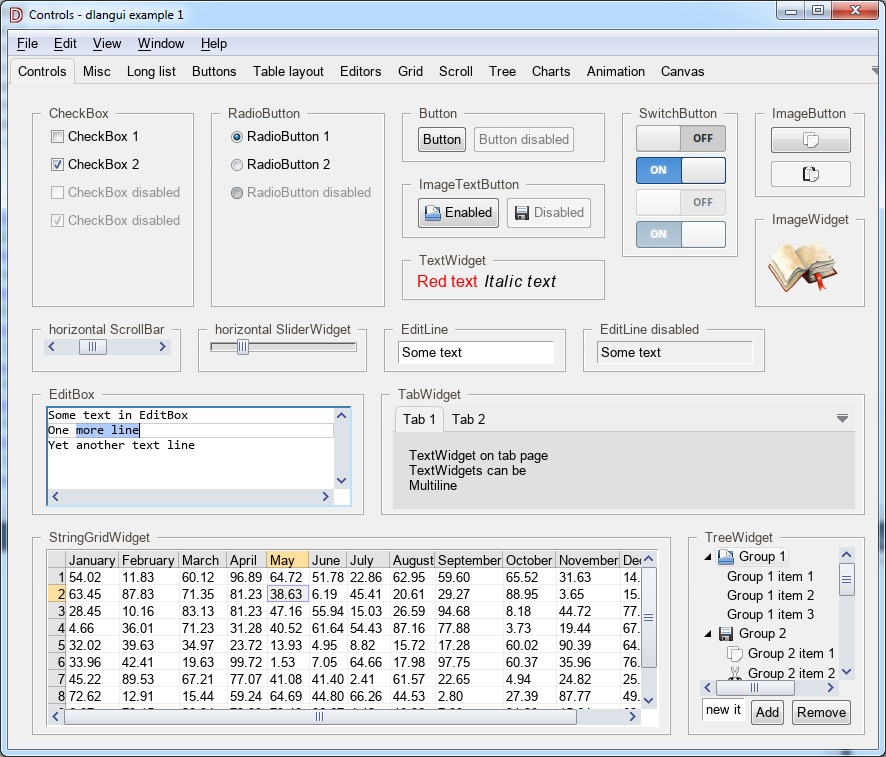
example1, the widget demo (dub run dlangui:example1).
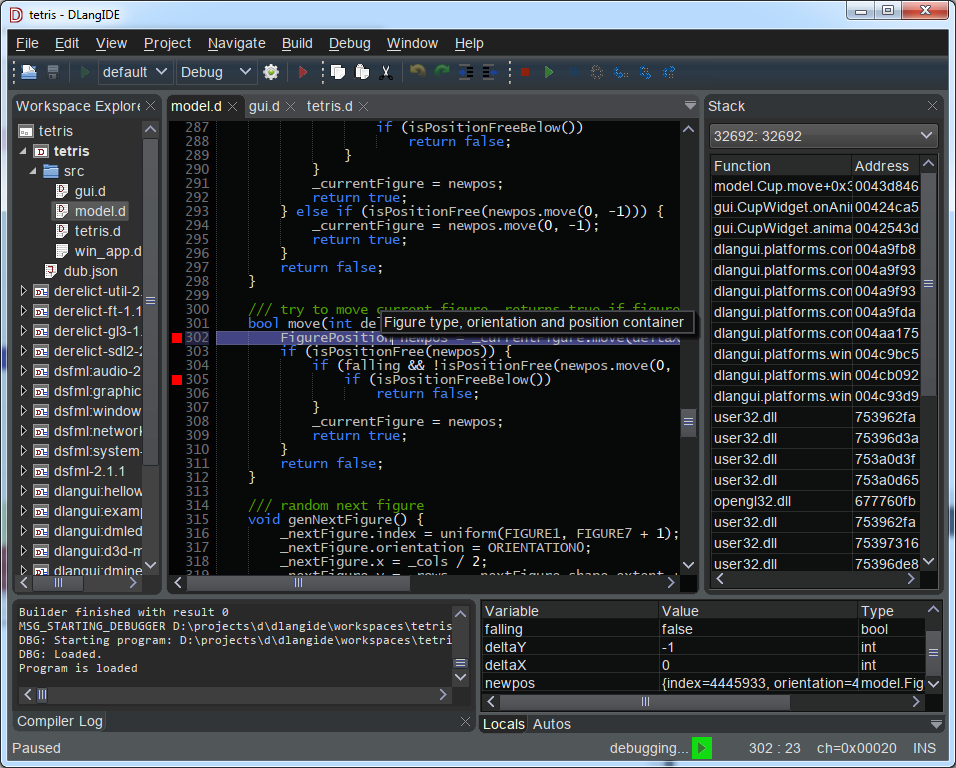
DlangIDE, an IDE for D written with DlangUI (dark theme).
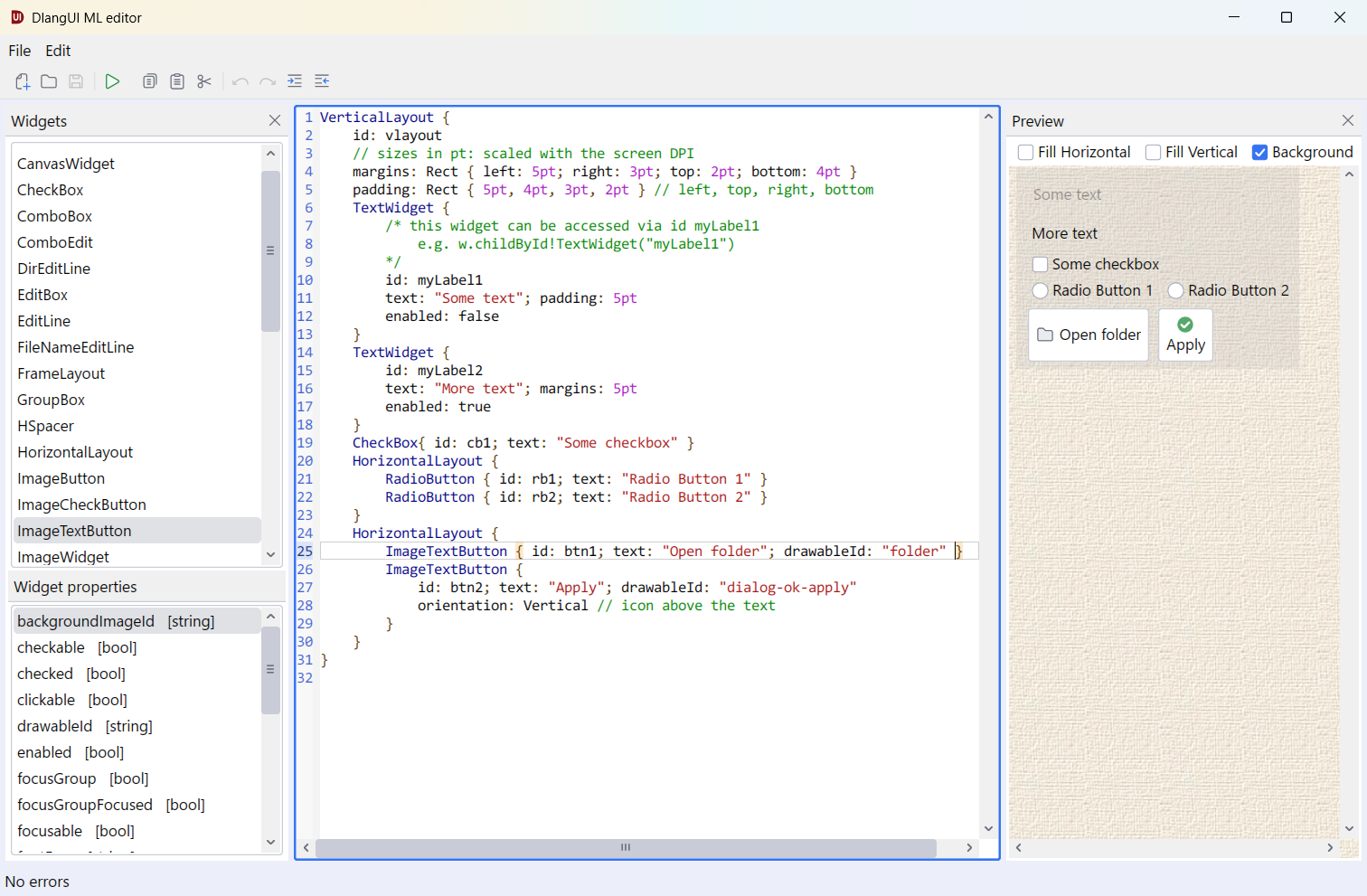
dmledit, a DML editor with live preview (dub run dlangui:dmledit).
GitHub page: https://github.com/buggins/dlangui
DUB package: https://code.dlang.org/packages/dlangui
API Documentation: https://dlangui.dpldocs.info/
Wiki: https://github.com/buggins/dlangui/wiki/Home
Getting Started Tutorial: https://github.com/buggins/dlangui/wiki/Getting-Started
Old project site (pages not updated since 2017): https://buggins.github.io/dlangui
Coding style: https://github.com/buggins/dlangui/blob/master/CODING_STYLE.md
Main features:
- Crossplatform: Windows, Linux and macOS (macOS builds in CI, but is not tested at runtime); also runs in a text console
- Mostly inspired by Android UI API (layouts, styles, two phase layout, ...)
- Supports highly customizable UI themes and styles; light and dark themes included
- DML: QML-like markup language to describe widget trees
- Supports internationalization
- HiDPI support: sizes in points (
pt) scale with screen DPI - Hardware acceleration using OpenGL (when built with version USE_OPENGL)
- Fallback to pure Win32 API / SDL / X11 when OpenGL is not available (e.g. opengl dynamic library cannot be loaded)
- Software rendering on request: call
setOpenglEnabled(false)before creating the first window; example1 has a--no-openglcommand line option - Subpixel (ClearType-like) font rendering with 1/3 pixel glyph positioning, with OpenGL and software rendering. On by default as set for the system (
SubpixelRenderingMode.Auto: ClearType settings on Windows,Xft.rgbaor fontconfig on Linux); setFontManager.subpixelRenderingModetoNone,RGBorBGRto override it - Fallback fonts: characters missing in a font are drawn with the first installed font of a fallback list that has them (default lists per platform: symbols, CJK in the order of the system language, other scripts);
FontManager.setFallbackFaces()to change them - Text files in UTF-8, UTF-16 and UTF-32 (UTF-8 and UTF-16 also without BOM); invalid bytes are shown as U+FFFD instead of cutting the text
- Actually it's a port (with major refactoring) of GUI library for cross platform OpenGL based implementation of Cool Reader app project from C++.
- Non thread safe - all UI operations should be performed in single thread
- Simple 3d engine - allows to embed 3D scenes within GUI
Needs DMD frontend 2.100.2 or newer to build (DMD 2.100.2+, LDC 1.30+, or a GDC with the same frontend).
dub.json:
{
    "name": "hello",
    "targetType": "executable",
    "dependencies": {
        "dlangui": "~>0.11.3"
    }
}
source/app.d:
import dlangui;

mixin APP_ENTRY_POINT;

/// entry point for dlangui based application
extern (C) int UIAppMain(string[] args) {
    // create window
    Window window = Platform.instance.createWindow("Hello", null);
    // create a widget tree from DML (QML-like markup)
    window.mainWidget = parseML(q{
        VerticalLayout {
            margins: 10pt
            padding: 10pt
            TextWidget { text: "Hello, world!"; textColor: "red"; fontSize: 150% }
            Button { id: btnOk; text: "Close" }
        }
    });
    // handle button click
    window.mainWidget.childById!Button("btnOk").click = delegate(Widget w) {
        window.close();
        return true;
    };
    // show window and run message loop
    window.show();
    return Platform.instance.enterMessageLoop();
}
Build and run with dub run. More examples are in the Wiki and in the examples directory.
Run from the repository root with dub run dlangui:<name>, e.g. dub run dlangui:example1:
example1- widgets demohelloworld- simple DML formdmledit- DML editor with live previewtetris- gamed3d,dminer- 3D scenesspreadsheet,ircclient,dragon- other demos
List of widgets, layouts and other is available in the Wiki
Resources like fonts and images use reference counting. For proper resource freeing, always destroy widgets explicitly (or let their parent widget destroy them).
- FontManager: provides access to fonts
- Images: .png, .jpg, .bmp, .ico or .svg images; if filename ends with .9.png, it's autodetected as nine-patch image (see Android drawables description)
- Image sizes are pixels at
BASE_DPI(96 DPI, 100% scaling); images are scaled bySCREEN_DPI / BASE_DPI. Images inhdpifolders (or with thehdpi_prefix) are 2x images. - SVG images are rendered in the size the screen DPI needs (an SVG of 16x16 px is 20 px at 125%, 32 px at 200%);
currentColorin them is replaced by the text color of the current theme, so one-color icons work in light and dark themes. In a resource directory, a .png with the same resource id wins over an .svg. A size in the file name sets the size at 96 DPI whatever the SVG content says:edit-copy.24x24.svg(resource idedit-copy) is 24x24 px at 100%, 30x30 at 125%. - SVG nine-patch images (#847): the frame and padding of a
.9.pnggo into the file name,name.9.<frame>[.<padding>][.WxH].svg, with 1, 2 or 4 numbers (all edges, horizontal-vertical, or left-top-right-bottom) joined by-, in px at 96 DPI; without a padding, the padding is the frame.btn_normal.9.4.6-3.48x24.svg(resource idbtn_normal) has a 4 px non-stretching border on all edges and a padding of 6 px left and right, 3 px top and bottom. Keep the stretched areas flat across the frame edges: at fractional scales an edge can fall between pixels. Gradients: givelinearGradientcoordinates in percent (y2="100%") or user space (gradientUnits="userSpaceOnUse"); the SVG renderer ignores bounding-box fractions likey2="1". - StateDrawables: .xml file can describe list of other drawables to choose based on widget's State (.xml files from android themes can be used directly)
- imageCache allows to cache unpacked images
- drawableCache provides access by resource id (string, usually filename w/o extension) to drawables located in specified list of resource directories.
Styles and themes are a bit similar to ones in Android API.
- Theme is a container for styles. Can be loaded from XML theme resource file.
- Styles are accessible in theme by string ID.
- Styles can be nested to form hierarchy - when some attribute is missing in style, value from base style will be used.
- State substyles are supported: allow to change widget appearance dynamically based on its state.
- Widgets use style attributes directly from assigned style. When some attribute is being changed in widget, it creates its own copy of base style, which allows to modify some of attributes, while getting base style attributes if they are not changed in widget. This trick can minimize memory usage for widget attributes when standard values are used.
- Included themes:
theme_default(similar to MS Visual Studio 2013) andtheme_dark; select one withPlatform.instance.uiTheme = "theme_dark"; - Resources can be either embedded into executable or loaded from external resource directory in runtime
- Sizes in themes and DML can be given in points (
pt), which scale with the screen DPI; pixel sizes (px) don't scale. - Images can be provided in
mdpiandhdpivariants. - Screen DPI detection: Windows uses the system DPI; on Linux, the desktop's
Xft.dpisetting is used when set; SDL detects scaled (e.g. Retina) displays. - Applications can override the DPI with
overrideScreenDPI.
If build of your app is failed due to dlangui or its dependencies, probably you have not upgraded dependencies.
Try following:
dub upgrade
dub build --force
As well, sometimes removing of dub.selections.json can help.
- Under Windows, uses Win32 API (default configuration) or SDL2 (
sdlconfiguration) as backend. - Optionally, may use OpenGL acceleration
- Uses Win32 API for font rendering.
- Optionally can use FreeType for font rendering.
Build and run demo app using DUB:
git clone https://github.com/buggins/dlangui.git
cd dlangui/examples/example1
dub run --build=release
No console window is shown: mixin APP_ENTRY_POINT defines WinMain on Windows, so the linker makes a GUI program
(32 and 64 bit, DMD and LDC). A win_app.def file is no longer needed; it was only for the old OMF/OPTLINK toolchain
(-m32omf), and the Microsoft linker ignores it with warnings.
- Uses SDL2 as a backend (or native X11 with
x11configuration). - Uses FreeType for font rendering.
- Uses FontConfig to get list of available fonts.
- OpenGL can be optionally used for better drawing performance.
SDL2, FreeType, FontConfig and OpenGL are loaded at runtime, so only their runtime (binary) packages are needed. To build, besides a D compiler and DUB, the zlib development package is needed (DlangUI links with zlib; Linux distribution builds of LDC and GDC use system zlib).
| Distribution | Build | Runtime |
|---|---|---|
| Debian, Ubuntu | zlib1g-dev |
libsdl2-2.0-0 libfreetype6 libfontconfig1 libgl1 |
| Fedora | zlib-devel |
SDL2 freetype fontconfig mesa-libGL |
| Arch, Manjaro | zlib |
sdl2 freetype2 fontconfig libglvnd |
E.g. in Ubuntu:
sudo apt-get install zlib1g-dev libsdl2-2.0-0 libfreetype6 libfontconfig1 libgl1The x11 configuration links libX11 and GLX at build time, so it additionally needs their development packages
(libx11-dev libgl-dev on Debian/Ubuntu, libX11-devel libglvnd-devel on Fedora).
Build and run on Linux using DUB:
git clone https://github.com/buggins/dlangui.git
cd dlangui
dub run dlangui:example1- Uses SDL2 as a backend, FreeType for font rendering. Install SDL2 e.g. with Homebrew:
brew install sdl2. - DlangUI builds on macOS in CI, but it is not tested at runtime. The support is not guaranteed.
The console configuration draws the UI with text characters in a terminal (ANSI terminals on Linux and macOS,
the Windows console on Windows), without OpenGL or FreeType. Build with -c console, e.g.:
dub run dlangui:example1 -c console- Android: there is a NativeActivity backend (
platforms/android, makefiles inandroid/), but it is not maintained or tested. - Other platforms support may be added easily
bindbc-opengl- for OpenGL supportbindbc-freetype+ FreeType library support under linux and optionally under Windows.bindbc-sdl+ SDL2 for cross platform supportx11andglx-dbindings for the native X11 backendarsd-officialFor image reading and XML parsinginilikeandicontheme- freedesktop icon themes on Linux
DlangIDE is a cross platform D language IDE built with DlangUI: DUB projects, DCD based completion and navigation, build, run and debug.
Run the latest release:
dub run dlangide --build=releasePlease report bugs and feature requests in GitHub issues. Pull requests are welcome; see the coding style.
Boost Software License 1.0, see LICENSE.txt.
The icons of the default theme have their own licenses: the SVG icons in views/res/icons are JetBrains IntelliJ Platform icons (Apache License 2.0), see LICENSE_JetBrains_icons.txt; the other icons, see LICENSE_default_theme_icons.txt. Apps embed these icons with the standard resources, so an app that ships binaries includes these license files (or their contents, e.g. in its documentation or About box). The embedded copies of the SVG icons don't contain the license comment of the files: it's dropped at compile time, which saves about 14% of the SVG data.