A web interface for browsing and exploring Amazon Bedrock AgentCore Memory resources. This application provides a user-friendly way to interact with AgentCore Memory data through both control plane and data plane APIs.
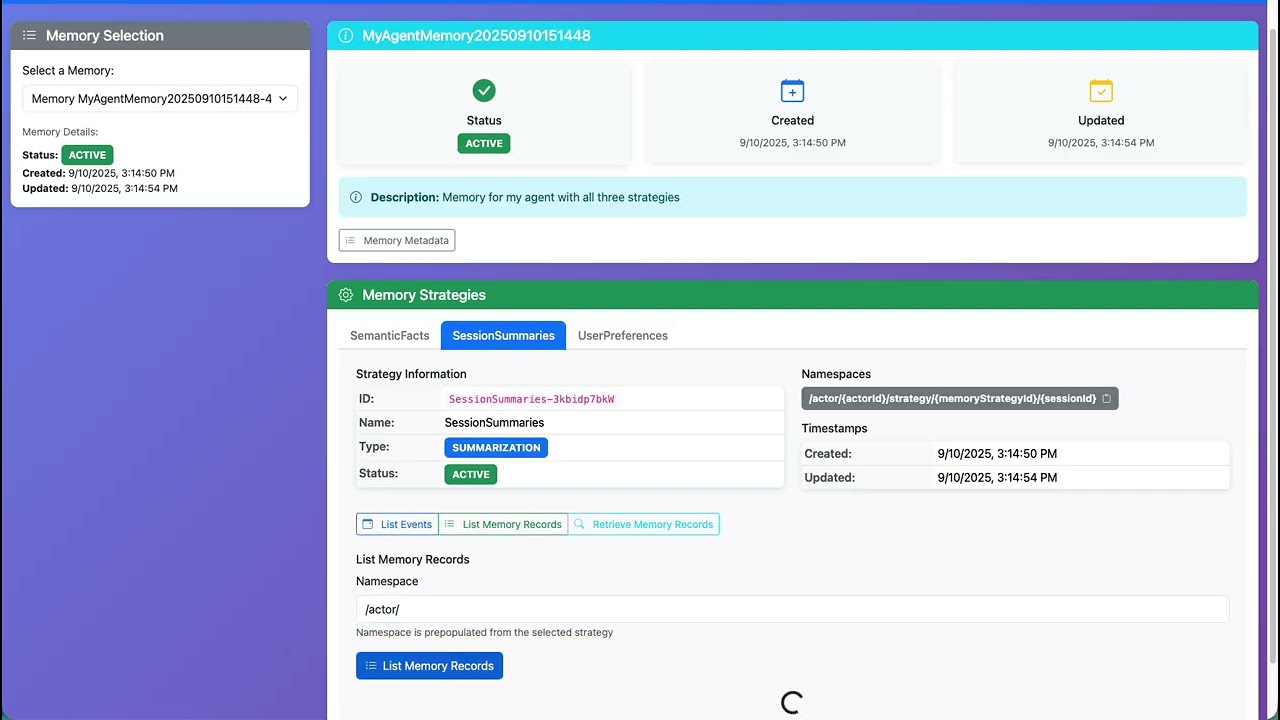
For more information on these implementaitons, see this blog post series:
Visualizing AI Agent Memory: Building a Web Browser for Amazon Bedrock AgentCore Memory


- Memory Overview: Browse all available AgentCore Memory resources with metadata
- Strategy-Specific Operations: Each memory strategy has its own dedicated operations interface
- Smart Namespace Handling: Automatically substitutes strategy IDs in namespace templates with editable paths
- Event Listing: List events for specific sessions and actors
- Memory Records: Browse memory records by namespace with persistent user edits
- Memory Retrieval: Search and retrieve memory records with queries
- Copy Functionality: Quick copy buttons for Memory IDs, ARNs, and namespace values
- Interactive UI: Modern FastAPI backend with responsive Bootstrap frontend
- JSON Viewer: Auto-expanding JSON viewer with tree view and syntax highlighting
- Security: HTML escaping for user content to prevent code injection
- Python 3.13+
- AWS CLI configured with proper credentials
- AWS permissions for:
bedrock-agentcore-control:ListMemoriesbedrock-agentcore-control:GetMemorybedrock-agentcore:ListEventsbedrock-agentcore:ListMemoryRecordsbedrock-agentcore:RetrieveMemoryRecords
Install as a global command-line tool using uv:
From GitHub repository:
uv tool install git+https://github.com/danilop/agentcore-memory-browser.gitFrom local directory (if you have the source):
uv tool install .Then run anywhere with:
agentcore-memory-browser- Clone the repository:
git clone https://github.com/danilop/agentcore-memory-browser.git
cd agentcore-memory-browser- Install dependencies using uv:
uv syncagentcore-memory-browserOption A: Direct Python execution
uv run python main.pyOption B: Using project script name
uv run agentcore-memory-browserThe application will automatically open in your browser at http://localhost:8000
- Sidebar: Memory selection dropdown showing all available memories
- Memory Overview: Displays selected memory metadata and status with expandable details
- Memory Strategies: Tabbed interface showing each strategy with:
- Strategy details (status, type, description)
- Available namespaces
- Strategy-specific memory operations
Each strategy tab contains three operation sub-tabs:
- Purpose: List events for specific sessions and actors
- Requirements: Session ID, Actor ID
- Configuration: Result limit (1-100)
- Purpose: Browse all memory records in a namespace
- Requirements: Namespace path (pre-filled with strategy ID, editable)
- Configuration: Result limit (1-100)
- Note: Replace
{actorId}and{sessionId}placeholders with actual values
- Purpose: Search memory records using queries
- Requirements: Namespace path and search query
- Configuration: Result limit (1-50)
- Note: Replace
{actorId}and{sessionId}placeholders with actual values
The application uses two main AWS service clients:
list_memories(): Get all memory resourcesget_memory(memory_id): Get detailed memory information
list_events(): List events for a memorylist_memory_records(): List memory records by namespaceretrieve_memory_records(): Search memory records with queries
Ensure your AWS credentials are configured via:
- AWS CLI:
aws configure - Environment variables:
AWS_ACCESS_KEY_ID,AWS_SECRET_ACCESS_KEY - IAM roles (if running on EC2)
The application uses your default AWS region. Set it with:
export AWS_DEFAULT_REGION=us-east-1agentcore-memory-browser/
├── backend.py # FastAPI backend application
├── main.py # Application runner
├── templates/
│ └── index.html # Main web interface
├── static/
│ ├── css/
│ │ └── styles.css # Custom styling
│ └── js/
│ └── app.js # JavaScript application logic
├── pyproject.toml # Dependencies and configuration
└── README.md # This file
fastapi: Modern web framework for building APIsuvicorn: ASGI server for FastAPIjinja2: Templating engine for HTML renderingboto3: AWS SDK for Pythonpython-multipart: For handling form data
GET /: Main web interfaceGET /api/health: Health checkGET /api/memories: List all memoriesGET /api/memories/{id}: Get memory detailsGET /api/memories/{id}/events: List memory eventsGET /api/memories/{id}/records: List memory recordsPOST /api/memories/{id}/retrieve: Retrieve memory records with query
- No memories found: Verify AWS credentials and permissions for AgentCore services
- Region errors: Ensure you're in the correct AWS region where AgentCore Memory is configured
- Permission denied: Check IAM permissions for AgentCore services
- Validation errors: Replace placeholder values (
{actorId},{sessionId}) with actual values in namespace fields - Connection errors: Verify network connectivity to AWS
- Port already in use: Change the port in
main.pyif 8000 is occupied
View server logs in the terminal when running the application. FastAPI provides detailed error messages and request logging.
This project is licensed under the MIT License.

