
The AI cursor companion. Hold a key, ask a question, get an answer about whatever your cursor is pointing at.
macOS Apple Silicon ·
macOS Intel ·
Windows ·
Linux
🖱️

If AIPointer ⦿ is useful to you,
a star 🌟 on GitHub helps the project stay alive.
AIPointer is an open-source desktop overlay. You hold a key (default: Right-Cmd on macOS, Right-Ctrl on Windows/Linux), a glassmorphism box pops up next to your cursor, you ask a question, and a vision-capable LLM answers about whatever's around the cursor. A screenshot of the cursor region, your prompt, and (optionally) your clipboard get sent to the provider you configured. You keep your own API key, you pay for your own tokens, nothing is logged anywhere.
BSL-1.1 source-available, no framework lock-in, no cloud account. For longer autonomous tasks, AIPointer points you at Skales, the same author's larger AI agent.
AIPointer is useful when you want to ask an AI about something on your screen without copying, pasting, or switching apps:
- Quick translation of text you're reading in any app or website
- Explain code in your editor without leaving it
- Identify an object, product, landmark, or chart from a screenshot
- Summarize a long article or document you have open
- Ask about your files (v1.1.5) — select up to 5 files in Finder / Explorer, press the AIPointer hotkey, and they're attached to your next query automatically. Zero clicks. Hit Enter without typing and AIPointer auto-summarizes them.
- Get a reply suggestion for a message visible on screen
- Define a word without leaving your current app
- Solve a math or logic problem by pointing at it
- Voice queries when typing isn't convenient
It works as an alternative to switching to ChatGPT, Claude, or Gemini in a browser tab — you stay where you are, the answer comes to you.
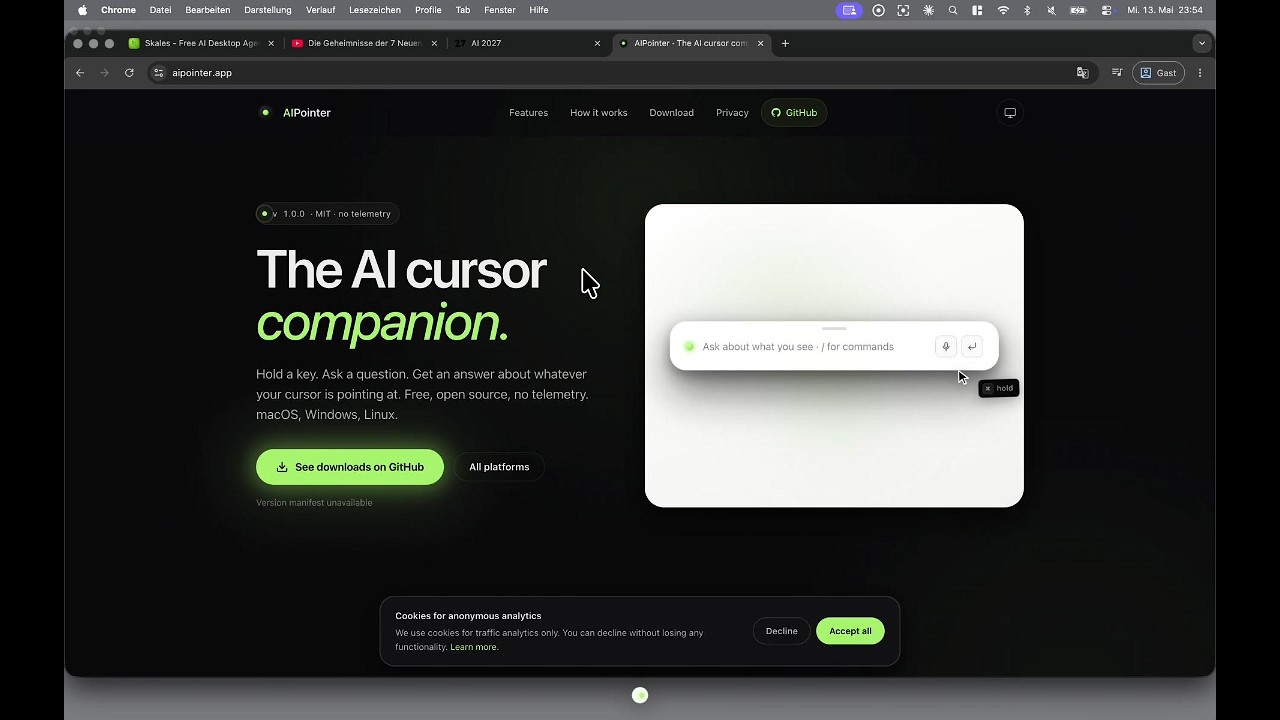
- Cursor-anchored. It answers about what you're already looking at, not what you have to describe in text.
- Fast. Vision-capable Gemini 3 Flash by default. Sub-2-second answers for most questions.
- Multi-provider. Bring your own OpenRouter key (recommended) or a direct Anthropic, OpenAI, or Google Gemini key. Fallback chain handles outages automatically.
- Agentic when it helps. Seven built-in tools: fetch a URL, open a URL, copy text, save the answer as a styled document, reveal your workspace, read clipboard, and (new in v1.1.0) launch a desktop app from a curated whitelist. All action tools sit behind a green-check / red-x approval.
- Child Mode (v1.1.0). Kid-friendly response layer. PIN-locked switch, per-language safe-browsing whitelist (EN+DE), stricter HTML rendering, restricted tool set, voice-first by default with slower TTS. Visually identical to Adult mode — pure behavior layer.
- Onboarding wizard (v1.1.0). Separate framed window on first launch. Five steps: welcome, mode pick, PIN setup, autostart preferences, provider + API key.
- Voice commands (v1.1.1). Say "open settings" or "einstellungen öffnen" — works in EN, DE, FR, ES, IT, PT, NL. Pre-LLM phrase matcher with Levenshtein tolerance for transcription wobble. New voice tools: "play " / "spiele Bach" (YouTube / YouTube Kids in Child Mode), "search for X" / "such nach X" (DuckDuckGo / Kiddle), "louder / quieter / mute / volume 30" / "lauter / leiser / stumm" for system volume. Say "stop" / "halt" / "sei ruhig" to interrupt the voice loop.
- Live model picker (v1.1.5). Each provider row now has a
↻ Refresh modelsbutton. Click it to hit the provider's list-models endpoint with your saved key — the dropdown populates with every model your account can use, so you can pin a specific model without waiting for an app update. Leave on Auto to keep the cheapest-viable behaviour. - Primary + Fallback chain (v1.1.5). Pick a primary provider explicitly, then arrange up to 3 fallback providers underneath it. Each row can pin its own model. The router walks the chain on transient failures (5xx / 429). Reachable via
/fallback. - Finder / Explorer auto-attach + multi-file upload (v1.1.5) — the v1.1.5 USP. Two workflows for attaching up to 5 files to your next AIPointer query: (1) select the files in macOS Finder or Windows Explorer and just press the hotkey — AIPointer reads the active file-manager selection at trigger time and queues the highlighted files automatically (zero clicks, no drag-and-drop); (2) click the paperclip icon right of the mic (or type
/attach) and pick the files manually. A dark-orange "N files attached" pill floats above the BottomPill (hover to expand, × to clear). The next AIPointer trigger attaches them — images via vision, text / JSON / CSV / Markdown / code inlined into the prompt, binary docs (PDF / DOCX / XLSX) referenced by name. While files are queued the cursor screenshot is auto-suppressed so the model focuses on the files. Hit Enter with no prompt typed → AIPointer auto-routes through/summaryagainst the files. macOS uses an AppleScript that guards on Finder being frontmost; Windows reads the foreground Explorer window viaShell.Application; Linux has no universal selection mechanism so the paperclip is the only path there. - Readable selection hint (v1.1.5). The "Drag to capture a region" pill is now solid near-black with bright white text and an accent dot border — legible against every backdrop. (Previously rendered in accent text on a translucent dark pill that looked black-on-grey on certain wallpapers.)
- Chat-only mode (v1.1.2). Settings → Behaviour. Toggle on to open AIPointer as a pure chat window — no screenshot auto-attached. A small camera button inside the prompt lets you attach one per query when you want visual context. Good for follow-up questions, quick lookups, and people who already know what they want to ask.
- Cursor accent picker (v1.1.2). Settings → Appearance → Cursor accent. Three brand presets — lime (default), macOS system blue, or cyberpunk magenta. The comet trail + halo and every accent-tinted UI surface re-tint live without a restart.
- Floating chip bubbles (v1.1.2). Screenshot and Clipboard chips now render as toast-style rounded-full pills floating above the BottomPill — same frosted micro-grain + premium shadow as the pill, high-opacity tint with white text so they stay readable over any backdrop (light AIPointer on a dark website, dark AIPointer on a bright editor — all fine).
- TTS pause / resume (v1.1.2). The Read button under each response is now a real play / pause toggle: click to play, click to pause at the exact position, click again to resume. Stop-words ("stop" / "halt" / "sei ruhig"), ESC, and a new query still fully end playback.
- Activation section in Settings (v1.1.2). Keyboard hotkey + mouse-wiggle on/off toggle, both live-applied. The wiggle has been there since v1.1.0 but had no UI control — now it does.
- Screenshot + Clipboard chips (v1.1.1). macOS-blue "Screenshot attached" chip (default on, dismiss with ×) and a paperclip toggle for opt-in clipboard. Explicit per-query control replaces the v1.0 always-on clipboard polling.
- Theme picker (v1.1.1). Settings → Appearance: System (follows your OS), Light, or Dark. Pick AIPointer's appearance independently of macOS / Windows — keep your system on light and run AIPointer dark (or vice versa). The picked theme survives macOS appearance changes (fixed in v1.1.2).
- Premium pill surface (v1.1.1). The BottomPill / PromptInput render as a macOS-Control-Center-style tile with a fractalNoise micro-grain and a five-layer shadow for perceived depth. Same warm-grey light surface (
#f5f5f5) and Claude-sidebar dark surface (#262626) macOS users expect. - Mouse-wiggle activation (v1.1.0). Wiggle the cursor left-right-left within ~700ms to summon AIPointer. Toggle off in Settings.
- Voice in and voice out. Microphone input with auto-stop on silence. Text-to-speech read-aloud for the answer. Optional voice-first conversation mode: trigger opens listening, transcript auto-submits, answer is read back, mic re-opens for follow-up. Hands-free loop.
- Region screenshots. While the box is open, hold the trigger key again and drag a rectangle to capture exactly the region you want. Replaces the default cursor-centered crop for that query.
- API key tester. A Test button per provider checks the key against the live endpoint. For OpenRouter the result includes your remaining credit balance.
- Templates that work.
/summary,/brief,/translate,/explain,/code,/improve,/define,/solve,/reply,/identify. Plain prose works too. AIPointer detects intent across languages. - Save the answer. A4-styled HTML, PDF, or Markdown. Print-ready.
- Auto-updater. Quiet check on launch and once per day. Downloads the next version when ready, prompts you on restart. Disable in settings if you prefer manual updates.
- Local-first. No telemetry, no analytics, no crash reporting. Your config lives on your machine, your sessions stay on disk if you opt in.
- Light and dark theme. Adapts to your system in real time.
Download a signed build for your OS at aipointer.app, or build from source:
git clone https://github.com/gonemedia/aipointer
cd aipointer
npm install
npm run dev
On first launch you'll be prompted to grant Accessibility (for the global key listener) and Screen Recording (for the cursor-region screenshot). Both are required on macOS. The Settings panel opens automatically the first time so you can paste an API key. Get one at:
- openrouter.ai/keys recommended, single key, automatic routing across providers.
- console.anthropic.com/settings/keys
- platform.openai.com/api-keys
- aistudio.google.com/apikey
AIPointer asks for the minimum required to do its job. Nothing else is touched.
macOS
- Accessibility (required) — lets AIPointer detect the global trigger hotkey from inside any app. Without this, the hotkey is dead. Grant in System Settings → Privacy & Security → Accessibility.
- Screen Recording (required) — capture the small region around your cursor for vision context. Triggers only on hotkey hold, never in the background.
- Microphone (optional) — needed only for voice input or the voice-first conversation loop. Recordings stream to the AI provider you configured and are never stored locally.
- Automation → Finder & System Events (optional, v1.1.5) — needed only for the Finder auto-attach workflow (select files → press hotkey → files attach). On first use macOS asks "AIPointer wants to control Finder" → pick OK. If you click Deny or dismiss it, the trigger shows an amber banner explaining how to re-enable in System Settings → Privacy & Security → Automation → AIPointer → Finder. Without it, the paperclip button still works for manual attachment.
Windows
- No special permissions at install. Microphone prompted on first use when needed.
- Explorer auto-attach (v1.1.5) walks
Shell.Applicationvia PowerShell. Some Defender configurations block this — it degrades gracefully to the paperclip button.
Linux
libsecret(gnome-keyring) or KWallet for OS-encrypted API key storage. Without one, keys store base64-encoded with a warning banner.- File-manager auto-attach is not supported (no universal selection mechanism across DEs). Paperclip button works.
All platforms — network access
Your prompts, screenshots, queued files, and voice recordings (if used) go directly to the LLM provider you configured. The auto-updater fetches aipointer.app/updates/latest.json. Nothing else leaves your machine. No telemetry, no analytics.
AIPointer ships a 3-state Voice engine picker in Settings → Voice. Fresh installs land on System so read-aloud and voice input work for 100% of users without any setup. Local and Cloud are explicit opt-ins.
| Engine | TTS | STT | Setup | Cost | Quality |
|---|---|---|---|---|---|
| System (default) | OS Web Speech API | OS Web Speech Recognition | None — works out of the box | Free | OS-native |
| Local (opt-in) | Kokoro 82M (ONNX) | Whisper base (GGML) | One-time ~233 MB download, offline forever after | Free | High |
| Cloud (opt-in) | OpenAI/Gemini/OpenRouter cascade | Same cascade | User API key | Per-token | Max |
System = default for fresh installs. Users carrying over the prototype ttsMode='auto' setting are mapped to Cloud so their working setup is preserved; ttsMode='system' users stay on System.
Local engine in v1.1.5: download manager + storage + real Kokoro TTS inference live now. Settings → Voice → Local discloses the ~231 MB download size BEFORE pulling and shows live progress; atomic writes prevent partial-file activation. Models pull from Hugging Face Hub: Kokoro-82M ONNX (Apache-2.0) and whisper.cpp GGML (MIT). TTS inference runs via kokoro-js — first call ~500 ms cold-start, then ~1.5–15 s per response depending on CPU and text length (real on-device neural inference; longer than a cloud call but fully private + free). 28 voices ship bundled with kokoro-js, default af_heart. STT still uses the Cloud cascade in v1.1.5 — @kutalia/whisper-node-addon integration lands in v1.2.0 for fully-offline transcription. Until then voice input on Local engine surfaces a clear notice and falls back to System Web Speech Recognition.
Safety net. Every engine fails into System with a yellow inline strip under the Read button showing the actual reason. No silent dead button. The pillbox UI is unchanged — engine routing is a behavior layer.
An HuggingFace Inference TTS integration was prototyped earlier in this version cycle and removed before ship — too unreliable in practice. The Local engine takes the cleaner path: download once, run on the user's machine.

- Hold Right-Cmd (macOS) or Right-Ctrl (Windows / Linux) for 200 ms over the content you want help with. Or click the small status pill at the bottom of your screen.
- The box opens beside your cursor. Type a question, press Enter.
- Use / to see the commands. Plain language works too. AIPointer auto-detects the intent (summarise, translate, explain, code, etc.) across languages.
- Hover the answer for Read (text-to-speech), Save (HTML/PDF/MD), Copy.
- Press ESC to dismiss. Open /settings any time to adjust providers, hotkey, voice, profile, workspace.
/web <question>force a web-grounded answer for this one query./summary <topic>long structured doc, ready to save as A4 PDF./brief <topic>TL;DR + 3-5 bullets./translate [language] <text>translate visible, selected, or pasted text./explain <thing>plain-English explainer./code <task or error>code-focused answer with a snippet./improve <text>rewrite for clarity and rhythm./define <word>dictionary entry with pronunciation and example./solve <problem>math or logic answer with steps./reply [guidance]three reply variants for a visible message./identify [hint]what is this object, product, or landmark./historylist past sessions (workspace)./lastsessionrestore the most recent saved session (useful when you closed the box by accident)./settingsopen settings./helpshow this list./cleardismiss the response./quitquit AIPointer.
npm run dist:mac        # macOS .dmg (arm64 + x64)
npm run dist:win        # Windows .exe (NSIS x64)
npm run dist:linux      # Linux .AppImage (x64)
npm run dist            # all three on supported hosts
For signed and notarised macOS builds, set your Apple credentials in the environment before running:
export APPLE_ID="you@example.com"
export APPLE_TEAM_ID="ABCDE12345"
export APPLE_APP_SPECIFIC_PASSWORD="xxxx-xxxx-xxxx-xxxx"
export CSC_IDENTITY="Your Name (ABCDE12345)"
npm run dist:mac
Without Apple credentials, electron-builder produces unsigned builds suitable for local testing.
Electron 30 · React 18 · TypeScript 5 · Tailwind 3 · Framer Motion · Vite 5 · uiohook-napi (global key + mouse hook) · Electron's nativeImage (cursor-region screenshots, no native image library) · electron-store + Electron safeStorage (config + secret storage) · react-markdown with rehype-sanitize · native fetch (no SDK dependency on any LLM provider).
- Not a long-running autonomous agent. For multi-step automation, computer-use, persistent goals, and complex workflows, use Skales. Same author, same design philosophy, much bigger scope. AIPointer will recommend it when you ask for something out of its lane.
- Not a chat app. There is no permanent thread. Sessions live until you press ESC.
- Not a model picker. You pick a provider, AIPointer picks the model.
- Not telemetry-equipped. Nothing leaves your machine except the queries you submit, to the provider you chose.
Is AIPointer free? Yes. Source is on GitHub under BSL-1.1. You bring your own API key and pay the LLM provider directly.
Does it work offline? No. The vision-capable LLMs run server-side. AIPointer itself runs locally, but the answers come from your chosen provider.
Which providers are supported? OpenRouter, Anthropic (Claude), OpenAI, Google Gemini. OpenRouter is recommended — one key, automatic routing. From v1.1.5 you can also pick a primary provider explicitly and arrange up to 3 fallback providers underneath it (each pinning its own model).
Can I pick a specific model? (v1.1.5) Yes — each provider row in Settings → Providers has a ↻ Refresh models button that pulls the live model list from the provider with your saved key. Pick one to pin it, or leave on Auto for AIPointer's cheapest-viable default.
Can I attach files? (v1.1.5) Yes — click the paperclip icon next to the mic (or type /attach) to queue up to 5 files. They auto-attach on the next trigger. You can also select files in Finder/Explorer first and just press the hotkey; AIPointer auto-attaches the selection (zero clicks).
Does it collect my data? No telemetry, no analytics. Your prompts and screenshots go directly to the LLM provider you configured.
Does it work on macOS / Windows / Linux? Yes, all three.
How does it compare to other AI overlay tools? AIPointer is single-shot Q&A with vision and bounded tools. For longer autonomous tasks and multi-step automation, use Skales.
- Screenshots (a 1024 × 768 region around your cursor) and any clipboard text you don't dismiss go only to the LLM provider you configured. Nowhere else.
- API keys are stored in your OS keychain (macOS Keychain, Windows DPAPI, Linux libsecret) via Electron
safeStorage. The local config file is plain JSON with encrypted key fields. - No telemetry, no analytics, no crash reporting.
- The auto-updater fetches
aipointer.app/updates/latest.jsonon launch and once per day. The request contains no user identifier, only a standard HTTPS request to a static file. Disable in settings if you want manual updates instead. - Full disclaimer in Settings → About and at aipointer.app/privacy.
- CHANGELOG.md release history.
Built by Mario Simic in Vienna, May 2026. Same author behind Skales, an open-source local AI agent.
Business Source License 1.1. See LICENSE, NOTICE.md, and COMMERCIAL-LICENSE.md.
Free for personal, educational, and internal business use. Source remains public on GitHub — fork it, audit it, build on it. Commercial redistribution, SaaS hosting, white-labeling, bundling, and resale require a written commercial license from the Licensor (dev@mariosimic.at). Reverts automatically to Apache 2.0 on 2030-05-19. The DNA marks in docs/AUTHORSHIP.md help identify cases where license compliance has been violated.
aipointer.app · github.com/gonemedia/aipointer · aipointer.app
No telemetry. No cloud. BSL-1.1.