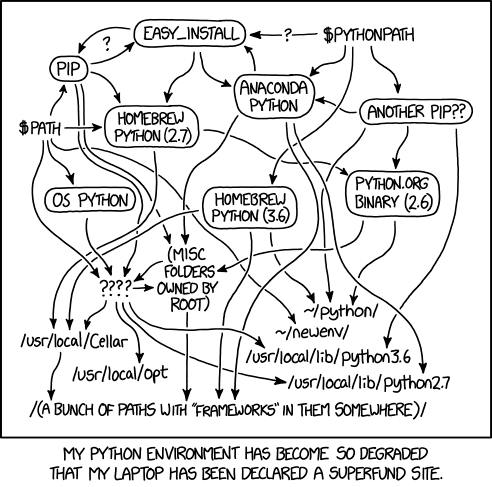
(As usual, XKCD has a comic for this. Appropriately enough, the comic is out of date.)




simple-modern-uv is a minimal, modern Python project template for new projects (Python 3.11–3.14) based on uv. This template aims to be a good base for serious work but also simple so it’s an easy option for any small project, like an open source library or tool. It can also upgrade an existing project to a modern setup: uv, ruff, BasedPyright, and GitHub Actions. The agent skill walks you through either workflow.
The fastest way to use this template is through your AI coding agent. Install the skill (the Agent Skills open standard, so it works with Claude Code, Codex, Cursor, Gemini CLI, and 50+ other agents):
npx skills add jlevy/simple-modern-uvThen tell your agent what you want, for example:
- “Start a new Python project called my-package using simple-modern-uv.”
- “Upgrade this repo to follow simple-modern-uv best practices.”
- “Update this project to the latest simple-modern-uv template.”
No installer handy? Paste this into any agent instead:
Fetch https://raw.githubusercontent.com/jlevy/simple-modern-uv/main/skills/simple-modern-uv/SKILL.md and follow it to [start a new Python project / upgrade this repo / update this project].
Generated projects are agent-ready too: each includes an
AGENTS.md following the agents.md
standard (read natively by Codex, Cursor, Copilot, Gemini CLI, and others) with the
project’s build/test commands and conventions, plus a CLAUDE.md
that imports it for Claude Code.
For non-agent options, scroll down to How to Use This Template.
The Story So Far
In the beginning, there was a hack called
setup.pyfor packaging (1990s–2000s) and it was not good.Then there arose
virtualenv,pip, andrequirements.txtfor isolated environments (2008–2011). Yet confusion still reigned.Meanwhile,
conda,pyenv,brew, andPyInstallervied to rule the system installations (2010s).Years of dissatisfaction led to the spread of a new religion,
pyproject.toml. Adherents ofpoetry,pipenv, andpipxpromised peace and prosperity (2020s) yet somehow, life felt mostly the same.Then AI robots began to invade. Rebel forces
uvandpixialigned with Rust gathered strength …
Apologies for the digression. The point is that unfortunately, the accidents of history make it quite confusing to learn best practices for setting up Python projects and dependencies. But it shouldn’t have to be this difficult, especially since uv has now significantly simplified Python dev tooling.
If you haven’t switched to uv, I can say I too was a little hesitant. It’s often possible to switch dev tooling prematurely because the new tool is shiny and exciting. But the advantages of uv have become too numerous to ignore. This article (Feb 2025) has a good overview.
This is the template I now use myself as I have been migrating from Poetry to uv for several projects. It’s new but it’s working well.
A lot of more senior engineers have justified hesitancy about templates. Templates can be a real problem if they add mindless, unexamined complexity. But if done carefully, I think they are better than official docs (they show real-world code you can adapt, instead of leaving you to figure out each tool choice and setting) or blog posts (that are typically not maintained or updated).
I think a good project template should be 3 Ms: minimalist, modern, and maintained. I looked at other templates but wanted one that was modern and “done right” but absolutely as simple as possible. Few existing templates seem to be both simple and use the newest generation of tools and best practices.
The template is short enough to read and understand in about 10 minutes. It’s only ~300 lines of code so you can just look at it, use it, and change what you want without fuss.
Because this template is minimal, you can always start with it and then pull in other tools and features if you want them. (In fact, even if you don’t like this template, you might want to use it as inspiration for your own Copier template, to take advantage of the Copier update workflow discussed next.)
One other benefit of this template is it uses copier.
Unlike with many previous project template tools, Copier allows you pull future changes to a template back into your instantiated copy any time.
You can start a project now, then if this template improves or is updated with other tools, you can pull those improvements back into your project, much like a git merge. You could even fork this repo yourself, then build your own forked template, and maintain it yourself.
If you’re not familiar with Copier, take a moment to understand the update feature. Then the options below will make sense. I put a few more thoughts on why a workflow like this is underrated is in a Twitter thread.
simple-modern-uv uses the tools I’ve come to think are best for new projects:
-
uv for project setup and dependencies. There is also a simple makefile for dev workflows, but it simply is a convenience for running uv commands.
-
ruff for modern linting and formatting. Previously, black was the definitive formatting tool, but ruff now handles linting and fast, black-compatible formatting.
-
GitHub Actions for CI and publishing workflows.
-
Dynamic versioning so release and package publication is as simple as creating a tag/release on GitHub (no machinery needed to manually bump versions and commit files every release).
-
Workflows for packaging and publishing to PyPI with uv. This has always been more confusing than it should be. The official docs about packaging are several pages long, and then even toy tutorials about publishing are even longer. This template makes all of that basically automatic with uv, GitHub Actions, and dynamic versioning.
-
Type checking with BasedPyright. (See below for more on this.)
-
Pytest for tests (with the excellent plugin pytest-sugar for faster errors and nicer output).
-
codespell for drop-in spell checking.
The template includes a few starter docs for you, collaborators, and users:
-
README.md is a placeholder for your project readme.
-
installation.md has brief reminders on the modern ways to install uv and Python.
-
development.md covers basic developer workflows.
-
publishing.md covers how to publish your project to PyPI.
If you haven’t done it before, publishing a package to PyPI can be a bit confusing,
especially because the
official Python docs
cover older and more complex workflows.
Be sure to check publishing.md for a modern and simple way that uses uv and GitHub
actions.
You can edit or delete these, but typically it’s sufficient to just edit the README.md. It helps to have the others in separate files so they get updated whenever you update the template.
The choice of what tool to use for type checking deserves some explanation. This seems to be a confusing area.
Like many, I’d previously been using Mypy, the OG type checker for Python. Mypy has since been enhanced with BasedMypy.
The other popular alternative is Microsoft’s Pyright. And it has a newer extension and fork called BasedPyright.
All of these work in build systems. But this is a choice not just of build tooling: it is far preferable to have your type checker warnings align with your IDE warnings. With the rises of AI-powered IDEs like Cursor and Windsurf that are VSCode extensions, it seems like type checking support as a VSCode-compatible extension is essential.
However, Microsoft’s popular Mypy VSCode extension is licensed only for use in VSCode (not other IDEs) and sometimes refuses to work in Cursor. Cursor’s docs suggest Mypy but don’t suggest a VSCode extension.
After some experimentation, I found BasedPyright to be a credible improvement on Pyright. BasedPyright is well maintained, is faster than Mypy, and has a good VSCode extension that works with Cursor and other VSCode forks. So I have now switched this template to use BasedPyright. (But please file an issue if you have better suggestions.)
One newer option worth watching is ty, Astral’s
own type checker (from the makers of uv and ruff), written in Rust.
It’s extremely fast, often 10–60x faster than Mypy or Pyright, and ships a language
server with extensions for VSCode, PyCharm, Neovim, and other editors.
As of mid-2026 it’s still in beta and on 0.0.x
versioning, so its API and diagnostics can change between releases.
It also doesn’t yet match BasedPyright on
typing-spec coverage
or strictness: Astral is still filling in the long tail of typing features and
first-class support for libraries like Pydantic and Django.
For now this template stays on BasedPyright for its maturity and more complete checks.
But ty is a strong contender that fits naturally with uv, and this recommendation may
change once ty reaches comparable coverage.
For the full comparison and the objective conformance data behind this, see the
type-checker research doc.
The template doesn’t have lots of options or try to use every bell and whistle. It just adds the above essentials.
This template does not handle:
-
Using Docker
-
Private or enterprise package repositories (but you can add this; see uv’s docs on alternative indexes)
-
Building websites or docs, e.g. with mkdocs
-
Using Conda for dependencies (but note many deep learning libraries like PyTorch now support pip so this isn’t as necessary as often as it used to be)
-
Using a code repo or build system that isn’t GitHub and GitHub Actions
-
Boilerplate docs or project management of any kind, like issue templates, contributing guidelines, code of conduct, etc.
Docker and private repo use can be added by you manually to the project after you get started. Similarly, you can change CI/CD workflows if you are not using GitHub or GitHub Actions or PyPI.
Also see below for other templates you can look at or use as references.
License and publishing are template questions, not hand edits: package_license
(default MIT; also Apache-2.0, BSD-3-Clause, AGPL-3.0-or-later, Proprietary, or None to
decide later) and publish_to_pypi (answer no for a private package; the publish
workflow and docs are then omitted).
Answer them at render time or change them later with
copier update --data package_license=…; see the skill’s
customize guide for details.
Prefer re-answering over hand-deleting generated files like publish.yml, so future
copier update runs stay consistent.
The template can be used in three ways. Option 1 is the quickest: your AI coding agent gathers the project details and does the setup. Option 2 is the normal way to use a Copier template by hand. Option 3 is handy if you prefer a GitHub template.
Install the agent skill and ask your agent; see Agent Quick Start above for the exact commands and prompts. The skill covers three workflows: creating a new project, upgrading an existing Python package to this template’s structure and tooling (including migrations from Poetry, setuptools/pip, or PDM), and updating a project already built from this template. Your agent collects the essentials (name, description, license, whether you publish to PyPI) and handles the rest non-interactively.
This template uses Copier, which seems like the best tool nowadays for project templates. Using Copier is the recommended approach since it then lets you instantiate the template variables and makes future updates possible. But it requires a few more commands.
To create a new project repo with copier:
# Install Copier:
uv tool install copier

# Change dirs to the place you want the new GitHub repo to be.
cd ~/projects/github   # Wherever you do your project work.

# Clone this template. This does everything!
# It will fetch from this GitHub repo and create a new directory
# with whatever name you put below:
copier copy gh:jlevy/simple-modern-uv YOURNEWREPO
# Then follow the instructions.
You can enter names for the project, description, etc., or just press enter and later
look for changeme in the code.
Once you have the template set up, you will need to check the code into Git for uv to work. Create a new GitHub repo, making sure to create it as an empty repo (don’t add a README, .gitignore, or license, since the template already provides these), and add your initial code:
cd PROJECT
git init --initial-branch=main
git add .
git commit -m "Initial commit from simple-modern-uv."
# Sync after the first commit so dynamic versioning gives the editable install
# a real version (not 0.0.0). This creates uv.lock; commit it so CI installs
# reproducibly with --frozen.
uv sync --all-extras
git add uv.lock
git commit -m "Add uv.lock."
# Create repo on GitHub.
git remote add origin git@github.com:OWNER/PROJECT.git  # or https://github.com/...
git push -u origin mainIf you prefer you can click the use this template on this repository, which is the current output of this template.
Go there and hit the “Use this template” button.
Once you have the code, search for changeme for all field names like project name,
author, etc. You want to do this to the .copier-answers.yml file as well.
You will also want to check the license/copyright.
Everything to get started is linked from the project README.md. It links to the installation.md, development.md, and publishing.md starter docs.
If you use Option 1 or Option 2 or if you pick Option 3 and correctly fill in your
.copier-answers.yml file, you have the option to update your project with any future
updates to this template at any time.
If this file is updated with your project name etc., then you can
update your project to reflect any
changes to this template by running copier update.
There are a couple other good uv templates, especially cookiecutter-uv and copier-uv you may wish to consider.
This template takes a somewhat different philosophy. I found existing templates to have machinery or files you often don’t need. And it’s hard to maintain a complex template repo. This is intended instead to be a very simple template. You can always add to it if you want.
There is also uv-migrator to help you migrate projects to uv.
Previously, Poetry was probably the best modern tool for managing dependencies. It is not as new as uv and arguably more mature (it just hit version 2.0). In fact, this template is based on my earlier Poetry template, simple-modern-poetry.
Another great resource to check is python-blueprint, which is a more established template with an excellent overview of other standard Python project best practices. It uses Poetry, nox, Material for Mkdocs, and Docker.
For Conda dependencies, also consider the newer pixi package manager.
Dependencies are an attack surface. The best resource on this is supply-chain-hardening, a concise guidebook of concrete recipes for npm, PyPI, and other ecosystems. If you use this template, follow it. Its key defaults, which this template also follows:
-
Cooling-off period: Don’t install or upgrade to a release less than 14 days old (most malicious publishes are caught within days). For uv, set
UV_EXCLUDE_NEWERto a cool-off window (recent uv accepts a relative duration like"14 days"); this template’s CI sets it automatically. -
Vet what you add: Only add dependencies you can verify upstream, and prefer a little first-party code over pulling in a new dependency.
-
Pin and lock: Commit your
uv.lockand pin GitHub Actions to a commit SHA (or at least a full, immutable version tag) so a tag can’t be silently re-pointed.
See updating.md for how this template applies these.
If you’re contributing to this template or forking it for your own use, see updating.md for the full process to check for new versions, update the template, and verify changes in a downstream project.
Please file an issue with any bugs, suggestions, or other ideas. PRs welcome on this repository (not on the GitHub template repo, which mirrors this one).