


⚡ Zero-copy GPU capture · 👁️ Sees occluded & off-workspace windows · 🦀 Rust, no XWayland · 🎨 Themeable · 🌍 13 languages
Five sharp tools for wlroots compositors, all sharing one capture engine.
| Tool | What it does | crate |
|---|---|---|
| wlr-chooser | Window & screen picker for screencast portals (xdg-desktop-portal-wlr) — a rofi-like overlay with live thumbnails. |
 |
| wlr-switcher | Live Alt-Tab / exposé window switcher (macOS-style strip, full-screen grid, or card) with hold-to-switch and live previews. Ships with wlr-chooser. |
|
| wlr-peek | Inspect the screen — colour picker, loupe, OCR, live picture-in-picture mirror (window or region), change monitor (watch), and visual grep. |
 |
| wlr-shot | Screen capture — screenshots of an output/region/window (PNG/JPEG/PPM), copy to clipboard; plus recording (H.264, or animated GIF/WebP) with system audio & timelapse (NVENC/VAAPI/libx264). |  |
| wlr-draw | Draw on screen — a transparent annotation overlay (gromit-mpx-style): freehand, shapes, arrows, text, dwell-to-snap, element move, plus presenter spotlight, freeze-frame and save. Daemon + control socket. |  |
They all share two library crates: wlr-capture, the wlroots
capture engine (ext-image-copy-capture-v1, full-resolution dma-buf zero-copy with a
CPU shm fallback) plus an egui/EGL rendering + dma-buf-import toolkit; and
wlr-i18n, the shared Fluent localisation plumbing each tool builds
its own message catalog on.
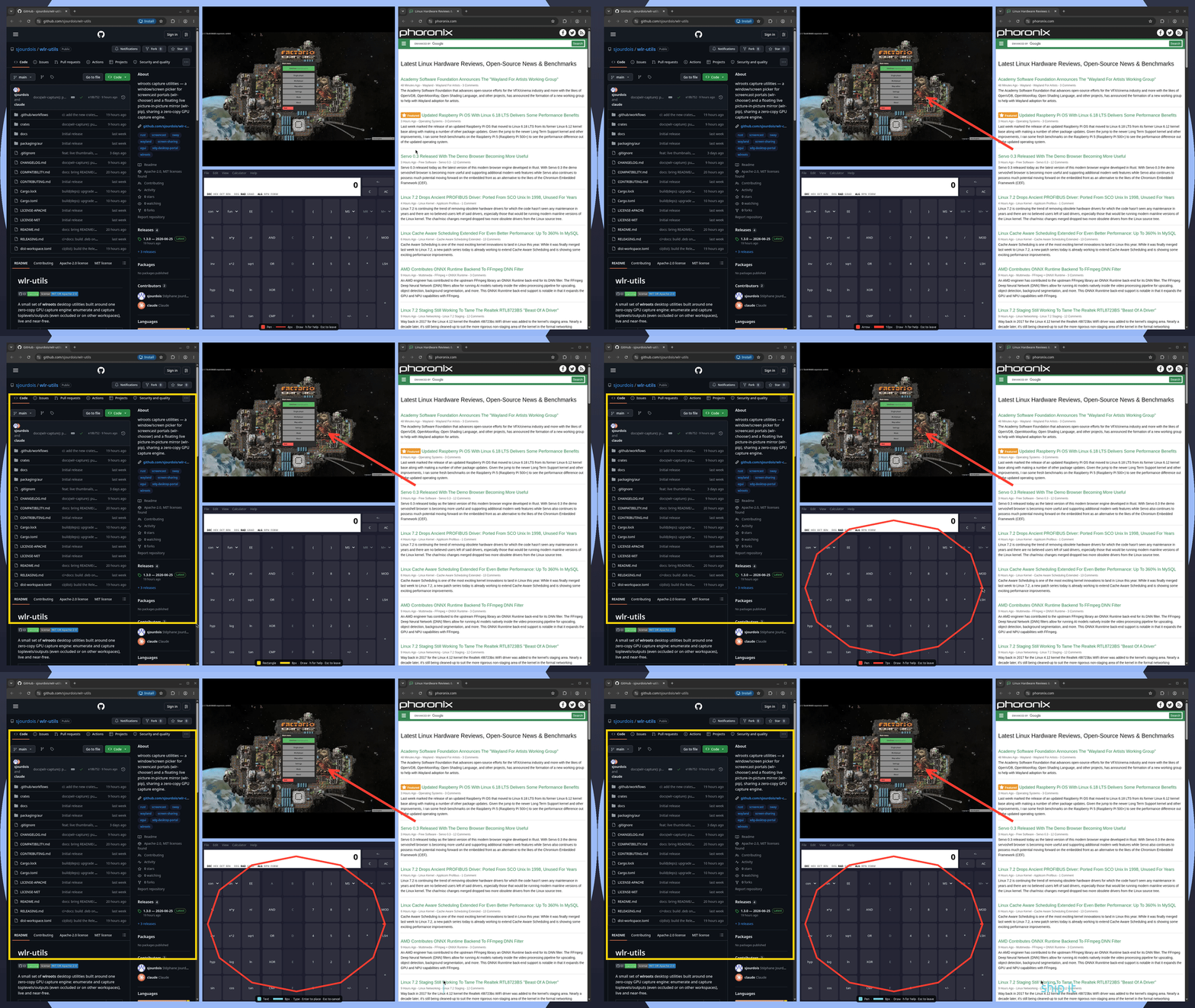
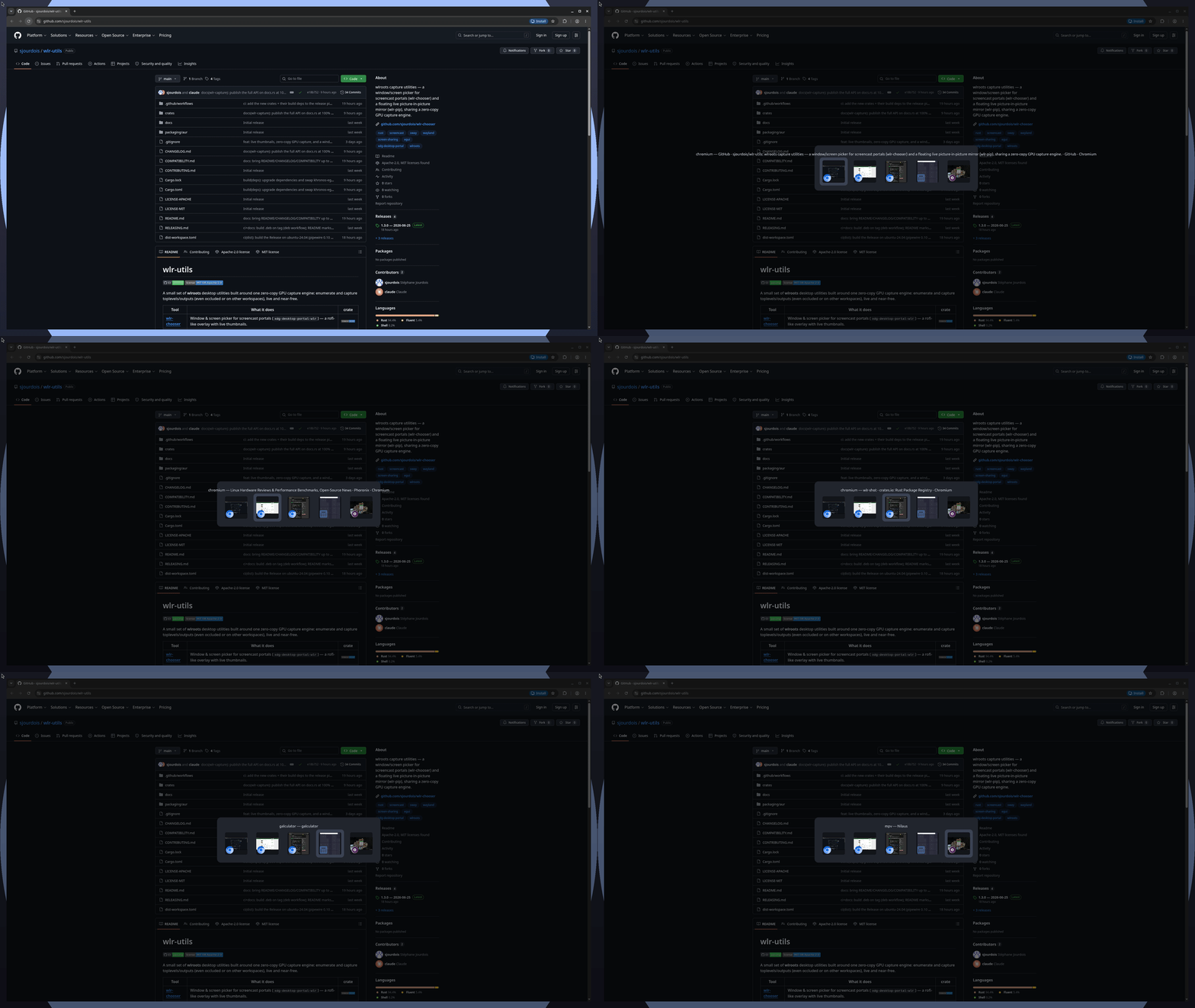
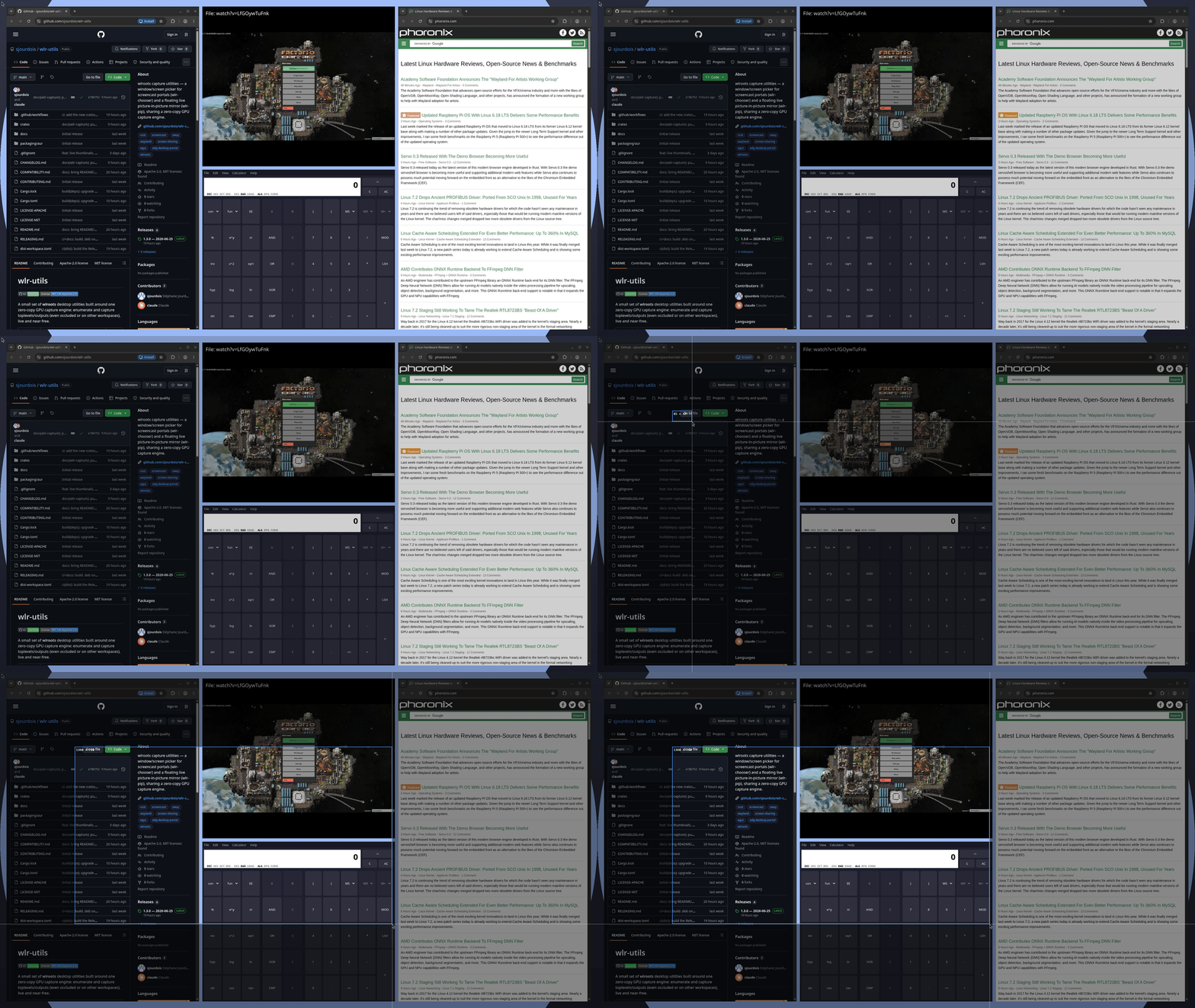
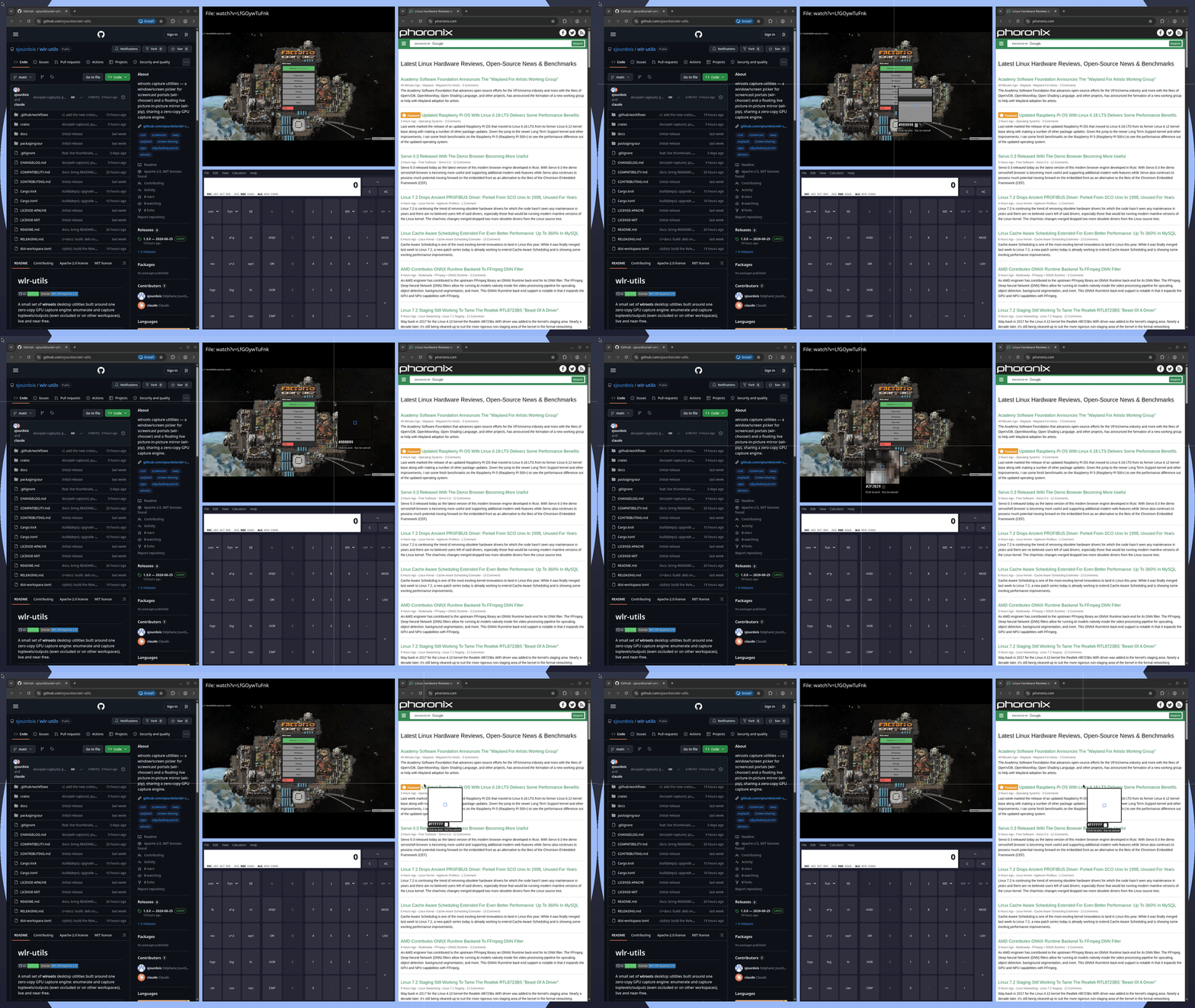
wlr-draw · wlr-switcher · wlr-shot · wlr-peek — see the showcase
A wlroots compositor. What you get depends on which capture protocols it exposes:
| Capability | Compositor floor | Wayland protocol |
|---|---|---|
| Screen capture (screenshots, recording, loupe, annotation) | wlroots ≥ 0.19 · Sway ≥ 1.11 | ext-image-copy-capture-v1 + wlr-layer-shell |
Window capture (switcher, -w, window mirror/record) |
wlroots ≥ 0.20 · Sway ≥ 1.12 | adds ext-foreign-toplevel-list-v1 |
Tools degrade gracefully: where windows aren't capturable they keep their screen features
and say so. See COMPATIBILITY.md for the full matrix (Hyprland, niri,
labwc, …), or run the doctor command that every tool exposes (e.g. wlr-shot doctor,
or wlr-chooser --doctor) to check your own compositor.
Runtime libraries:
| Library | Needed by | Why |
|---|---|---|
libegl1 |
every tool | EGL/GLES overlay rendering |
libgbm (Mesa) |
wlr-chooser |
zero-copy GPU capture path (wlr-shot/wlr-peek use CPU shm, so they don't need it) |
xdg-desktop-portal-wlr ≥ 0.8 |
wlr-chooser |
portal-based picking |
zwlr-foreign-toplevel-management-v1 |
wlr-switcher |
focusing windows |
Everything at once — the wlr-utils crate bundles all five binaries
(wlr-chooser, wlr-switcher, wlr-peek, wlr-shot, wlr-draw):
cargo install wlr-utilsOr grab the prebuilt bundle from the latest release — one archive with every binary, plus a one-line installer:
curl --proto '=https' --tlsv1.2 -LsSf \
  https://github.com/sjourdois/wlr-utils/releases/latest/download/wlr-utils-installer.sh | sh
À la carte — each tool is also its own crate, for a lighter, single-purpose install (only the system deps that tool needs). Per-tool instructions live in each crate's README:
cargo install wlr-chooser        # window/screen picker + wlr-switcher (Alt-Tab/exposé)
cargo install wlr-peek           # colour picker, loupe, OCR, live mirror, watch
cargo install wlr-shot           # screenshots + recording
cargo install wlr-draw           # annotation overlay
Debian / Ubuntu .deb — a single package with the whole suite is attached to every
release, built per distro so it links against that distro's FFmpeg / Leptonica. Pick the
one matching your system:
| Distro | Asset suffix |
|---|---|
| Debian 12 (bookworm) | …_amd64.bookworm.deb |
| Debian 13 (trixie) | …_amd64.trixie.deb |
| Debian 14 (forky) / sid | …_amd64.forky.deb / …_amd64.sid.deb |
| Ubuntu 24.04 (noble) / 26.04 | …_amd64.noble.deb / …_amd64.ubuntu2604.deb |
Ubuntu 22.04 has no .deb (its PipeWire is too old for the audio engine); install it with
cargo install wlr-utils or the prebuilt tarball / installer above.
Important
These .debs link dynamically against the FFmpeg (libavutil) and Leptonica
(liblept) of the distro they were built on. If your installed versions don't match
(different release, backports, a soname your distro doesn't ship), the tool won't start —
error while loading shared libraries: libavutil.so.NN / liblept.so.N. In that case,
build from source instead (below): a source build links against whatever you have.
From source — cargo install wlr-utils (above) or the whole workspace; the OCR/video
features link the system Tesseract/FFmpeg -dev packages (see each tool's README), and the
gpu feature needs libgbm-dev at build time:
cargo build --release # builds all binariescargo install drops the binaries in ~/.cargo/bin. Remove the bundle with
cargo uninstall wlr-utils, or an individual tool the same way:
cargo uninstall wlr-utils        # the whole bundle
cargo uninstall wlr-draw         # …or just one: wlr-chooser / wlr-peek / wlr-shot
wlr-draw also registers an XDG autostart entry on first run (see its README). Drop the
checkbox in its tray menu, or delete the files by hand (honouring $XDG_CONFIG_HOME /
$XDG_STATE_HOME if you set them):
rm -f ~/.config/autostart/wlr-draw.desktop \
      ~/.local/state/wlr-draw/autostart-initialized
# and, if you installed the systemd unit:
systemctl --user disable --now wlr-draw.service
rm -f ~/.config/systemd/user/wlr-draw.service- wlr-chooser README — portal setup, options,
the
wlr-switcherAlt-Tab/exposé, theming and localisation. - wlr-peek README — colour picker, loupe, OCR, live mirror, change monitor and visual grep.
- wlr-shot README — screenshots, recording and timelapse, with system audio and hardware encoding.
- wlr-draw README — the annotation overlay: daemon, control socket, tools and example key bindings.
- wlr-capture README — the shared engine.
- wlr-i18n README — the shared localisation plumbing.
Bug reports, translations and patches welcome — see
CONTRIBUTING.md. Please keep cargo fmt, cargo clippy and
cargo test clean.
Licensed under either of Apache-2.0 or MIT at your option.