
This CloudFormation Snippets extension provides JSON and YAML snippets for over 2,000 AWS CloudFormation resource types, plus AWS SAM resource types in YAML. Requires VS Code 1.140.0 or newer.
Tip
Catch AWS waste before and after you deploy.
CloudBurn is a free, open-source CLI that checks your Terraform and CloudFormation for costly patterns before deploy, then finds the waste already running in your AWS account. Run it locally or in CI.

Want it managed across your AWS accounts? CloudBurn Platform runs it for you and keeps scan results in your own account. Join the waitlist for 30% off.
- Resource Coverage: Generates snippets for every resource in the bundled AWS CloudFormation specification, alongside the included AWS SAM resource snippets.
- Nested Property Support: Expands nested properties with typed placeholders. Recursive objects and large resources use editable empty objects to keep each snippet within 400 lines.
- Documentation Hover Links: Access AWS documentation for resource types and nested property names in YAML, JSON and JSON with comments, including conditional branches.
- Flexible Template Support: Seamlessly works with both YAML and JSON CloudFormation templates.
- Efficient Autocomplete: Simply type the resource name (e.g.,
ec2-instance) to instantly load the corresponding snippet forAWS::EC2::Instance. - Rich Feature Set: Incorporates intrinsic functions, conditions, and diverse parameter types for robust template creation.
- Enhanced Navigation: Features placeholders that enable swift movement through resource properties.
- Resource Documentation: Each snippet is linked to its official AWS documentation, providing quick access to detailed information.
- Up-to-Date: Regularly refreshed on a weekly basis to reflect the latest CloudFormation Resource Specification.
- Gitpod Ready: Made available on the Open VSX Registry to ensure compatibility with Gitpod.
Counts for release 5.129.0, generated from the bundled CloudFormation specification 267.0.0:
| Coverage | Count |
|---|---|
| CloudFormation resource types, available in both JSON and YAML | 2,052 |
| AWS SAM resource types, available in YAML | 9 |
| JSON snippets, including template helpers | 2,058 |
| YAML snippets, including SAM, intrinsic functions, conditions and parameter types | 2,106 |
Snippet totals count the entries contributed to each language. CloudFormation resource types are shared across both languages.
- Install the CloudFormation Snippets extension in VS Code.
- Create a new
.ymlor.jsonfile. - Ensure the file type is set to "YAML" or "JSON" in the bottom right corner of VS Code.
- Type cfn to insert the basic CloudFormation template structure.
- Add resources using their short prefix (e.g.
s3-bucketforAWS::S3::Bucket).
Example of auto-completion in action:
and an example of the hover information:
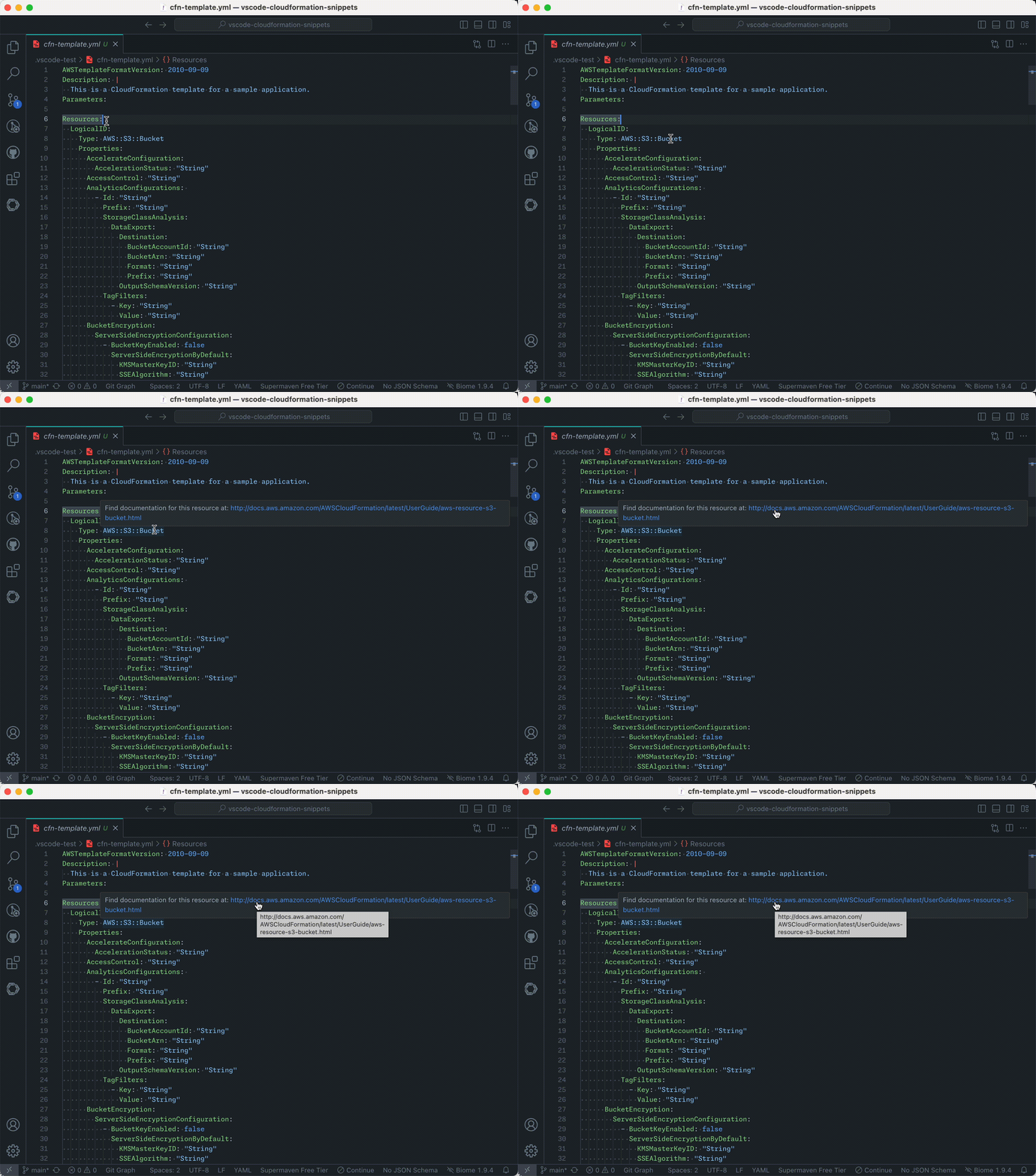
Note: Once you start typing a prefix (explained in step 5), the corresponding snippet will show up in the dropdown menu. If this doesn't happen automatically, press
ctrl + spaceto invoke IntelliSense and search for the prefix of the resource type that you want to add (as listed in step 5).
Files ending in .template use JSON by default. For YAML templates with that extension, set "files.associations": { "*.template": "yaml" } in VS Code settings. The Red Hat YAML extension is installed alongside this extension for YAML editing support; snippets and documentation hovers also work independently of it.
Use Node 26.11.1 (fnm use) and Python 3.12 or newer. CI uses Python 3.14.8; local Python installations can keep their current supported version. Install dependencies and run the checks:
npm ci
uv venv --python "$(python --version 2>&1 | sed 's/Python //')"
uv pip install --python .venv/bin/python -r src/requirements.txt
.venv/bin/python -m unittest discover -s tests -v
.venv/bin/python src/validate-snippets.py --spec specification/resource-specification.json.gz
npm test
VSCODE_VERSION=stable npm test
npm run package
.venv/bin/python tests/check-package.py .vscode-test/cloudformation-snippets.vsix
.venv/bin/python tests/run-package-tests.py .vscode-test/cloudformation-snippets.vsix
npm test runs the Extension Host regressions on the minimum supported VS Code by default. Test results and logs are retained in .vscode-test; Linux needs a display or xvfb-run -a. CI tests the VSIX on Linux, macOS and Windows, with the minimum version also checked on Linux.
Regenerate the checked-in snippets from the pinned specification:
.venv/bin/python src/generate-snippets.py --spec specification/resource-specification.json.gzThe weekly release workflow downloads one AWS snapshot, validates generated syntax, types, resource coverage and documentation, then tests the packaged extension. An unchanged specification skips the release. Manual runs support force for releasing code fixes. If publication fails, rerun the failed jobs to reuse the retained VSIX and version; already-published versions are skipped. The released specification hash advances only after both registries succeed.
We've developed the AWS CloudFormation Starterkit to streamline your infrastructure setup using CloudFormation.
It comes with pre-configured templates, automated validation scripts, and seamless integration with CI/CD pipelines, you'll be able to deploy robust, scalable, and secure AWS environments with ease.
The starterkit empowers you to adopt best practices effortlessly. By leveraging tools like Checkov for security compliance and cfn-lint for template validation, you ensure that your infrastructure is both reliable and secure.
If you have a feature request or an issue, please let me know on Github


