An Upbound DevX configuration package that enables global blue/green deployments across geographically distributed Kubernetes clusters using k8gb. This configuration provides automatic active/passive cluster switching with Azure infrastructure and intelligent GSLB health monitoring.
┌─────────────────┐    ┌─────────────────┐    ┌─────────────────┐
│   Cluster A     │    │   Cluster B     │    │   Cluster C     │
│  (Primary EU)   │    │ (Secondary US)  │    │ (Secondary CN)  │
├─────────────────┤    ├─────────────────┤    ├─────────────────┤
│ GlobalApp XR    │    │ GlobalApp XR    │    │ GlobalApp XR    │
│ ├─Azure RG      │    │ ├─Azure RG      │    │ ├─Azure RG      │
│ ├─Redis Cache   │    │ ├─Redis Cache   │    │ ├─Redis Cache   │
│ ├─Podinfo App   │    │ ├─Podinfo App   │    │ ├─Podinfo App   │
│ └─k8gb GSLB     │    │ └─k8gb GSLB     │    │ └─k8gb GSLB     │
└─────────────────┘    └─────────────────┘    └─────────────────┘
         │                       │                       │
         └───────────────────────┼───────────────────────┘
                                 │
                    ┌─────────────────┐
                    │   DNS/GSLB      │
                    │ Traffic Routing │
                    └─────────────────┘

The configuration uses intelligent health monitoring to automatically detect cluster health and recommend policy changes for seamless blue/green switching.
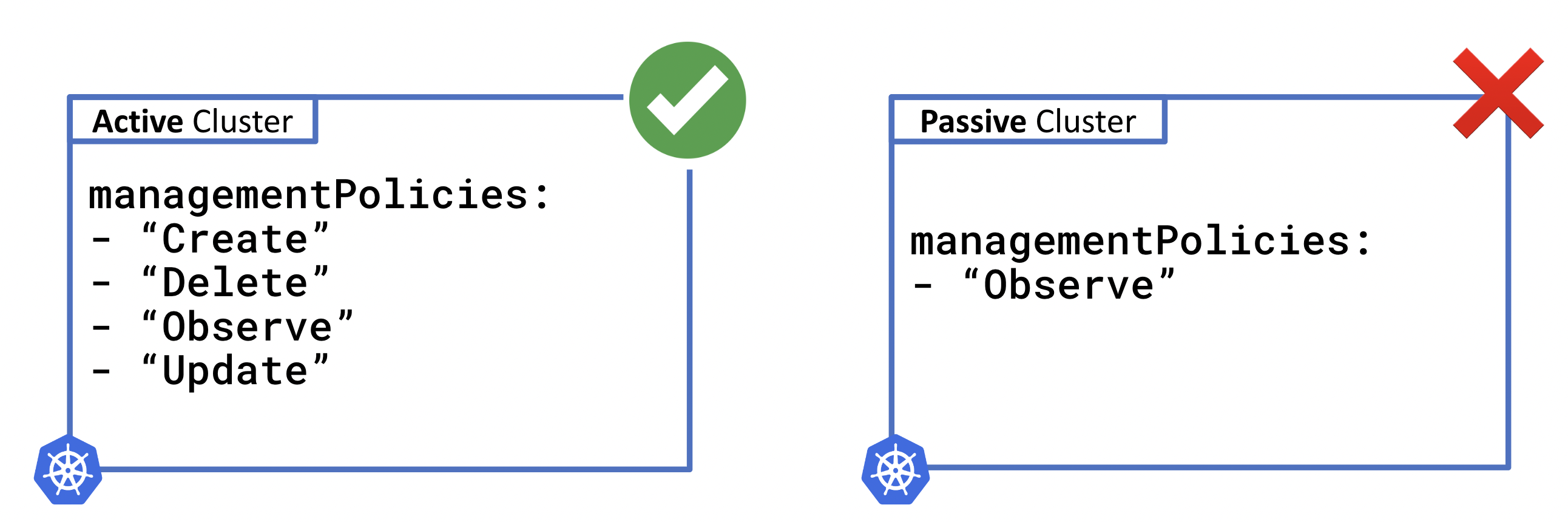
Automatic policy management enables hands-off blue/green deployments where unhealthy clusters are automatically moved to "Observe" mode while healthy clusters receive traffic.
- Global Blue/Green: Automatic active/passive cluster switching based on health
- Azure Infrastructure: Resource Groups and Redis Cache for application state
- Application Deployment: Podinfo with k8gb integration via Helm
- GSLB Health Monitoring: Intelligent traffic routing and failover
- Upbound DevX: Modern embedded functions with KCL-based composition logic
- Auto-Policy Management: Hands-off blue/green switching with policy automation
- Crossplane v2: Compatible with namespace-scoped
.m.upbound.ioresources
Important: k8gb must be pre-installed on your Kubernetes clusters for proper GSLB functionality. This configuration creates k8gb Gslb resources but does not install the k8gb operator itself.
# Install k8gb using Helm
helm repo add k8gb https://www.k8gb.io
helm install k8gb k8gb/k8gb --namespace k8gb --create-namespace
See k8gb installation guide for detailed setup instructions.
- Crossplane >= v2 with v2 composition mode
- Azure credentials configured as Kubernetes secrets
- DNS delegation configured for k8gb domains
- Ingress controller (nginx recommended)
-
Install the configuration:
kubectl apply -f - <<EOF
apiVersion: pkg.crossplane.io/v1
kind: Configuration
metadata:
  name: configuration-k8gb-bluegreen
spec:
  package: xpkg.upbound.io/upbound/configuration-k8gb-bluegreen:v0.1.1
EOF
-
Configure Azure credentials:
# Create Azure service principal credentials file
cat > azure-credentials.json <<EOF
{
  "clientId": "your-client-id",
  "clientSecret": "your-client-secret",
  "subscriptionId": "your-subscription-id",
  "tenantId": "your-tenant-id"
}
EOF

# Create Kubernetes secret
kubectl create secret generic azure-creds \
  -n crossplane-system \
  --from-file=credentials=./azure-credentials.json
-
Apply the ClusterProviderConfig:
kubectl apply -f examples/providerconfig-azure.yaml
Create a basic global application with manual policy management:
apiVersion: example.upbound.io/v1alpha1
kind: GlobalApp
metadata:
  name: my-global-app
  namespace: default
spec:
  region: "West Europe"
  primaryGeoTag: "eu"
  hostname: "myapp.example.com"
  managementPolicies: ["*"]
autoApplyRecommendedPolicy: falseCreate a global application with automatic active/passive switching:
apiVersion: example.upbound.io/v1alpha1
kind: GlobalApp
metadata:
  name: auto-global-app
  namespace: default
spec:
  region: "East US"
  primaryGeoTag: "us"
  hostname: "auto-app.example.com"
  managementPolicies: ["*"]
autoApplyRecommendedPolicy: true # Automatic policy switching| Parameter | Description | Default |
|---|---|---|
region |
Azure region for infrastructure | "West US" |
primaryGeoTag |
Primary geographic tag for GSLB failover | "eu" |
hostname |
Application hostname for ingress | "globalapp.cloud.example.com" |
managementPolicies |
Crossplane management policies | ["*"] |
autoApplyRecommendedPolicy |
Enable automatic policy switching | false |
Run the included composition tests:
up test run tests/*Prerequisites: k8gb must be installed and configured on all clusters.
- Deploy test applications across multiple clusters
- Configure DNS delegation for your test domains
- Apply GlobalApp resources in each cluster
- Test failover scenarios:
# Check GSLB status
kubectl get gslb

# Test DNS resolution
dig your-app.example.com

# Simulate cluster failure
kubectl scale deployment podinfo --replicas=0
For local development and testing:
# Build and test locally
up project build
up test run tests/*

# Run composition rendering tests
up composition render apis/globalapp/composition.yaml examples/globalapp/example.yaml --xrd=apis/globalapp/definition.yamlThe GlobalApp provides comprehensive status information:
kubectl get globalapp my-global-app -o yamlStatus fields:
infrastructure: Azure resource deployment statusapplication: Podinfo and GSLB resource statusgslb: Health monitoring and policy recommendations
Set up a full local multi-cluster environment to demonstrate blue/green deployments:
# Clone and set up k8gb test environment
git clone https://github.com/k8gb-io/k8gb
cd k8gb
git checkout v0.15.0
make deploy-full-local-setup# Clone this configuration
git clone https://github.com/upbound/configuration-k8gb-bluegreen.git
cd configuration-k8gb-bluegreen
# Switch to EU cluster (Blue environment)
kubectl config use-context k3d-test-gslb1
up uxp install
# Install the configuration package
kubectl apply -f examples/configuration.yaml
kubectl get configurations# Set up Azure credentials
kubectl create secret generic azure-creds -n crossplane-system \
--from-literal=credentials="$(cat ~/.azure/credentials.json)"
# Apply provider configurations and RBAC
kubectl apply -f examples/providerconfig-helm.yaml
kubectl apply -f examples/providerconfig-azure.yaml
kubectl apply -f examples/rbac-k8gb.yaml# Deploy blue environment
kubectl apply -f examples/globalapp/blue-active.yaml
# Monitor deployment
crossplane beta trace globalapps.example.upbound.io/blue-green
kubectl get globalapps.example.upbound.io blue-green
# Check blue environment status
kubectl get globalapps.example.upbound.io blue-green -o yaml | yq# Switch to US cluster
kubectl config use-context k3d-test-gslb2
up uxp install
kubectl apply -f examples/configuration.yaml
# Set up providers (repeat provider setup from step 3)
# ...
# Deploy green environment
kubectl apply -f examples/globalapp/green-passive.yaml
# Check green environment status
kubectl get globalapps.example.upbound.io blue-green -o yaml | yq# Simulate blue environment failure
kubectl config use-context k3d-test-gslb1
kubectl scale deployment podinfo-blue-green --replicas=0
# Watch GSLB detect failure and policy changes
kubectl get globalapps.example.upbound.io blue-green -o yaml | yq '.status.gslb'
# Switch to green cluster - check if it's now active
kubectl config use-context k3d-test-gslb2
kubectl get globalapps.example.upbound.io blue-green -o yaml | yq '.status.gslb'Monitor the automatic failover process:
# View complete GlobalApp status (infrastructure, application, gslb)
kubectl get globalapps.example.upbound.io blue-green -o yaml | yq '.status'

# View just GSLB status (health, policies, active cluster)
kubectl get globalapps.example.upbound.io blue-green -o yaml | yq '.status.gslb'

# View k8gb GSLB resources directly
kubectl get gslb -A
kubectl describe gslb failover-ingress-blue-green- k8gb not installed: Ensure k8gb operator is running in all clusters
- DNS not configured: Configure DNS delegation for GSLB domains
- Azure credentials: Verify ClusterProviderConfig and secret configuration
- Network connectivity: Ensure clusters can communicate for health checks
# Check resource status
crossplane beta trace globalapp.example.upbound.io/my-global-app

# Check k8gb status
kubectl get gslb -A
kubectl describe gslb failover-ingress-blue-green

# Check provider status
kubectl get providers
kubectl get clusterproviderconfigs